128
Configuring View Restrictions
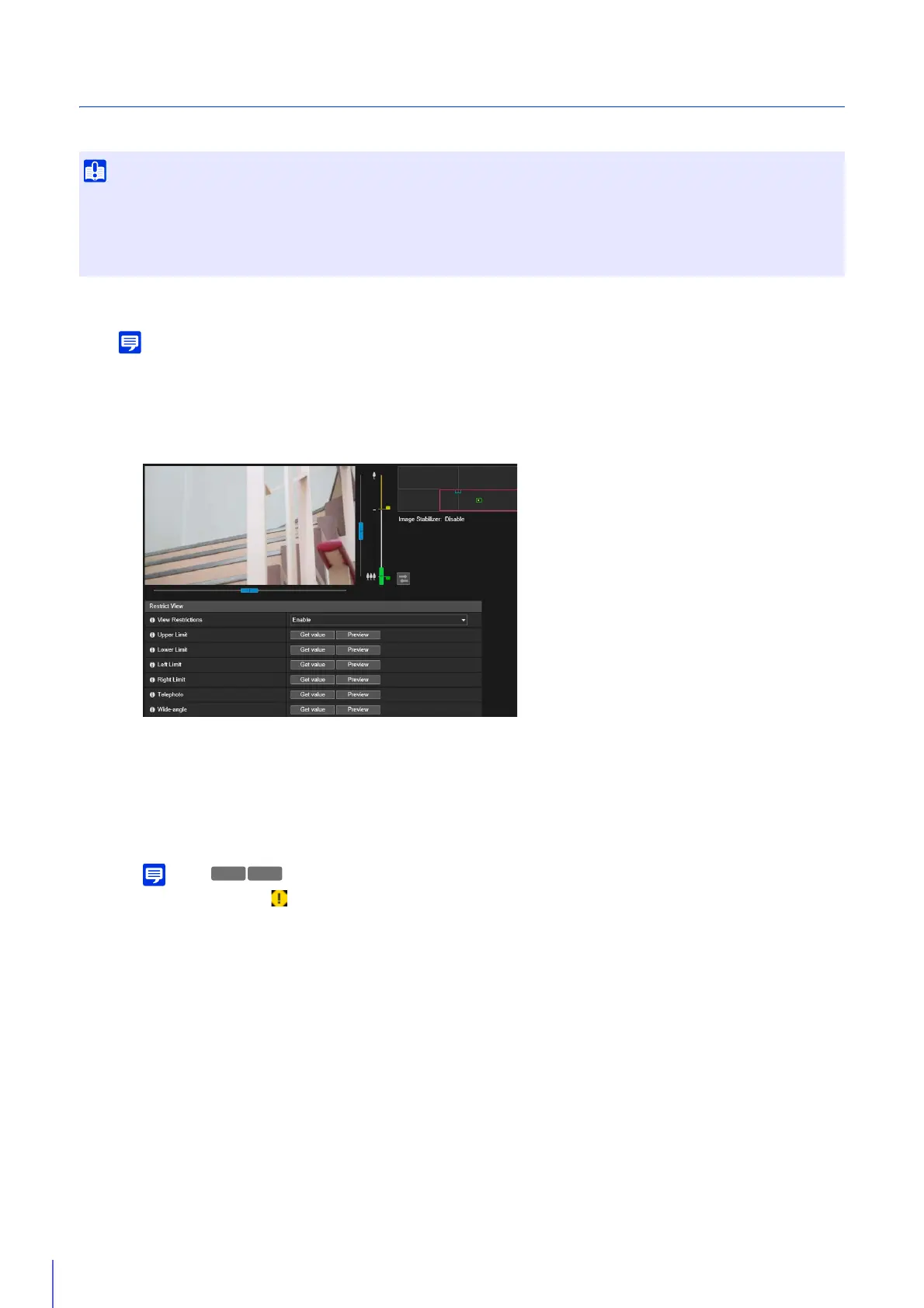
Set a restrict view area and click [Apply] to restrict the capture range of the Camera Viewer.
To delete view restriction settings, select [Disable], and click [Apply].
Operate the camera angle in the video display area to get the positioning value, and specify the restrict view
area.
[Upper Limit]/[Lower Limit]/[Left Limit]/[Right Limit]
Operate the camera angle to the upper limit, lower limit, left limit, and right limit to set in the video display area.
Click [Get value] in each position to reflect the values to the pan/tilt preview frame.
Click [Preview] in [Upper Limit]/[Lower Limit]/[Left Limit]/[Right Limit] to move the preview frame to the upper
limit, lower limit, left limit, and right limit of the current pan/tilt preview frame, respectively, and display it in the
video display area.
In the following cases, (warning icon) will be displayed with a message stating that the restrict view area cannot be
configured, and you will become unable to set view restrictions.
• For [Left Limit]/[Right Limit]: If [Camera] > [Camera Control] > [Auto Flip] (P. 109) is set to [Enable]
• For [Upper Limit]: If [Camera] > [Camera Control] > [Auto Flip] (P. 109) is set to [Enable], and [Camera] > [Installation
Conditions] > [Image Flip] (P. 111) is also set to [Enable]
• For [Lower Limit]: If [Camera] > [Camera Control] > [Auto Flip] (P. 109) is set to [Enable], and [Camera] > [Installation
Conditions] > [Image Flip] (P. 111) is set to [Disable]
To set the upper limit, lower limit, left limit, and right limit, set [Camera] > [Camera] > [Camera Control] > [Auto Flip] (P. 109) to
[Disable].
[Telephoto]/[Wide-angle]
Operate the camera angle to the wide-angle/telephoto limit to set in the video display area.
Click [Get value] in each position to reflect the values to the wide-angle preview frame/telephoto preview frame.
Click [Preview] in [Telephoto]/[Wide-angle] to move the preview frame to the telephoto/wide-angle limit of the
current wide-angle preview frame/telephoto preview frame and display it in the video display area.
You can also set the telephoto/wide-angle limit range by directly moving the operation knob on the zoom slider up
and down. This also moves the preview frame to the telephoto/wide-angle limit of the current wide-angle preview
• If you have changed how the camera is installed, reconfigure the view restriction settings.
• Check view restrictions again if you change the [Basic] > [Video] > [All Videos] > [Video Size Set] settings on the Setting Page.
• When [Camera] > [Camera] > [Camera Control] > [Digital Zoom] or [Image Stabilizer] are changed in the setting page, check the view
restriction settings again.
1
Select [Enable] in [View Restrictions].
2
Use the video display area to configure the view restrictions.



 To Next Page