SECTION 58 -- ATTACHMENTS AND HEADERS -- CHAPTER 2
58-16
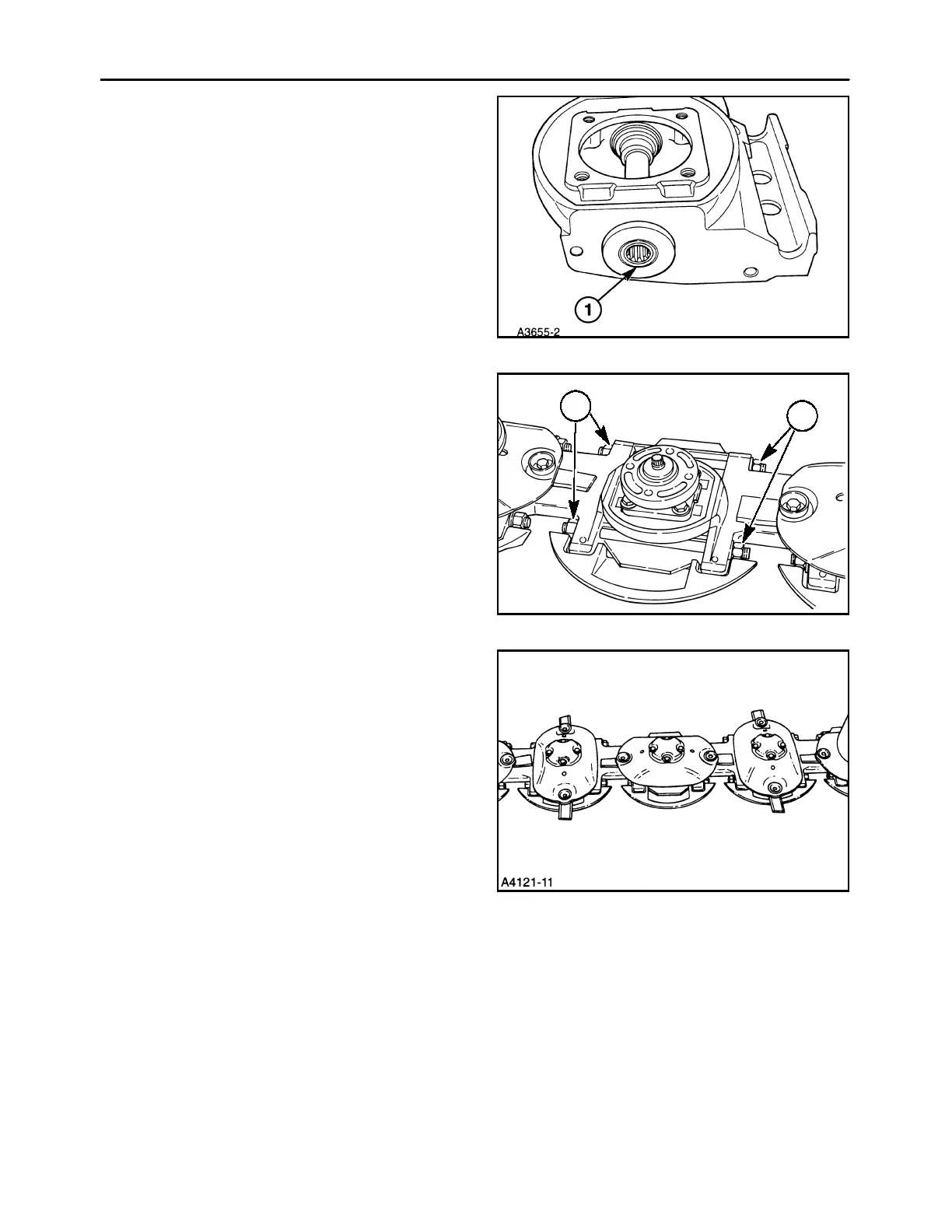
It may be necessary to determine the direction of
rotation of a replacement module prior to instal-
ling it in the cutter bar. Note that the pinion end of
the lower module shaft has a groove, 1, in it to de-
termine which side of the module the pinion gear
is on; this affects direction of rotation. If the
groove (pinion) is on the right side of assembled
module, module will rotate clockwise, while a
module with the groove (pinion) on the left will ro-
tate counter- clockwise.
34
4. Slide the cutter bar together so that the other con-
necting shaft splines into the pinion shaft, and the
spacer aligning dowels engage the holes in the
disc module. Ensure that the discs on either side
of the replacement module remain timed to each
other.
5. Install the nuts, 1, onto the tie bolts, and tighten
finger tight, ensuring that the tie bolt threads pro-
trude out of the nuts on both ends for full thread
engagement in the nuts.
1
1
35
6. The replacement module must be timed to the
rest of the cutter bar by properly positioning the
disc hub on the top cap assembly. The discs are
properly timed when they are 90° apart, as
shown. The disc hub and top cap shaft splines
are randomly cut, with no index marks.
36



 To Next Page