SECTION 58 -- ATTACHMENTS AND HEADERS -- CHAPTER 2
58-4
DISCS
Each time knives are replaced or turned, check the
discs for damage and wear. If a disc is bent or
cracked, replace it. When the leading edge of the disc
wears thin, it can be used on an opposite rotating
module to utilize the second face.
IMPORTANT: Do not make weld repairs to the discs,
as this will affect disc strength and balance.
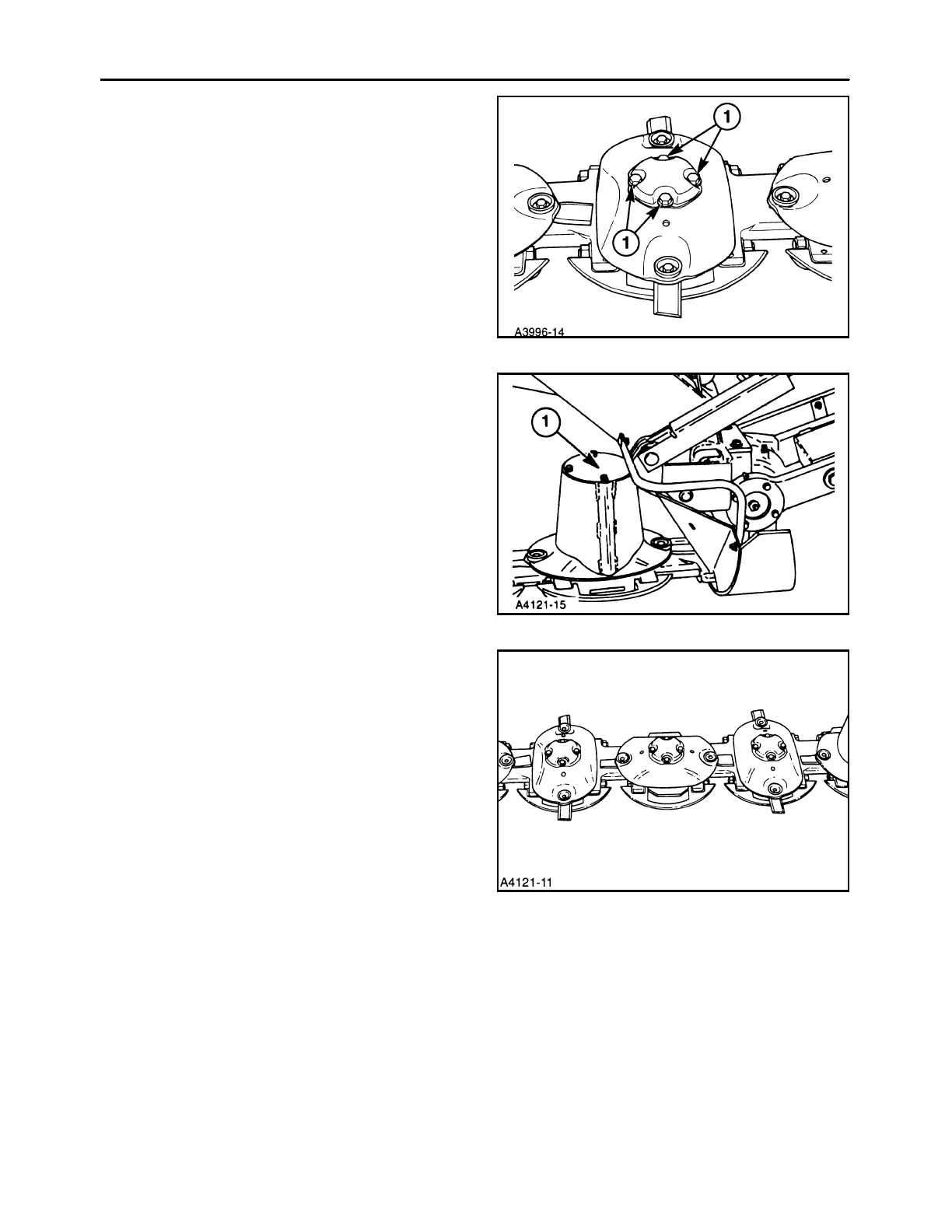
Remove discs by removing four bolts at 1.
6
Discs with drums can be removed by first removing
the drum covers, 1; the four disc/drum retaining bolts
can then be removed.
7
Reinstall discs at right angles to each other as
shown. Be sure the correct hardware is installed as
follows:
1. Discs w/caps: 1/2″ x1″ cap screws
cupped lock wash
2. Discs w/drums: 1/2″ x1-1/4″capscrews
thick hardened washers
IMPORTANT: Use of incorrect disc retaining hard-
ware may cause cutter bar lock-up and potential
damage, or may prevent proper retention of discs.
Torque retaining bolts to 83 ft lbs (113 N⋅m).
NOTE: Do not overtighten as bolts may yield.
8



 To Next Page