SECTION 58 -- ATTACHMENTS AND HEADERS -- CHAPTER 2
58-6
KNIFE REPLACEMENT
NOTE: Inspect the cutter bar for leaks or other need-
ed repairs whenever performing service work on the
bar. If a leak is found repair it immediately to prevent
possible future failures.
IMPORTANT: Always replace both knives on a disc
to maintain balance. Do not intermix old and new
knives on a disc.
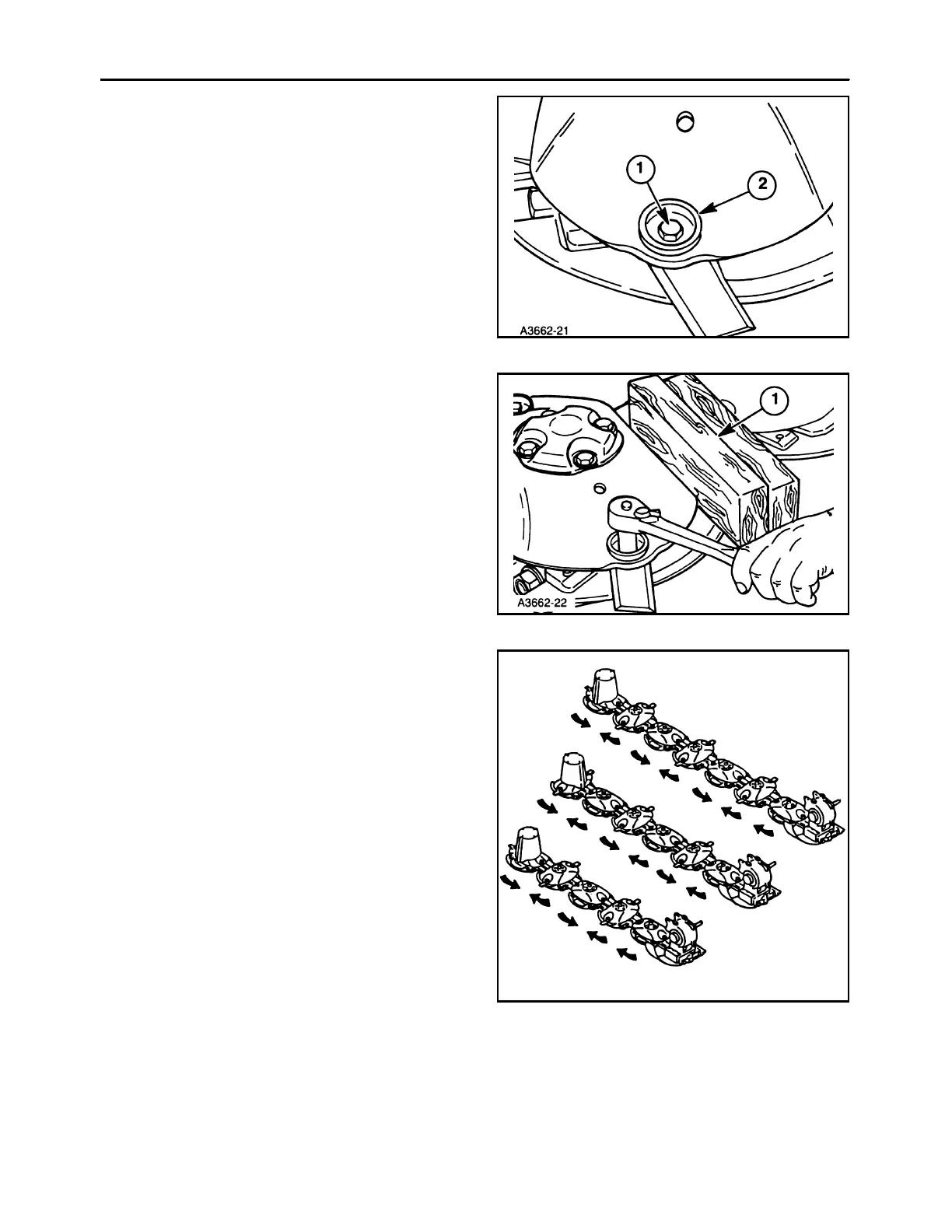
1. Remove the dirt around the knife bolt, 1, and bolt
protector, 2.
11
2. Block the discs in place with a hardwood block,
1, or install a bar through the right hand tower.
3. Remove the bolt with a socket as shown. If nec-
essary hold the nut in place from the bottom with
your hand. This will keep the nut from turning.
NOTE: If you are using an impact wrench use a bar
to hold the nut in place, not your hand.
12
4. The knife and the nut can be removed from under
the disc after the bolt is removed.
5. Knives can be turned over to use the opposite
cutting edge after they become dull or nicked. All
knives are angled. Knives are referred to as
clockwise or counterclockwise depending on
which disc they are attached to.
6. The leading edge of the knives must be lower
than the trailing edge. Refer to the accompanying
drawing as to which way the discs turn.
MDX71
MDX81
MDX91
13



 To Next Page