
EasyManua.ls Logo

Chore-Time Chore-Tronics 3 Control - User Manual

Chore-Time Chore-Tronics 3 Control
142 pages
Print Icon
To Next Page IconTo Next Page
Loading...
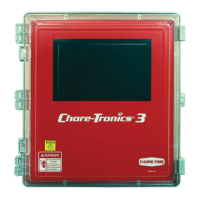
Chore-Tronics
®
3 Control
Installation & Operators Instruction Manual
MT2398CNovember 2013

Table of Contents

Questions and Answers

  • A
    Allison RobinsonSep 9, 2025
    What does it mean if Chore-Time Chore-Tronics 3 Control Home Automation says that the pressure in the house is .00?
    • J
      James BrennanSep 9, 2025
      If the control says that the pressure in the house is .00" and will not move, it indicates a wire connection problem between the static pressure monitor and the IO board. When the static pressure monitor is disconnected from the IO Board the Control defaults to a reading of .00. Check for wires being switched, broken wires, wires not making a good connection, etc. An easy way to remember the wiring is that the red wire is connected to the positive terminal of both the IO board and the static pressure monitor.
  • D
    Daniel GonzalesSep 6, 2025
    What to do if Chore-Time Chore-Tronics 3 Control pot not responding alarm?
    • H
      Holly LunaSep 7, 2025
      If you receive a 'Pot not responding' alarm for your Chore-Time home automation system, consider the following: * The gear might not be making contact with the screw. Loosen the potentiometer assembly mounting bolts and slide until the gear makes contact with the screw. * The gear set screw might not be tight on the potentiometer shaft. Tighten the gear set screw. * The potentiometer might not be connected to the control, or there could be a bad connection between them. Connect the potentiometer to the control and check for and correct any bad connections. * The potentiometer might be bad. Replace the potentiometer. * The first opening movement might be too small. Make sure that the first opening movement causes at least a 10-count change in the potentiometer reading.
  • R
    Randy Sellers DDSAug 22, 2025
    What to do if Chore-Time Home Automation relays are constantly failing?
    • M
      Mrs. Emily SmithAug 22, 2025
      If the relays are constantly failing, it could be due to several reasons: * The relays are overloaded. Reduce the load on the relays, the maximum is 1HP. * There is a short in the wiring connected to that relay. Find the problem in the wiring and correct it. * One of the stand-offs holding the relay module is broken, causing the board to touch the back plate. Replace the stand-off. * The voltage from the back-up thermostat is the wrong phase of 220. Connect the other phase of 220 to the back-up thermostat.
  • B
    Brandon CruzSep 4, 2025
    Why Chore-Time Chore-Tronics 3 Control Home Automation fan anticipation feature is not working?
    • J
      Jackie WrightSep 4, 2025
      If the fan anticipation feature is not working, it could be due to: * Minimum Ventilation Fans assigned to something other than Minimum Ventilation Timer, or no Timer at all. All Fans intended for minimum ventilation must be assigned to the Minimum Ventilation Timer. * Other Fans (example: Stir Fans) are already operating due to temperature settings. If any other Fans are operating at the time the Minimum Ventilation Timer reaches its On Time, the anticipation function is disabled.
  • J
    Jeffrey JacksonSep 3, 2025
    What to do if Chore-Time Chore-Tronics 3 Control tunnel curtain opens completely before adjusting to static pressure?
    • J
      Jessica MartinezSep 3, 2025
      If the tunnel curtain opens completely before adjusting to static pressure, it could be due to: * Incorrect tunnel curtain speed and/or full movement distance entered in the "Setup" screen. Correct the tunnel curtain speed and/or full movement numbers. * A .00" static pressure setting in the (Main Menu) "Static Pressure screen". Set the desired static pressure settings for Tunnel Mode.
  • E
    Elizabeth ClarkSep 2, 2025
    What to do if Chore-Time Home Automation tunnel curtain does not completely open?
    • M
      Makayla Harris DDSSep 2, 2025
      If the tunnel curtain does not completely open when going into Tunnel Mode, consider the following: * If, in the "Static Pressure" screen, the high control limit is set to something other than .00 under Tunnel Mode, the control will adjust the tunnel curtain for static pressure. To stop Static Pressure Control on the tunnel, set the high static pressure limit to .00 under Tunnel Mode in the (Main Menu) "Static Pressure" screen. * Check the limit switches and adjust as necessary. * Correct any cabling and/or curtain problems.
  • C
    Crystal ButlerSep 1, 2025
    What to do if Chore-Time Chore-Tronics 3 Control temperature sensor reading is very high?
    • R
      Roberto OsborneSep 1, 2025
      If the temperature sensor reading is very high or shows a “#” in place of a temperature reading, it could be due to: * Moisture inside the temperature sensor junction box causing a short. Remove moisture from the sensor box and recheck the temperature. * A break in the temperature sensor wire causing a short. Check the sensor wire and wire connections and correct any problems. * A defective temperature sensor. Replace the temperature sensor.
  • A
    Amy SpencerAug 30, 2025
    What to do if Chore-Time Chore-Tronics 3 Control Home Automation temperature sensor reading is very low?
    • C
      Carmen PetersonAug 31, 2025
      If the temperature sensor reading is very low, but not stuck on 0° F, it could be due to: * Loose or corroded connections in the temperature sensor junction box, and/or I/O Board. Check all temperature sensor connections and correct any problems. * A defective temperature sensor. Replace the temperature sensor.
  • T
    timothy19Aug 29, 2025
    What causes Chore-Time Home Automation I2C Alarm and how to solve it?
    • A
      Anthony MurrayAug 30, 2025
      An I2C Alarm in your Chore-Time Home Automation system can arise from: * A loose, mis-aligned, or defective flat cable. Check all flat cables and correct or replace them as necessary. * A defective I/O, I2C, or Expansion Board. Replace the defective board. * Incorrectly set Expansion Board address Dip Switches. See page 113 for correct Dip Switch settings.
  • A
    alexandra13Aug 28, 2025
    What to do if Chore-Time Chore-Tronics 3 Control water meter not recording?
    • L
      Lisa DavidAug 28, 2025
      If the water meter is not recording, consider the following potential causes and solutions: 1. Check for a loose connection on the water meter and/or I/O Board and correct it. 2. Ensure the water meter is a dry contact pulsed water meter (Chore-Time part no. 13228-GP) and that the pulser unit is working correctly. 3. To prevent noise, use non-shielded Twisted Pair Wire (part no. 42208) and run the wire separately from high voltage wires. Avoid Romex, SJO cord, or shielded wire as water meter wire. 4. Replace the I/O Board. 5. Replace/repair the water meter.

Summary

Chore-Time Warranty

Conditions and Limitations

Outlines the conditions and limitations applicable to the Chore-Time warranty, including voiding conditions and exclusions.

General Information

Support and Safety Information

Provides support information, emphasizes safety warnings, and describes safety decals for equipment operation.

Introduction to the Control

Display Screen and Navigation

Explains the touch screen display, navigation methods (touch/mouse), and screen layout elements.

Keypad and Control Interface

Details the numeric keypad and keyboard functions for data entry and control interaction.

Graphs and Relay Box Indicators

Describes graph displays and the function of relay box indication lights and auto/manual switches.

Glossary of Terms

Overview of Screens

Alarms Overview

Explains how to view active and recovered alarms, including alarm status and notice functions.

Control Setup

General and Unit Settings

Covers general setup, language, time/date configuration, and unit of measurement selection.

Analog Input Configuration

Details the setup and calibration of various analog inputs including temperature, static pressure, and humidity sensors.

Digital Input Configuration

Explains how to configure digital inputs such as water meters, feed scales, and airspeed sensors.

House and Output Assignments

Covers house setup, mortality tracking, and assigning equipment to control outputs.

Ventilation Modes and Settings

Details configuration for ventilation modes like Tunnel, Stir, Exhaust, Cool, Cool Pad, and Heat Zones.

Clock and Miscellaneous Outputs

Covers clock assignments for lights, feed, spares, and miscellaneous output configurations like backup relays.

Curve and Temperature Settings

Explains setup for ventilation settings, static pressure, curves, and temperature influences.

Management and Program Setup

Covers mortality tracking, flock setup, and program/setup key management for control configurations.

Control Operation Overview

Standard Mode Functionality

Describes Power and Natural mode functionalities, including curtain movement timing and rate.

Control Installation

Mounting and Wiring Basics

Provides guidelines for mounting the control boxes and basic wiring principles, including wire routing.

Input Wiring Procedures

Details wiring for analog inputs (temperature, static pressure, humidity) and digital inputs (meters, switches).

Expansion Board and Scale Wiring

Covers wiring for bird scales, expansion boards, and related components.

Output and System Testing

Explains manual testing of outputs, back-up box testing, and relay assignments.

PC Connection

Troubleshooting

Programming and Configuration Issues

Addresses common problems related to programming, fan operation, and temperature set points.

Equipment and Potentiometer Problems

Details troubleshooting steps for display issues, pressure readings, and potentiometer response.

Network and System Errors

Provides solutions for IONet communication failures and other system-level errors.

Wiring Diagrams

Backup Control and Fan Wiring

Illustrates wiring diagrams for backup control systems and typical fan connections.

Specialized Equipment Wiring

Shows wiring diagrams for linear lifts, turbo-cool systems, I/O boards, and brooders.

Improving Lightning Surge Suppression

Surge Protection System Installation

Details the installation of farm and house main service panel surge suppressors for lightning protection.

Telephone Line Surge Suppression

Explains the wiring and installation of surge suppressors for FNET/ALARM and telephone lines.

Parts Information

Main Box Parts Listing

Lists itemized parts and their corresponding part numbers for the main control box.

Relay Box Parts Listing

Provides a list of itemized parts and their part numbers specifically for the relay box.

Extra Parts and Kits

Lists optional add-on kits and repair boards for expanding system functionality.

Input Wiring Assignment Diagram

Technical Specifications

Revisions to this Manual

Details the changes and revisions made to the manual, including page numbers and descriptions.

Chore-Time Chore-Tronics 3 Control Specifications

General IconGeneral
BrandChore-Time
ModelChore-Tronics 3 Control
CategoryHome Automation
LanguageEnglish