ChroMate™ ChroMate™ Operator’s Manual Doc. 4300 Rev. E 37
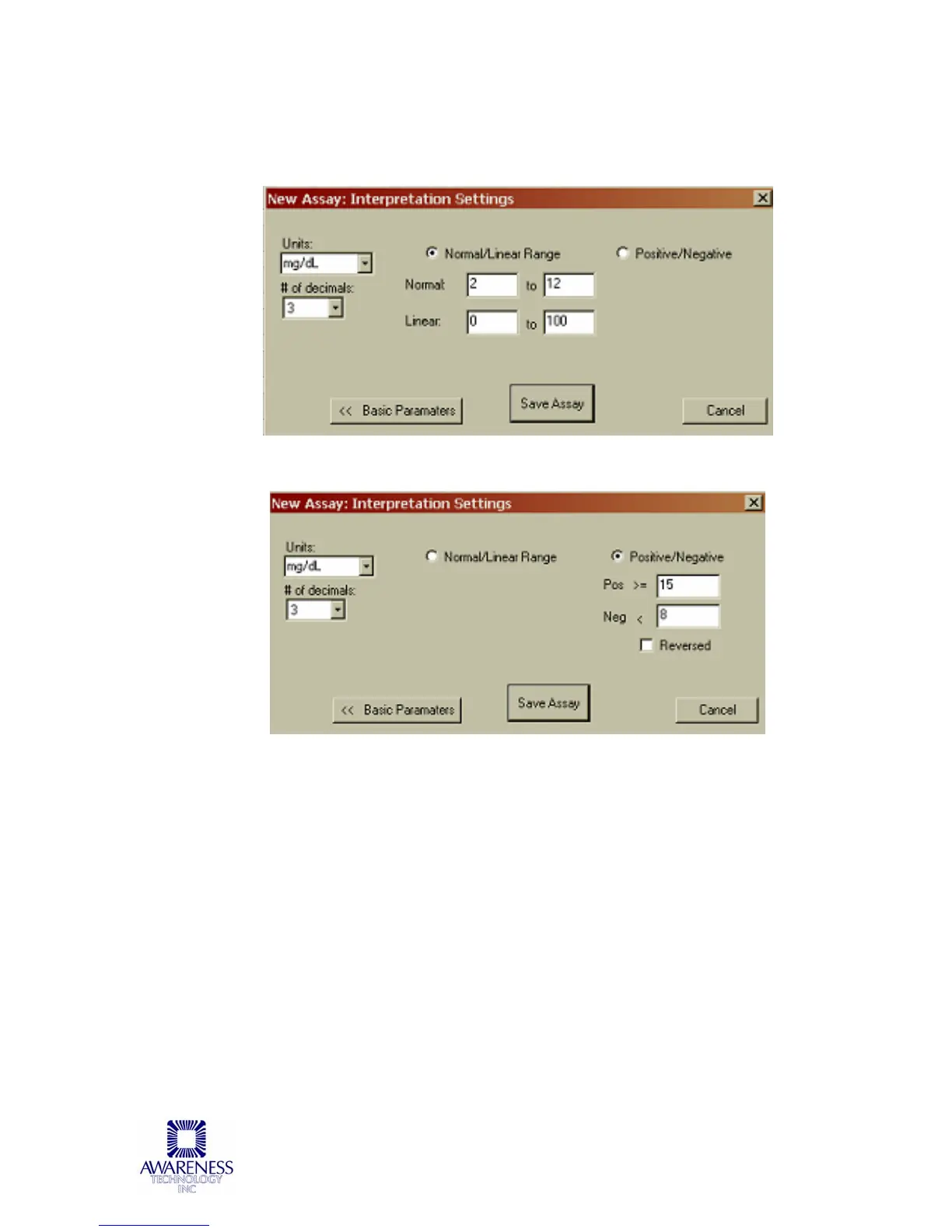
Click on the Interpretation button. Specify range by clicking the Normal/Linear
Range button to monitor the quality (optional). Highlight the field to change, type
in new value.
For Positive/Negative Interpretation results click on the Positive/Negative button:
Click on Save Assay.
Press the Close button to save.
If you do not want to see this window every time, click the “Do not automatically
show up” box in the bottom left corner of the window. If checked, the New Assay
Calibration Data can only be viewed by selecting it from the Management menu
window or by pressing the F8 key on your keyboard at any time.
When selected, New Assay Calibration Data will display the blank, calibrator, and
controls valid for 7 days. After they expire, you will have to re-run the Calibrators
to use that assay. You may run more frequent recalibrations and control checks
as often as you like.



 To Next Page