80 ChroMate™ Operator’s Manual Doc. 4300 Rev. E
Steps Prompts/Screen Display
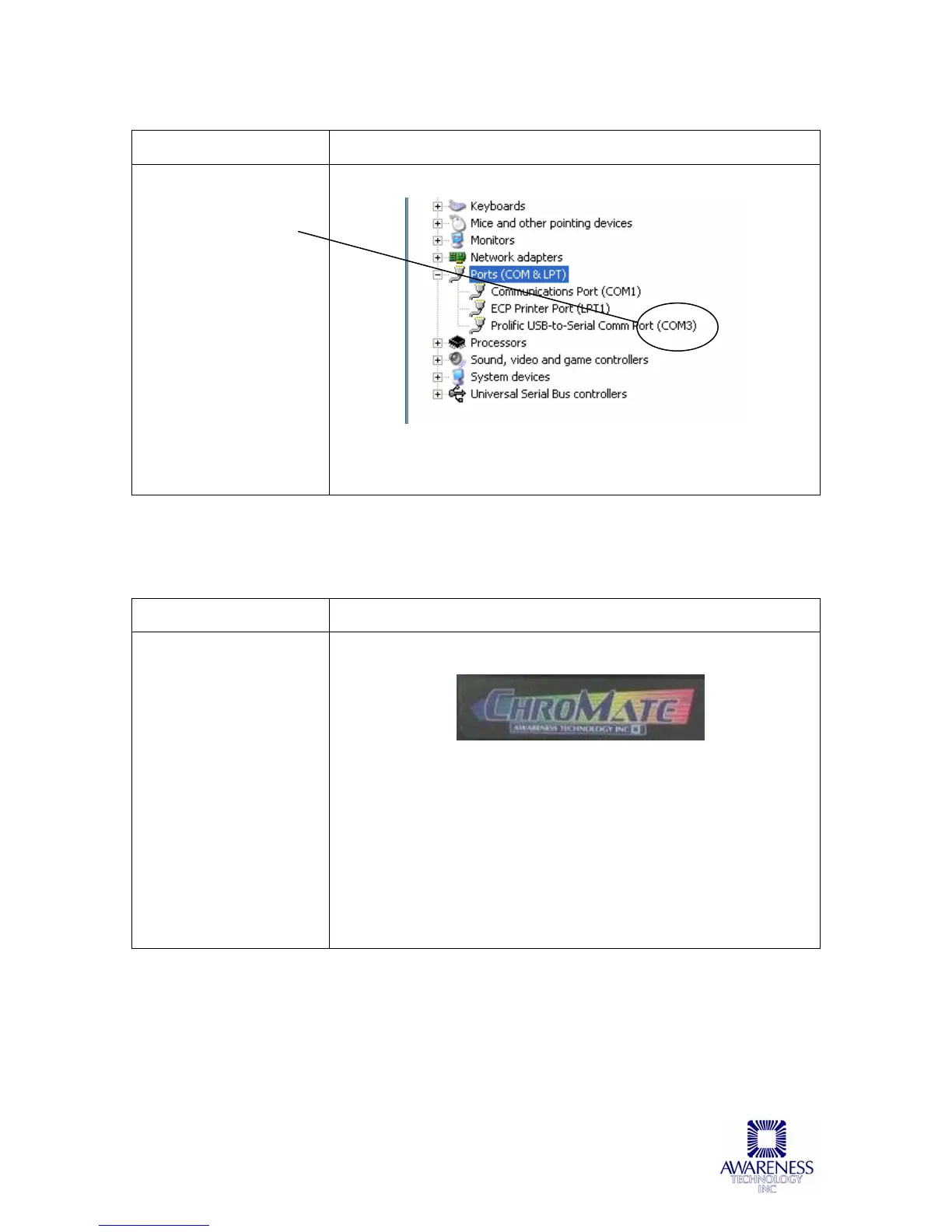
Click on the Ports
(COM & LPT) folder;
view the USB-to-Serial
Comm Port setting.
Follow the steps under
Section 6.2.2 ChroMate
Communication (COM)
Port Setting to ensure
that the ChroMate
COM port setting
matches the COM port
setting on your PC.
NOTE: In this instance
the COM port is COM3,
your system may
display a different port.
6.2.2 ChroMate Communication (COM) Port Setting
To adjust the 4300 ChroMate COM Port Setting to match the computer’s COM Port
setting, follow these steps:
Steps Prompts/Screen Display
Power on the 4300
ChroMate instrument.
The instrument will
annunciate a beeping
sound; the LED power
indicator will light (the
light will pulse/flash);
and the instrument will
warm-up. When the
instrument has
completed its
initialization process, it
will annunciate three
short beeping sounds
signaling it is
operational.
The computer screen will display the ChroMate logo:



 To Next Page