60 ChroMate™ Operator’s Manual Doc. 4300 Rev. E
5.3.1 Plate Layout Tab
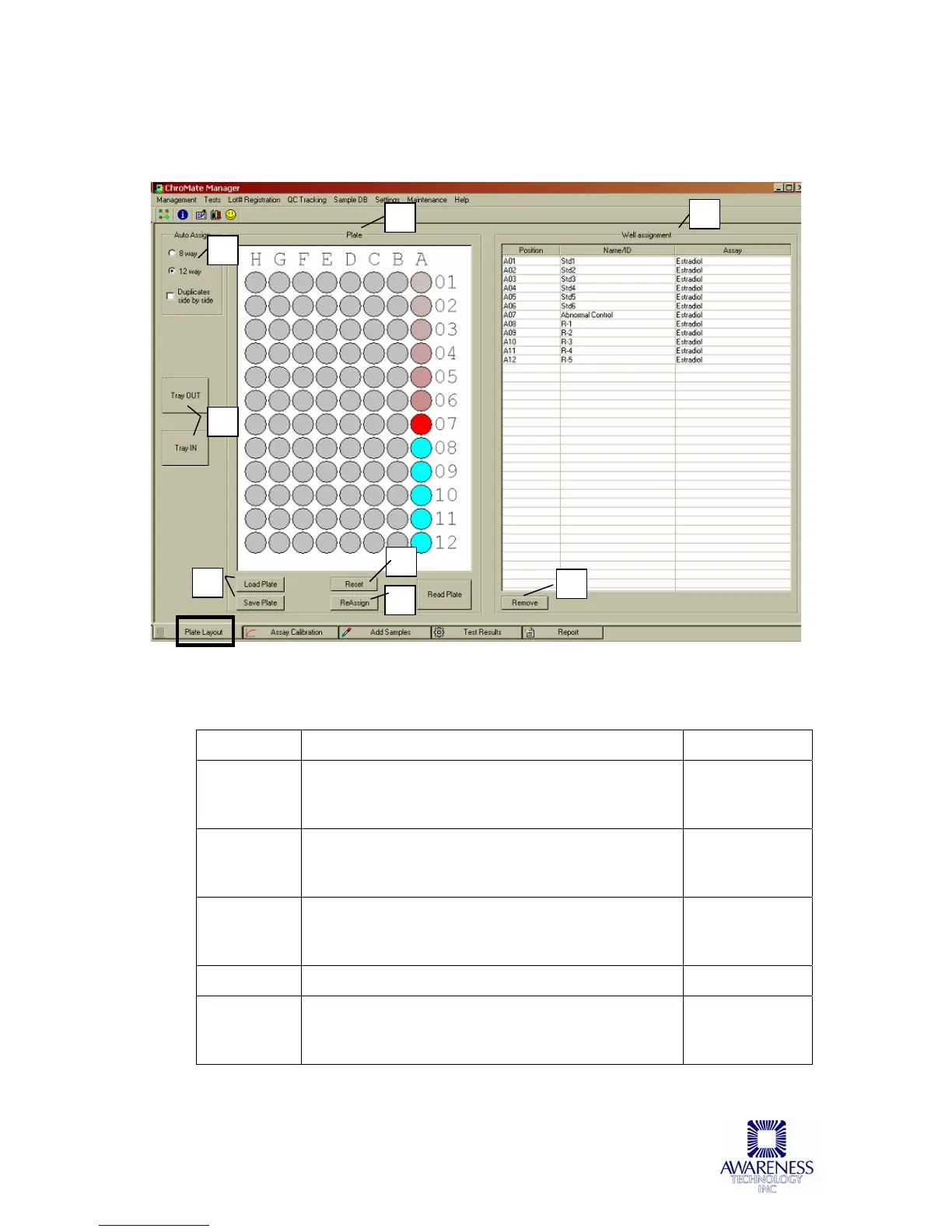
Plate Layout is the ChroMate’s default window and displays when the program is
started.
Figure 5.3.1-1 Plate Layout Tab
This window displays the current status of the instrument. Also shown is the currently
loaded plate.
Feature: Description: Item No.:
Auto Assign Auto Assign allows the user to select 8-way or 12-
way trays. This setting will remain in force until
changed.
1
Tray In /
Tray Out
Tray In / Tray Out buttons are provided to allow
the user to manipulate the instrument door to the
Open or Closed position.
2
Load Plate /
Save Plate
Load Plate sets up a previously stored assay and
Save Plate allows saving a set up assay for future
use.
3
Plate Location of 96 wells 4
Well
Assignment
Displays area for the position of blanks, the
standard, blank, control(s), Sample ID, and name
of the Assay.
5
1
2
3
4
5
6
7
8



 To Next Page