11-7
Catalyst 2950 and Catalyst 2955 Switch Software Configuration Guide
78-11380-10
Chapter 11 Configuring Interface Characteristics
Using the Interface Command
This example shows how to use a comma to add different interface type strings to the range to enable all
Fast Ethernet interfaces in the range 0/1 to 0/3 and Gigabit Ethernet interfaces 0/1 and 0/2:
Switch# configure terminal
Switch(config)# interface range fastethernet0/1 - 3, gigabitethernet0/1 - 2
Switch(config-if-range)# no shutdown
If you enter multiple configuration commands while you are in interface-range mode, each command is
executed as it is entered. The commands are not batched together and executed after you exit
interface-range mode. If you exit interface-range configuration mode while the commands are being
executed, some commands might not be executed on all interfaces in the range. Wait until the command
prompt reappears before exiting interface-range configuration mode.
Configuring and Using Interface-Range Macros
You can create an interface-range macro to automatically select a range of interfaces for configuration.
Before you can use the macro keyword in the interface range macro global configuration command
string, you must use the define interface-range global configuration command to define the macro.
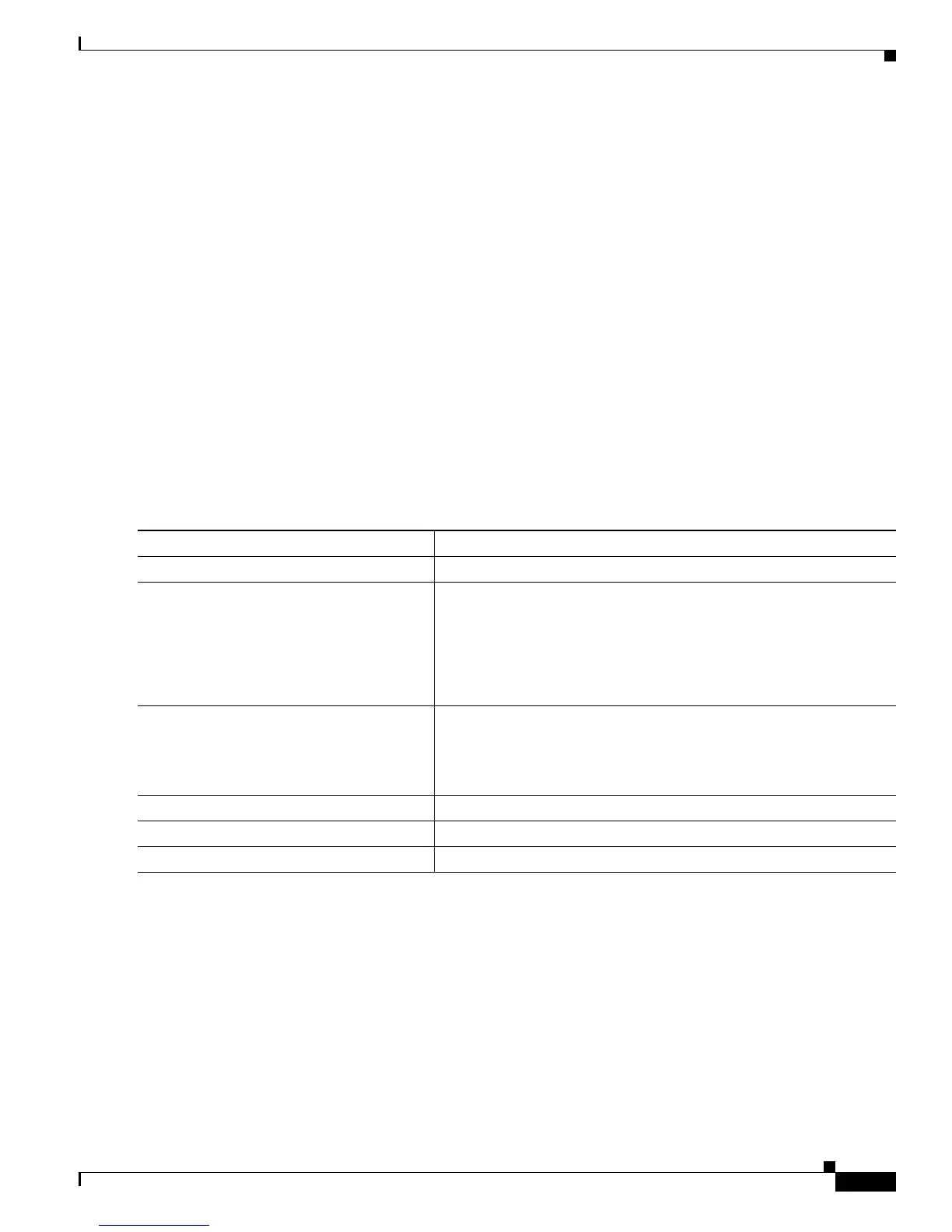
Beginning in privileged EXEC mode, follow these steps to define an interface-range macro:
Use the no define interface-range macro_name global configuration command to delete a macro.
When using the define interface-range global configuration command, note these guidelines:
• Valid entries for interface-range:
–
vlan vlan-ID - vlan-ID, where VLAN ID is from 1 to 1005 with the SI installed or 1 to 4094
with the EI installed
–
fastethernet slot/{first port} - {last port}, where slot is 0
–
gigabitethernet slot/{first port} - {last port}, where slot is 0
Command Purpose
Step 1
configure terminal Enter global configuration mode.
Step 2
define interface-range macro_name
interface-range
Define the interface-range macro, and save it in NVRAM.
• The macro_name is a 32-character maximum character string.
• A macro can contain up to five comma-separated interface ranges.
You do not need to enter spaces before or after the comma.
• Each interface-range must consist of the same port type.
Step 3
interface range macro macro_name Select the interface range to be configured by using the values saved
in the interface-range macro called macro_name.
You can now use the normal configuration commands to apply the
configuration to all interfaces in the defined macro.
Step 4
end Return to privileged EXEC mode.
Step 5
show running-config | include define Show the defined interface-range macro configuration.
Step 6
copy running-config startup-config (Optional) Save your entries in the configuration file.









 To Next Page