4-14
Catalyst 2950 and Catalyst 2955 Switch Software Configuration Guide
78-11380-10
Chapter 4 Getting Started with CMS
Displaying CMS
Note Figure 4-7 shows a cluster with a Catalyst 3550 switch as the command switch. Refer to the release notes
for a list of switches that can be members of a cluster with a Catalyst 2950 or a Catalyst 2955 switch as
the command switch.
Topology View
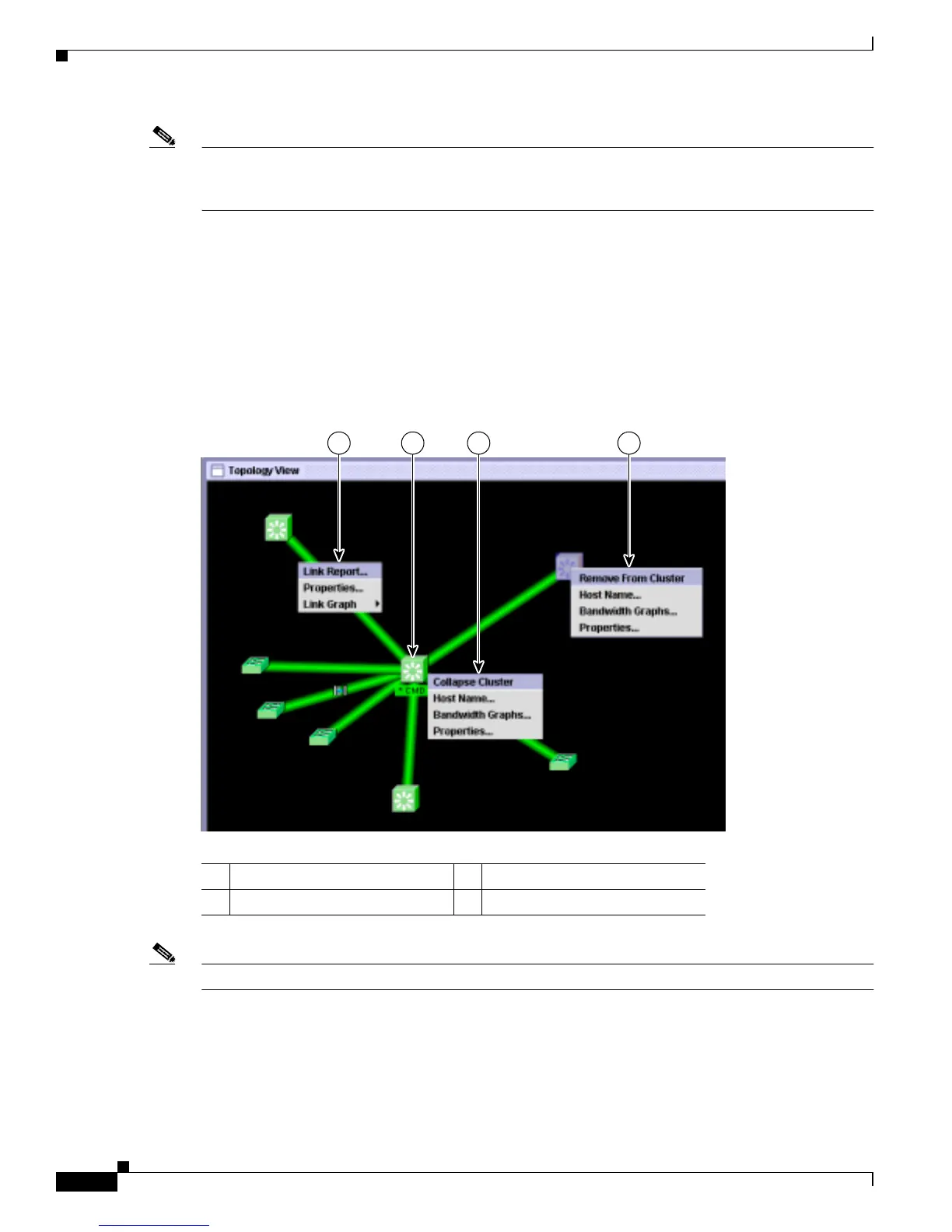
When CMS is launched from a command switch, the Topology view appears by default.
When you click the topology button on the tool bar, the Topology view displays the command switch
(shown by the *CMD* label) and the devices that are connected to it, as shown in Figure 4-8. You can
right-click on a switch or link icon to display a menu for that icon.
Figure 4-8 Topology View and Device Popup Menus
Note Figure 4-8 shows multiple popup menus. Only one popup menu at a time appears in the CMS.
1 Link popup menu 3 Command switch popup menu
2 Command switch 4 Cluster member popup menu
1 432
98675









 To Next Page