2-39
Cisco ASR 1000 Series Aggregation Services Routers Hardware Installation Guide
OL-13208-11
Chapter 2 Cisco ASR 1000 Series Routers Component Overview
Power Supplies for the Cisco ASR 1002 Router
Cisco ASR 1002 Router –48 VDC Power Supply LEDs and Connector
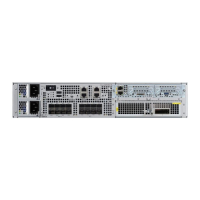
Figure 2-12 shows the –48 VDC power supplies at the rear of the Cisco ASR 1002 Router. The Cisco
ASR 1002 Router supports up to two power supplies.
Figure 2-12 Cisco ASR 1002 Router –48 VDC Power Supply
Table 2-22 describes the power supply LEDs and connectors on the rear of the chassis.
1 Chassis ESD socket 6 Power supply captive installation screw
2 Power supply slot 0 label 7 Power supply slot 1 label
3 Power supply switch standby/On (|) 8 Ground lead
4 Power supply LEDs 9 Positive lead
5 Fan 10 Negative lead
280289
OUTPUT INPUT
FAIL
OK OK
FAN
-48V/-60V 16A
This unit might have more than
one power supply connection.
All connections must be removed
to de-energize the unit.
OUTPUT INPUT
FAIL
OK OK
FAN
-48V/-60V 16A
This unit might have more than
one power supply connection.
All connections must be removed
to de-energize the unit.
9 810
4 5 63
0
1
7
1
2
Table 2-22 Cisco ASR 1002 Router –48 VDC Power Supply LEDs
LED Label LED Color Description
INPUT OK A bi-color LED
indicates presence
of input voltage
Green LED illuminates green to signal that the –48 VDC power supply
input voltage is greater than–43.5VDC at turn-on and remains
green down to –39VDC.
Amber The LED illuminates amber when the input voltage (falls below
–39VDC) and indicates that there is still a voltage present
(voltage on the terminal block). The LED remains amber and is
active to around 20 V +/-5 V. The LED is not illuminated if the
input is below –15 V.


 To Next Page
 Loading...