2-42
Cisco ASR 1000 Series Aggregation Services Routers Hardware Installation Guide
OL-13208-11
Chapter 2 Cisco ASR 1000 Series Routers Component Overview
Power Supplies for the Cisco ASR 1002 Router
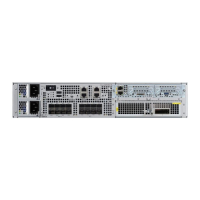
Figure 2-14 Cisco ASR 1002 Router Rear View With +24 VDC Power Supply Terminal Block
Table 2-25 describes the power supply LEDs and connectors on the rear of the chassis.
Table 2-25 Cisco ASR 1002 Router +24 VDC Power Supply LEDs
+24 VDC Power System Input for Cisco ASR 1002 Router
The +24 VDC power supply operates within specification between +21 and +36 VDC continuously once
the power supply DC input is turned on. The power supply shall measure the input voltage at the
terminals of the power supply and turn off the supply when the input voltage reaches 19.0 volts +/- 0.5
volts. Once this low voltage threshold is reached, the power supply does not resume operation until the
1 Positive (+) lead 6 GROUND (GND) LEAD
2 Negative (-) lead 7 +27VDC label
253165
OUTPUT INPUT
FAIL
OK OK
FAN
This unit might have more than
one power supply connection.
All connections must be removed
to de-energize the unit.
+27V DC INPUT
+27V 32A
1
2
4
3
LED Label LED Color Description
OUTPUT FAIL Power supply
activity
Red When the LED is off, it signals that the +24 VDC output voltage are
within the normal operating range. Output voltage between the
minimum and maximum limits will not create an output fail alarm,
and output voltages below the minimum or above the maximum will
create an Output Fail alarm.
When you turn the power supply on, the red LED illuminates for two
to three seconds to test LED operation before going off.
INPUT OK A bi-color LED
indicates
presence of
input voltage
Green LED illuminates green to signal that voltage is > or = to 20VDC at
turn-on and down to 19.0VDC (+/- 0.5 V tolerance).
Amber The LED illuminates amber when the input voltage is active down to
16.0VDC and indicates that there is still a voltage present (voltage on
the terminal block). The LED remains amber and is active to around
10 V. The LED can be OFF below 15.8VDC.
FAN OK A bi-color LED
indicates power
supply fan status
Green The LED illuminates s green when all fans are operational.
Red The LED illuminates red when a fan failure is detected.


 To Next Page
 Loading...