Page 20 WS2H and WS3 Manual
SYSTEM SETUP SCREENS (CONTINUED)
SYSTEM SETUP 6
SYSTEM SETUP 6 – Automatic reserve calculation
This screen will not display on units set to On 0, capacity set to Off, or any systems
On: Unit will regenerate before reaching 0 capacity, based on previous usage trends
Requires delayed regeneration
OFF: Regeneration is scheduled after reaching 0 capacity
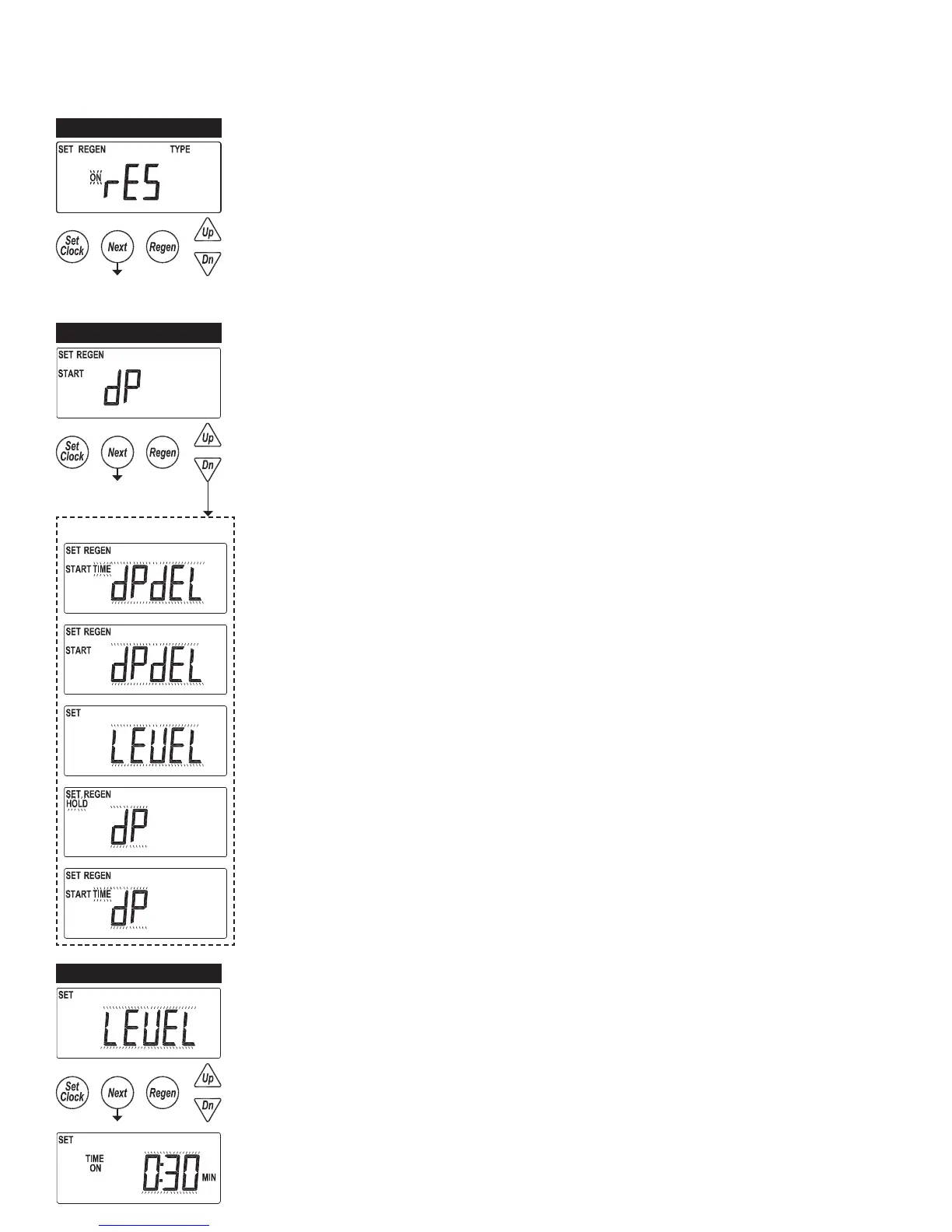
SYSTEM SETUP 7A
SYSTEM SETUP 7A - Auxiliary Input
START REGEN
• Control will start an immediate regeneration upon switch closure
• Systems follow “on0 logic” regenerating all agged units sequentially
START TIME REGEN dEL
• Control will immediately schedule a regeneration upon accumulating 2 minutes of
intermittent switch closures
• Systems follow “Delayed Logic” regenerating agged units in available time slots
START REGEN dEL
• Control will immediately schedule a regen upon switch closure
• Systems follow “Delayed Logic” regenerating agged units in available time slots
LEVEL
• Only available on single units
• External switching can be used to control the On Line / Standby status
- Switch closure will trigger the unit to go to a standby condition
HOLD
• Regeneration will not be allowed as long as there is switch closure
- On0 units will regenerate immediately after the hold switch opens
- Delayed regenerations will be delayed until the next scheduled time if the hold is active
when the scheduled time passes
START TIME REGEN
• Control will immediately regenerate upon accumulating 2 minutes of intermittent switch
closures
• Systems follow “on0 logic” regenerating all agged units sequentially
Non-Default Settings
SYSTEM SETUP 7B
SYSTEM SETUP 7B - Level option selected
Set a time duration of switch closure when Level option is selected



 To Next Page