Comau Robotics Product Instruction
40
USE OF THE “E.DO” APP
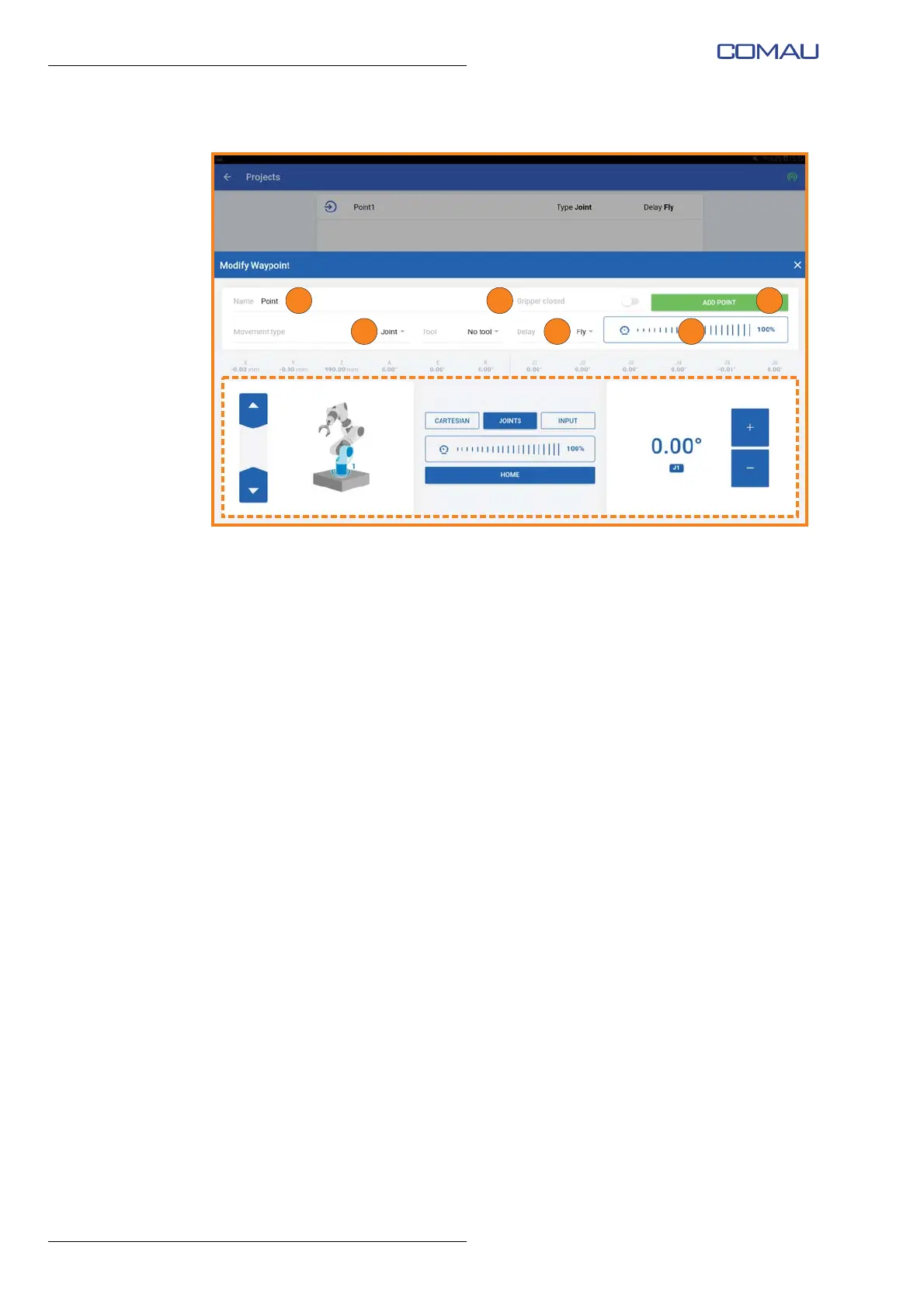
– a new point creation screen image will open;
– assign a name to the point (“Name” field (A) at the top left);
– if present, select the open or closed position of the e.DO Gripper (“Gripper closed”
switch (B) at the top right);
– select the type of movement with which you want to save the point, to be chosen
between Joints and Cartesian (“Movement type” field (C) at the top left);
– set the delay time, which elapses from the reaching of the previous point to the
beginning of the Robot movement towards the next point (“Delay” field (D) at the
top right). It is possible to set a zero delay by selecting “Fly”, or a delay in seconds
that can be selected from the drop-down menu;
– set the speed with which the Robot will move to the desired point during program
execution (“Speed” slider (E) at the top right);
– manually move the Robot to the desired point using the commands present in the
lower part of the screen image (dotted area), according to one of the previously
described movement modes (
Movement in Cartesian mode, Movement in Joints
mode or Movement in Input mode);
– having obtained the correct positioning of the Robot, confirm the creation of the
point by pressing the green button “Add point” (F) at the top right;
– following the same procedure, create the remaining points of the movement
program;





 To Next Page