HPOD C-, X-, or Ku-Band High-Power Amplifier Revision 6
Updating Firmware MN/HPOD.IOM
3–3
• Driveletter‘c:’isusedintheseexamples. Anyvalid,writabledrivelettercanbe
used.
• Typicalforalltasks:Typethecommandwithoutquotes
,andthenpressEnterto
execute.
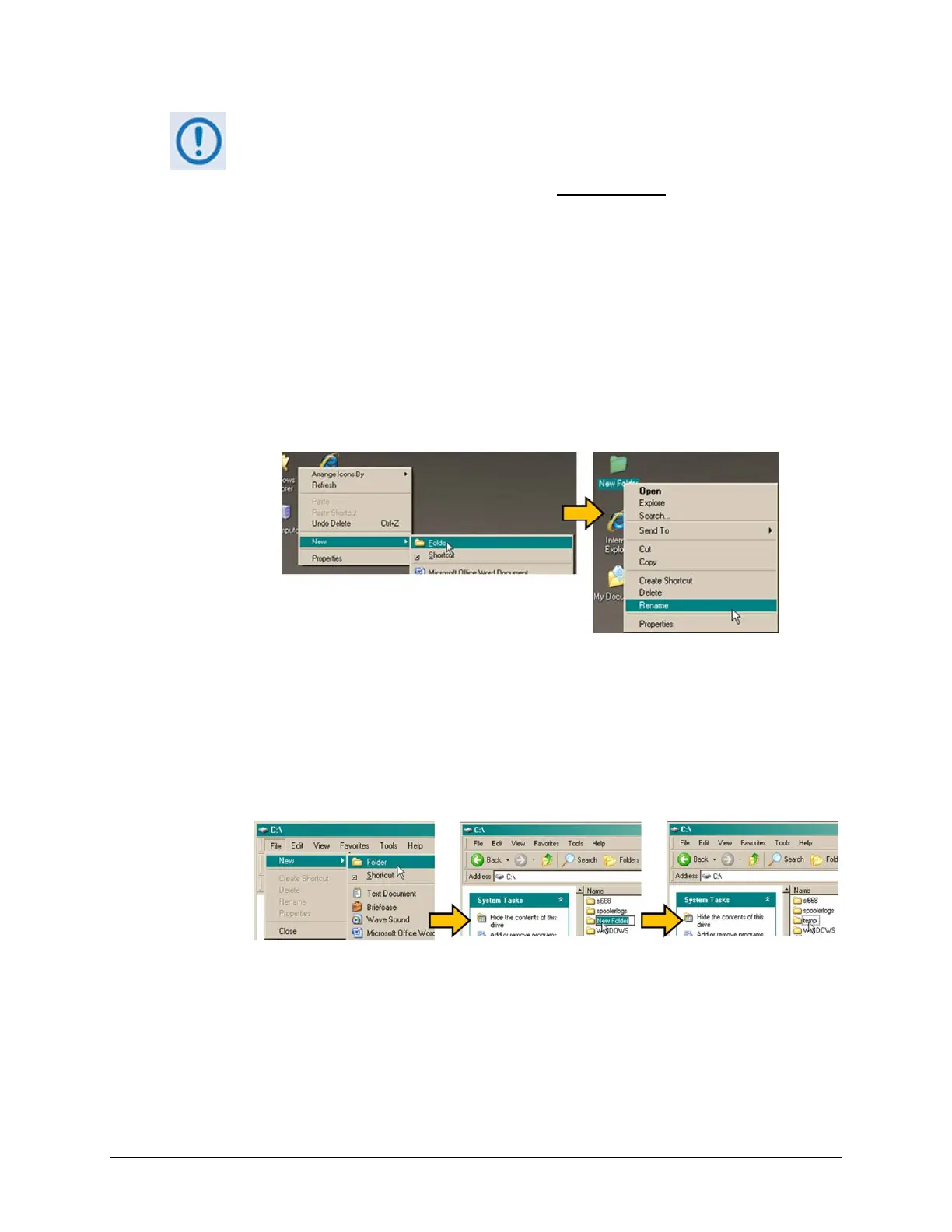
ThereareseveralwaystheusermayusecreateatemporaryfolderonaWindows‐basedPC:
A. UsetheWindowsDesktoptocreateandrenamethetemporaryfolder.
• Right‐click anywhere onthe desktop to open the popup submenu, and then se
lect
New>Foldertocreatethetemporaryfolder.Thenewfolderwillbecreatedonthe
desktop.
• Right‐click on the new folder and then select ‘Rename’ from the popup submenu.
Renamethisfolderto"temp"orsomeotherconvenient,unusedname.
B. UseWindowsEx
plorertocreateandrenamethetemporaryfolder.
• Select File > New > Folder to create the temporary folder. The new folder will be
createdintheactivefolder.
• Right‐clickthe‘NewFolder’foldername,andthenrenamethisfolderto"temp"or
someotherconvenient,u
nusedname.
C. Usethe‘Run’and‘Browse’windowstocreateandrenamethetemporaryfolder.
• Select [Start] on the Windows taskbar and then click the Run... icon. The ‘Run’
windowwillopen.
• Click[Browse]inthe‘Run’window.The‘Browse’wi
ndowwillopen.



 To Next Page