HPOD C-, X-, or Ku-Band High-Power Amplifier Revision 6
Updating Firmware MN/HPOD.IOM
3–4
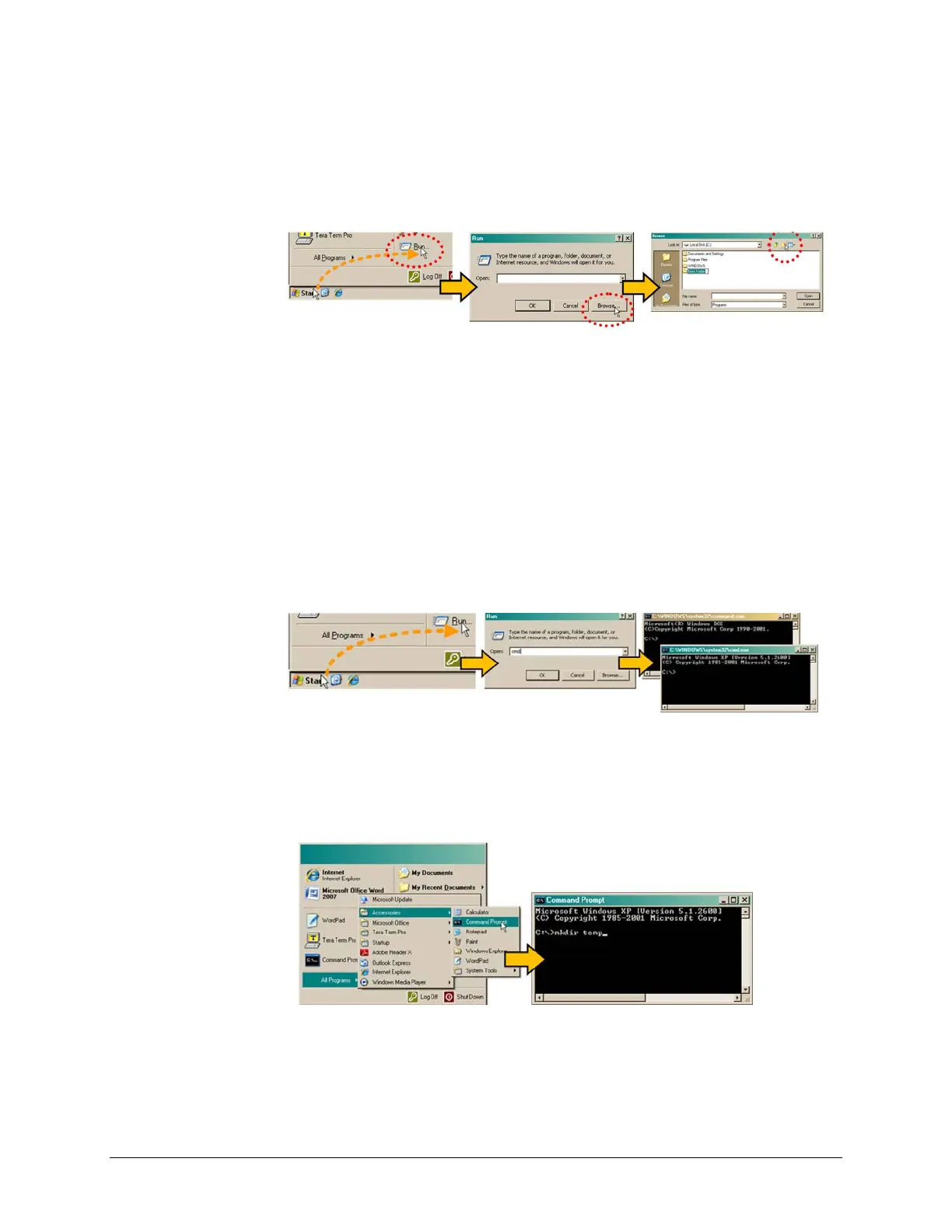
• Click the Create New Folder icon in the ‘Browse’ window. The new folder will be
created.
• Right‐clickthe‘NewFolder’foldername,andthenrenamethis folderto“temp”or
someotherconvenient,unusedname.
D. UseWindowsCommand‐linetocreatethetemporaryfolder.
• First, click [S
tart] on the Windows taskbar, and then click the ‘Run...’ icon (or,
depending on Windows OS versions prior to Windows 95, click the ‘MS‐DOS
Prompt’iconfromtheMainMenu).
• Next,openaCommand‐linewindow…
o ForWindows95orWindows98–Type“command”.
o For any Windows OS versions later than Windows 98 – Type “cmd” or
“command”.
o Alternately, from [S
tart], select All Programs > Accessories > Command
Prompt.
o Finally,fromtheCommand‐line‘c:\>’prompt,type“mkdirte
mp”or“mdtemp”
(mkdirandmdstandformakedirectory),andthenclick[OK].
Thereshouldnowbea‘temp’foldercreatedand availableforplacementofthe
firmwarefiledownload.



 To Next Page