HPOD C-, X-, or Ku-Band High-Power Amplifier Revision 6
Updating Firmware MN/HPOD.IOM
3–8
3.4 Performing the FTP Upload Procedures
Toproceedwiththefirmwareupdateprocedure,assumptionsaremadethat:
• TheHPODJ6|COM1portisconnectedtotheuser‐supplied,Windows‐based
PCserialportorEthernetport,and
• The PCis runningaterminal emulationprogram (foroperationofthe HPOD
serialorTelnetinterfa
ce)and/oracompatibleWebBrowser(foroperationof
theHPODWebServerInterface).
• The latest firmware files have been downloaded or otherwise received from
ComtechEFDataandareavailableontheuserPCinanaccessibletemporary
folder.
3.4.1 Performing the Automated Serial-based FTP Upload Procedure
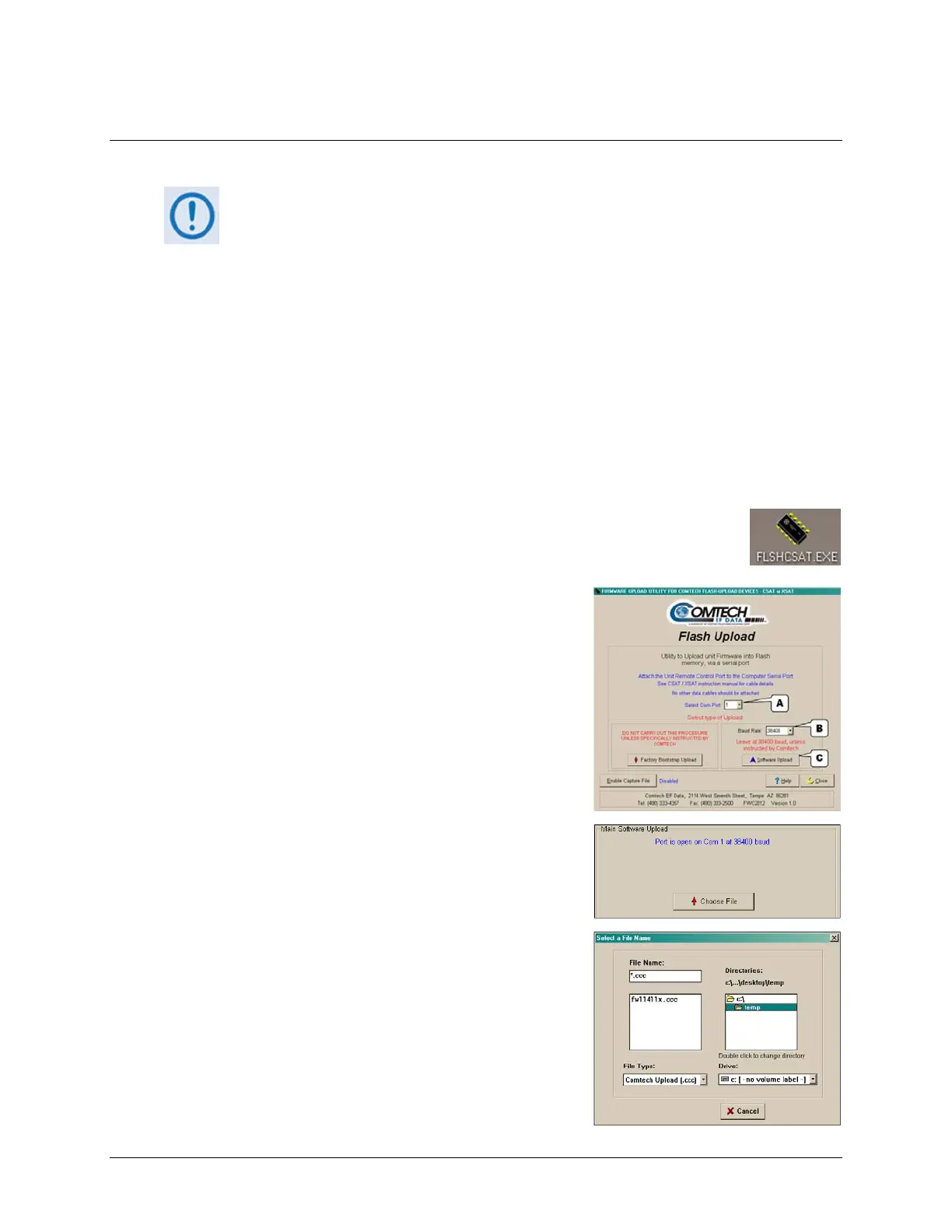
1. Double‐click FLSHCAT.EXE (filename or icon) on the PC desktop to execute
theFLASHUPLOADutilityprogram.
2. From the FL SHCAT dialogue box, select the pertinent
serial port used for communication between the PC
andtheHPOD(thisexampleselectsCOM1,asnoted at
‘
A’.)
3. Do notselectaBaudRate(‘
B’)otherthanthedefault
selection of 19200, unless otherwise instructed by
ComtechEFDataTechnicalSupport.
4. Click‘SoftwareUpload’(‘
C’).
A. Selectthefirmwarefileforupload.Click‘Choose
File’then,oncetheSelectaFileNamedialogue
boxopens,usethewindowontherightto
navigatetothedesiredfolder.Finally,double‐click
onthefirmwarefilefromthewindowontheleft.



 To Next Page