HPOD C, X-, or Ku-Band High-Power Outdoor Amplifier Revision 6
Ethernet-based Remote Product Management MN/HPOD.IOM
4–16
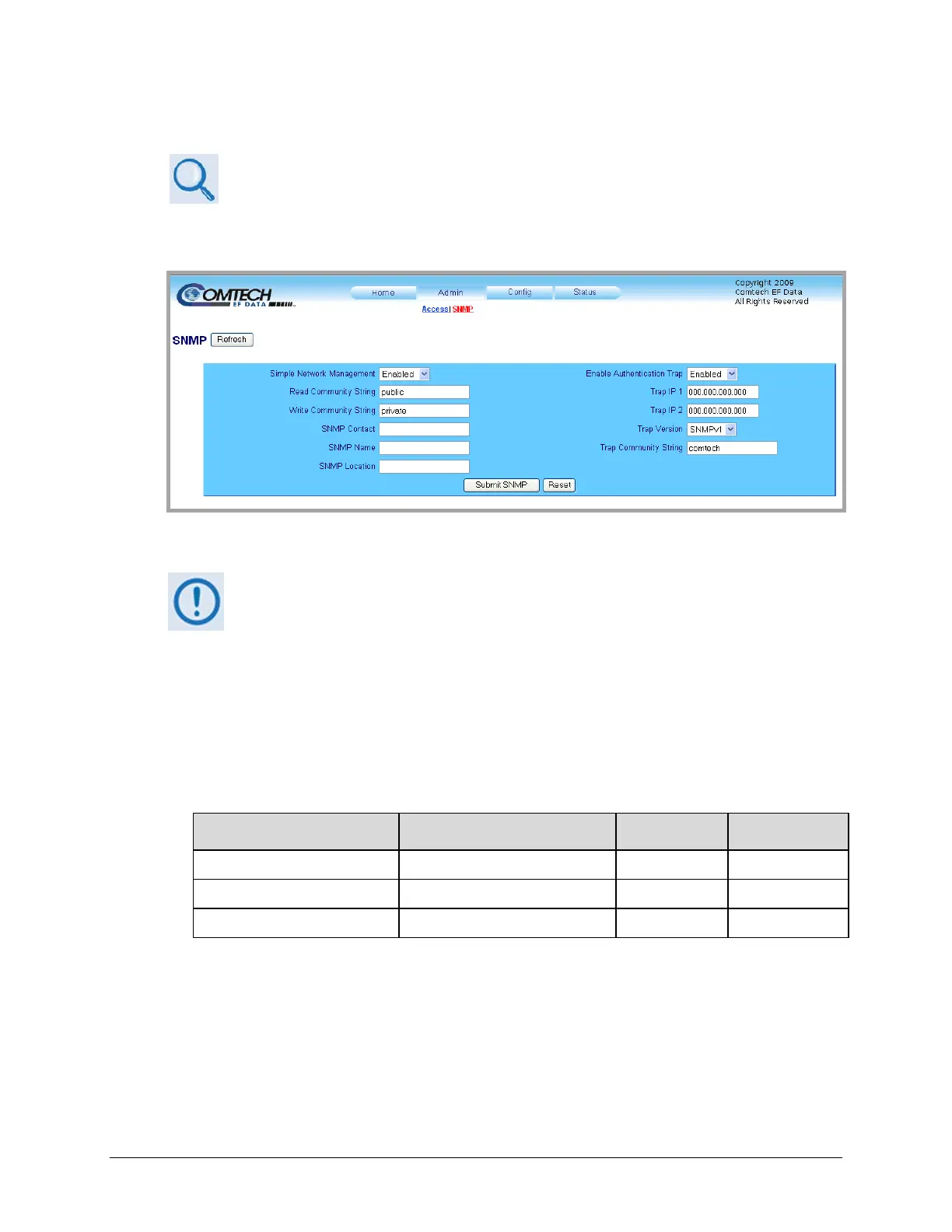
4.5.5.2.2 Admin | SNMP Page
Sect. 4.3 SNMP INTERFACE
The Administrator must use this page to manage the HPOD SNMP (Simple Network
ManagementProtocol)settings.
Figure 4-5. Admin | SNMP page
Atanytime,click[Refresh]toupdatethispageandseethemostrecentdata.
SNMP
• Simple Network Management – Use the drop‐down list to set SNMP as Enabled or
Disabled.
• Read/Write/TrapCommunityStrings–Thesedefaults, setatthefactory,maybechanged
asneeded:
Field Factory Default Name
Number of
Characters
Format
Read Community String public 0 to 20 alphanumeric
Write Community String private 0 to 20 alphanumeric
Trap Community String comtech 0 to 20 alphabetic
• SNMP Contact / Name / Location – Enter this contact information as needed, in
alphanumericformat,uptoamaximumof20characters.
• Enabled Authentication Trap – Use the drop‐down list to set the Authentication Trap as
EnabledorDisabled.



 To Next Page