Product Manual — Doc. 8559B 4-Series™ Control Systems • 211
Port Forwarding
Port forwarding can be used to provide connections from outside the local network for mobile
and browser applications.
Observe the following points about port forwarding:
l
Remap the external ports from the initial defaults. Remapping the external ports
minimizes the number attempts that are allowed to access the system. A hacker will be
unable to scan well-known ports for entry, and must instead scan all ports and then
determine what protocols are supported before attempting to log in to the system.
l
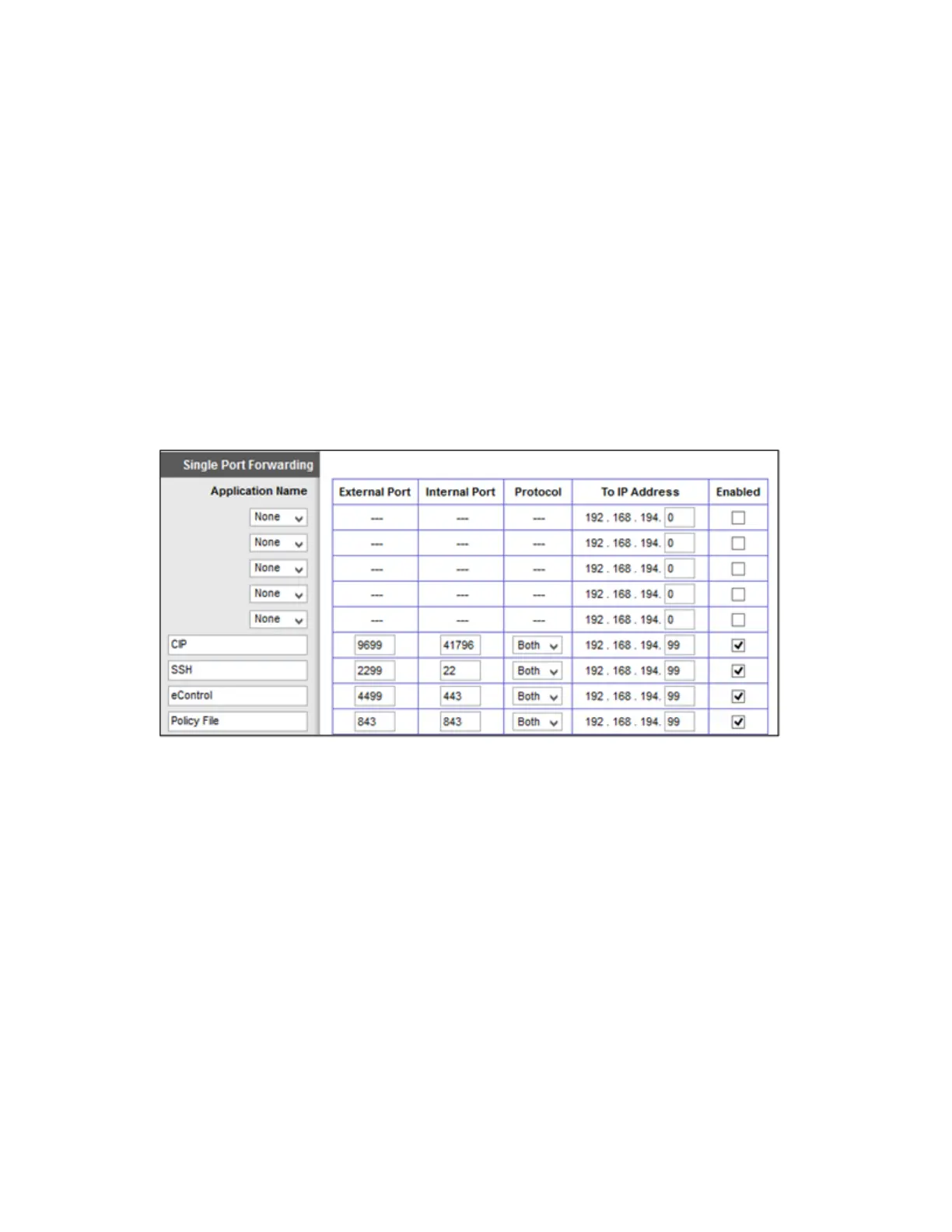
Most home routers allow different external and internal ports to be set. An example of a
home router setup page is provided below.
Home Router Setup Page Example
l
Use external port numbers that are not commonly used. The actual number is not
important; it simply must match the entry in the mobile app configuration.
l
Open ports that are required only. For example, if mobile applications or XPanel
applications are used, open only the secure CIP port (default is 41796) and HTTPS port
(default is 443). Ensure that SSL settings are used in the mobile application.
l
If ports 41795 or 41797 were opened for external use, reroute the external ports to port 22
and use the SSH console.



 To Next Page