Driving
Operating the speed limiter with the
turn signal lever
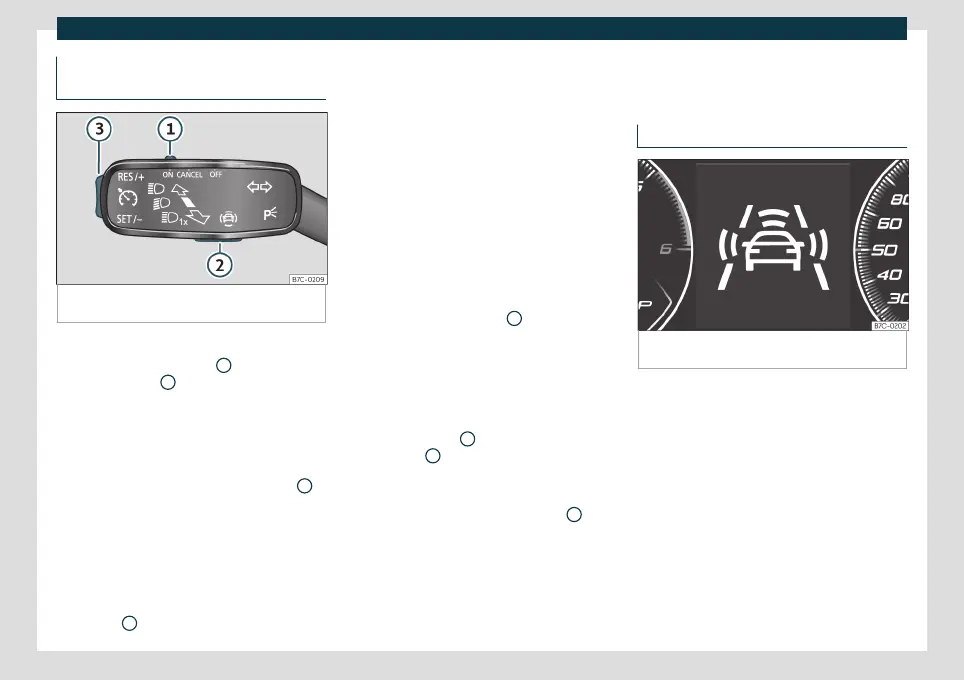
Fig. 157
On the turn signal lever: buttons to oper-
ate the speed limiter.
Connecting
●
Move control
›››
Fig. 157
1
to position
and press button
2
.
The last programmed speed is stored. It does
not take effect yet.
Activating the speed limiter
●
While driving, press button
›››
Fig. 157
3
in
the area
.
The current speed is stored as the maximum
speed.
Setting the programmed speed
You can set the speed using button
›››
Fig. 157
3
:
●
Briefly press area to increase speed in
small increments of 1 km/h (1 mph).
●
Press and hold the area
to continu-
ously increase speed in increments of 10
km/h (5 mph).
●
Briefly press area
to decrease speed
in small increments of 1 km/h (1 mph).
●
Press and hold area
to continuously
decrease speed in increments of 10 km/h (5
mph).
The speed is limited to the set value.
Switching off the speed limiter
●
Move control
›››
Fig. 157
1
to position
.
The system switches off.
Switching off temporarily
If you want to temporarily deactivate the
speed limiter, e.g. for overtaking, move the
control
›››
Fig. 157
1
to position
or
press button
2
.
After overtaking, the speed limiter can be
activated with the previously programmed
speed by pressing button
›››
Fig. 157
3
in
the area
.
Emergency brake assistance
system (Front Assist)*
Introduction
Fig. 158
On the instrument panel display: advance
warning indications.
The objective of the system is to prevent
head-on collisions against objects that may
be in the vehicle’s path or minimise the con-
sequences of such impacts.
Depending on several factors and how criti-
cal the situation is, the system operates in a
staggered manner. First it warns the driver,
and if the driver’s reaction does not occur or
is insufficient, it activates independent
emergency braking.
Front Assist is active between 4 km/h (2.5
mph) and 250 km/h (156 mph). Depending
224



 To Next Page