Driving
Parking with the parking assist system
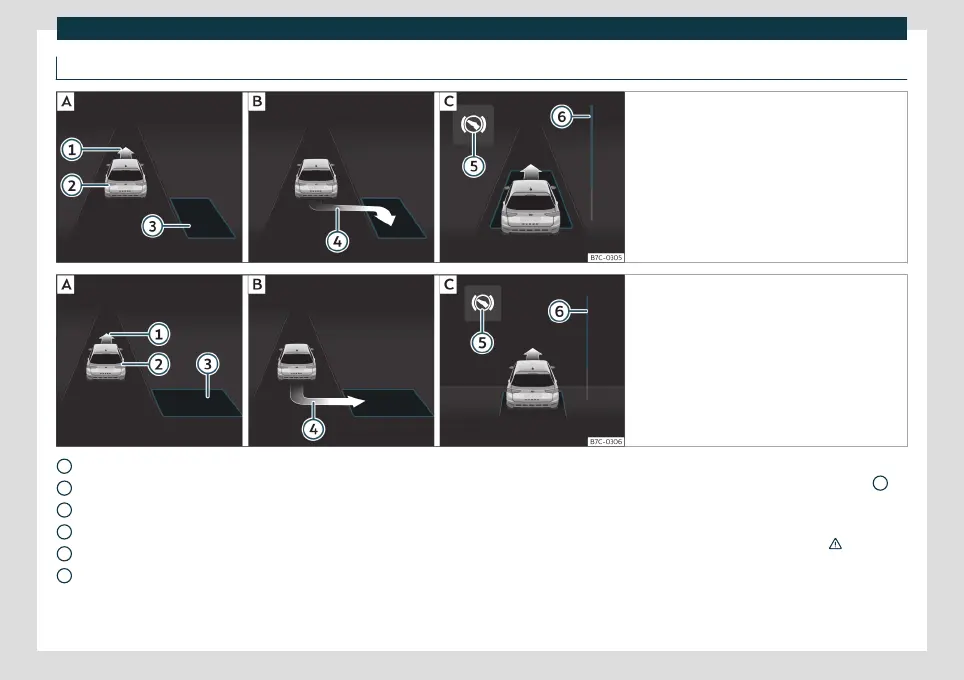
Fig. 180 On the instrument panel display: parallel
parking.
Finding a parking space.
Parking posi-
tion.
Manoeuvring.
Fig. 181 On the instrument panel display: angle
parking.
Finding a parking space.
Parking posi-
tion.
Manoeuvring.
Message to move forwards
Your vehicle
Parking space detected
Message to park
Message to press the brake pedal
Progress bar
1
2
3
4
5
6
The necessary conditions have to be met to
park with Park Assist
›››
page 253 and the
parking mode must be selected
›››
page 255 .
Parking
●
Look at the display on the instrument pan-
el to see if the space has been detected as
“appropriate” and if the correct position for
parking has been reached
›››
Fig. 180
or
›››
Fig. 181
. The space is considered
“appropriate” if the display on the instru-
ment panel shows the message to park
4
.
●
Stop the vehicle and, after a brief pause,
engage the reverse gear.
●
Release the steering wheel
›››
in Intro-
duction on page 252.
●
Please note the following message:
Inter-
vention in active direction. Watch
your surroundings!
. While you keep
256



 To Next Page