Help with parking and manoeuvring
Automatic disconnection of Parking Aid
●
Drive forward at 15 km/h (9 mph) or faster.
●
OR: move the selector lever to position P.
Temporary suppression of sound in Park-
ing Aid
●
Press the
function button.
Change from reduced view to full view
●
Select reverse gear.
●
OR: press the car icon on the reduced
view.
Switch to the reverse assist image (Rear
View Camera “RVC”)
●
Select reverse gear.
●
OR press the
RVC
function button.
A short confirmation signal will be heard and
the button symbol will light up when the sys-
tem is switched on.
Automatic activation
When the Plus Parking Aid connects auto-
matically, a diagram of the vehicle and the
segments will appear on screen.
It only operates every time the speed is re-
duced below 15 km/h (9 mph) for the first
time.
If it is switched off using the
button, one
of the following actions must be taken for it
to reactivate automatically:
●
Switch off the ignition and switch it on
again.
●
OR: drive forward at over 15 km/h (9 mph)
approx.
●
OR: move the lever into position P and
pack again.
●
OR: switch the automatic activation on and
off in the Infotainment system.
The automatic activation of the parking aid
can be switched on and off in the Infotain-
ment system
›››
page 84
›››
page 88 :
●
Switch the ignition on.
●
Select: Infotainment button
> SETTINGS
> Parking and manoeuvring
.
●
Select Automatic activation. If the box is
checked, the function is connected.
If activated automatically, an audible sound
warning will only be given when obstacles in
front are at a distance of less than 50 cm. ap-
prox.
CAUTION
The automatic connection of the Parking
Aid only works when you are driving slowly.
If driving style is not adapted to the circum-
stances, an accident and serious injury or
damage may be caused.
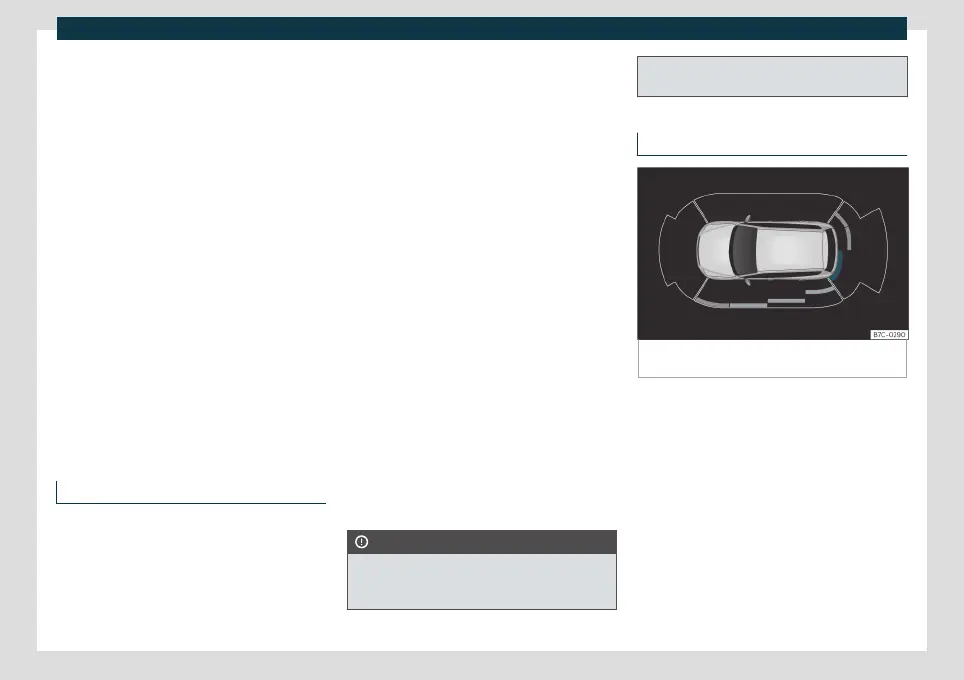
Visual indication segments
Fig. 185
Parking aid view on the Infotainment sys-
tem display.
The optical indication of the segments works
as follows:
White and grey: the obstacle is more
than approx. 30 cm away from the path
or in the direction opposite to travel.
They are also displayed when the elec-
tronic parking brake is activated.
Yellow segments: the obstacles lie on
the vehicle’s path and are at a distance
of less than approx. 30 cm away.
Red segments: obstacles are less than
approx. 30 cm away.
»
–
–
–
261



 To Next Page