Driving
Parking System Plus*
Description
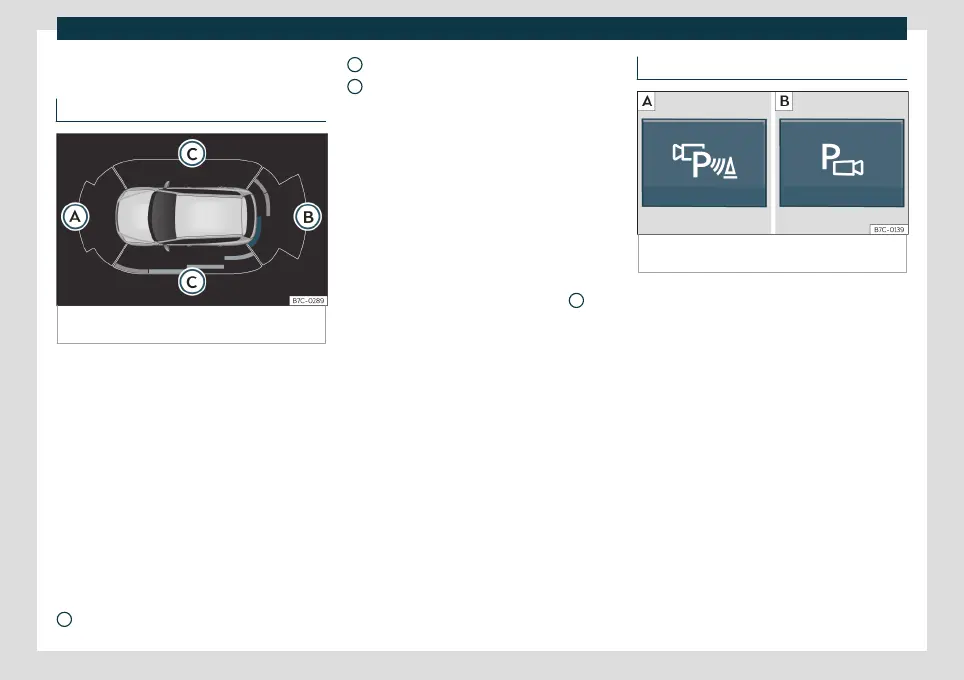
Fig. 183
Parking aid view on the Infotainment sys-
tem display.
Parking aid plus assists the driver by giving
visual and audio warnings about obstacles
detected in front of and behind the vehicle.
The bumpers are fitted with sensors. When
an obstacle is detected, it is indicated by au-
dible signals and in the Infotainment system
›››
Fig. 183.
When moving close to an obstacle, it is pos-
sible to know if the obstacle is in front of the
vehicle or behind it by choosing different
sounds.
The approximate measurement range of the
sensors is:
1.20 m
A
1.60 m
0.90 m
As you approach the obstacle, the frequency
of the audible signals will increase. The signal
will sound continuously at around 0.30 m:
Stop!
If the separation is maintained, the warning
volume is reduced after about 4 seconds.
In order to view the entire periphery of the
vehicle, the vehicle must be moved a few
metres forwards or backwards. Thus, the
missing areas are screened and obstacles at
the sides of the vehicle are displayed
C
.
Special features of ParkPilot with Area
View
In the following situations the screened area
on the side of the vehicle is automatically
hidden:
●
When a vehicle door is opened.
●
When the ASR is switched off.
●
When there is ASR or ESC regulation.
●
If the vehicle remains stationary for more
than approximately 3 minutes.
B
C
Parking Aid operation
Fig. 184 Centre console: parking aid button (de-
pending on the version).
Manually connecting and disconnecting
the parking aid
●
Press the
button once.
Manual disconnection of Parking Aid dis-
play (the audible sounds remain active)
●
Press a button on the main menu of the
factory-assembled infotainment system.
●
OR press the
BACK
function button.
Automatic connection of Parking Aid
●
Select reverse gear.
●
OR: If you drive forward at a speed of less
than 15 km/h (9 mph) and an obstacle is en-
countered, it is detected when it is approx.
less than 95 cm. away. If the automatic con-
nection is activated, a reduced view is shown.
●
OR: if the vehicle moves backwards.
260



 To Next Page