SiEBE18-526 Instruction
System Configuration 185
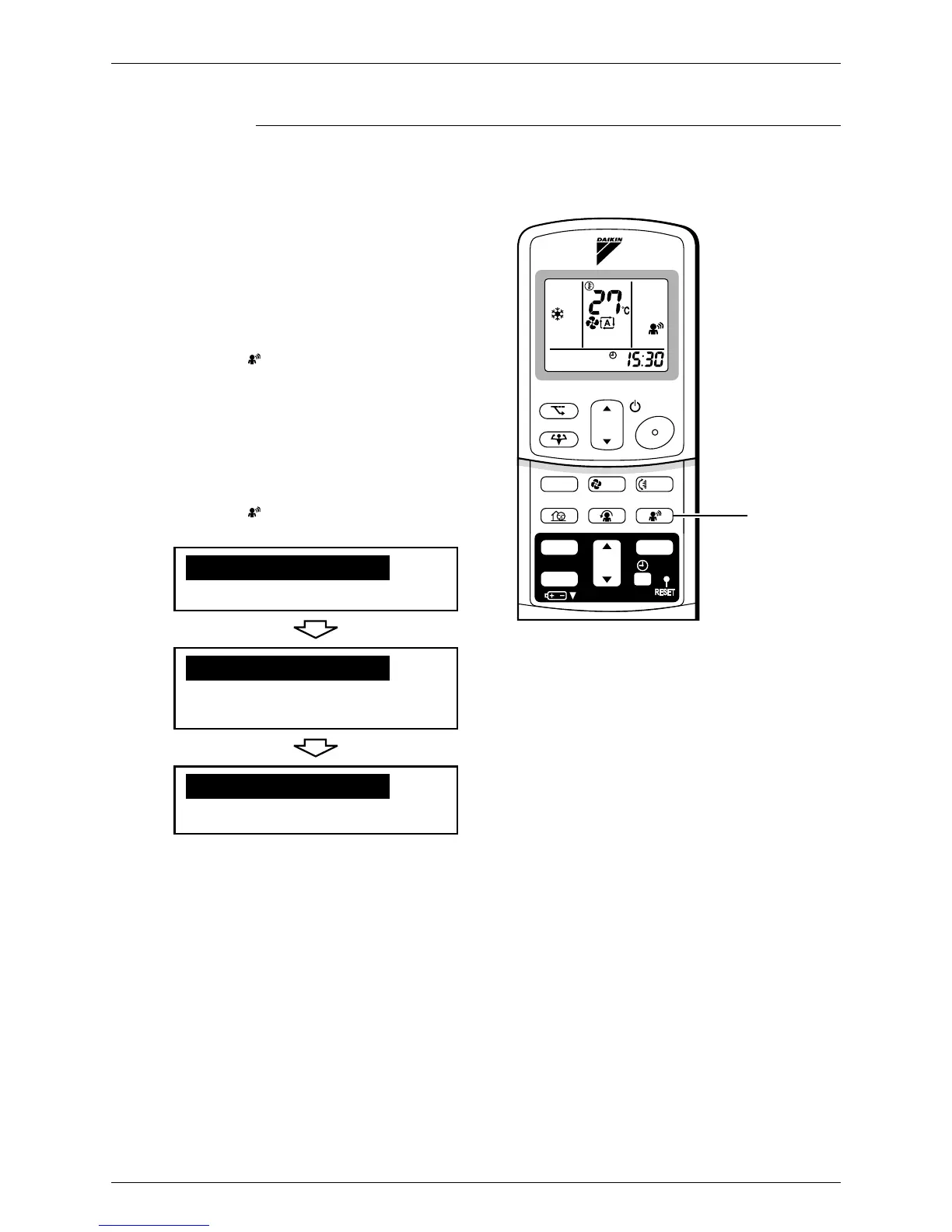
2.2.11 INTELLIGENT EYE Operation
FTXS20/25/35D, CTXS50D
TEMP
ON/OFF
POWERFUL
MODE
FA N
SWING
SILENT
SENSOR
ECONO
COMFORT
TIMER
ON
CANCEL
OFF
1, 2
INTELLIGENT EYE Operation
“INTELLIGENT EYE” is the infrared sensor which
detects the human movement.
■ To start INTELLIGENT EYE
operation
■ To cancel the
INTELLIGENT EYE
operation
1. Press “SENSOR button”.
2. Press “SENSOR button” again.
• “” is displayed on the LCD.
• “” disappears from the LCD.
[EX.]
• Normal operation
•
20 min. after, start
energy saving
operation
.
•
Back to normal operation.
When somebody in the room
When nobody in the room
Somebody back in the room









 To Next Page