13
I-Class Mark II Maintenance Manual
Ad
ustments and Maintenance
2.2 Printhead Adjustments
To ensure even and consistent print quality across a wide range of media types and sizes, the printhead is
adjustable.
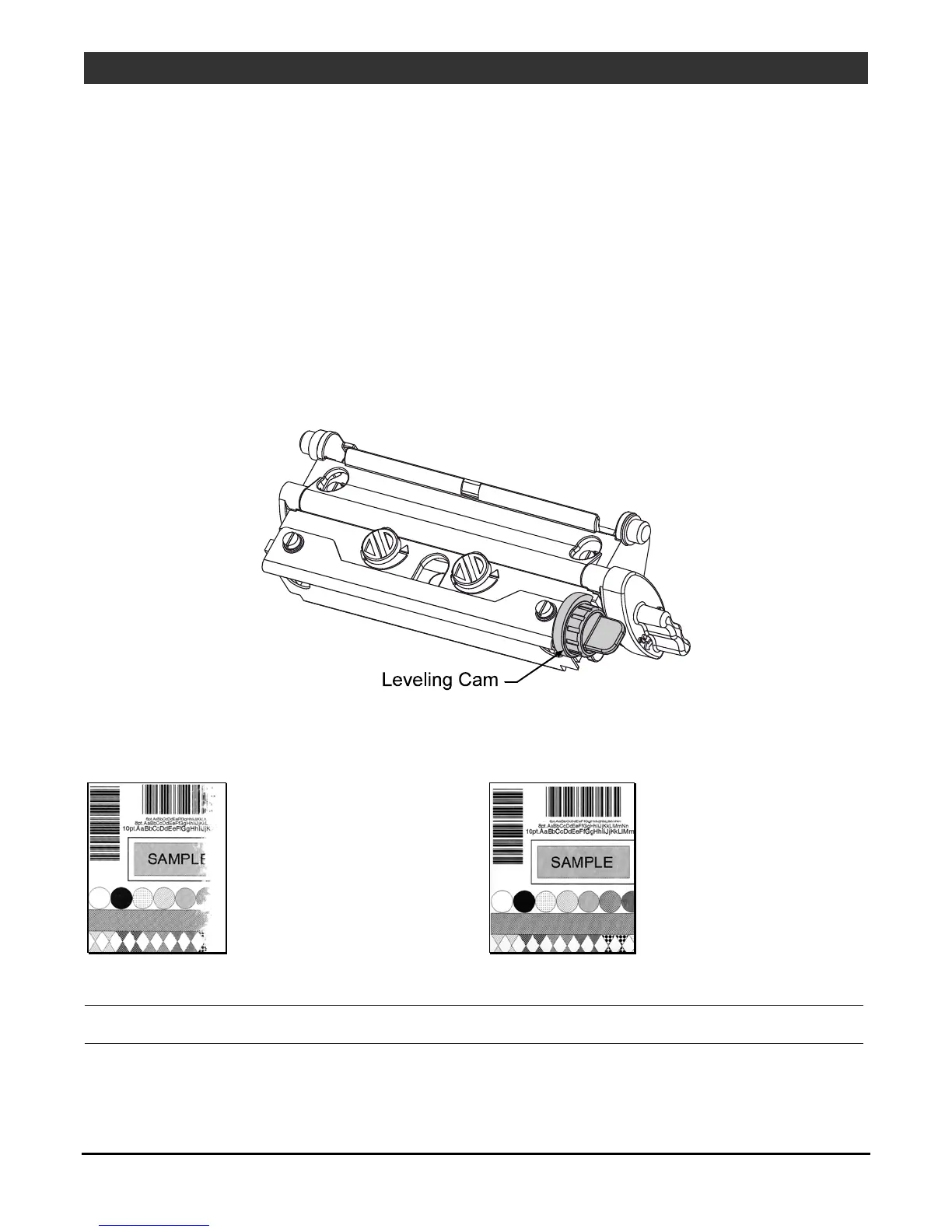
2.2.1 Leveling Cam Adjustment
The Leveling Cam ensures that even pressure is maintained across the label. Whenever using media that is
less than the full width of the platen, proceed as follows:
1. Load the printer with media. Download a label format or choose a Quick Test Label and begin printing.
2. While observing the right side of the label, rotate the Leveling Cam clockwise, or counter-clockwise, until
even print is achieved across the width of the label (see examples below).
Example 1 –
Over-adjustment
produces an image
that fades across the
label, requiring a
decrease in the setting
of the Leveling Cam.
Example 2 –
Correct adjustment
produces a complete
image, with even
print contrast across
the label.
Note: Under-adjustment can cause ribbon wrinkling, tracking problems, and excessive wear on printer
components.



 To Next Page
 Loading...









