26
I-Class Mark II Maintenance Manual
Ad
ustments and Maintenance
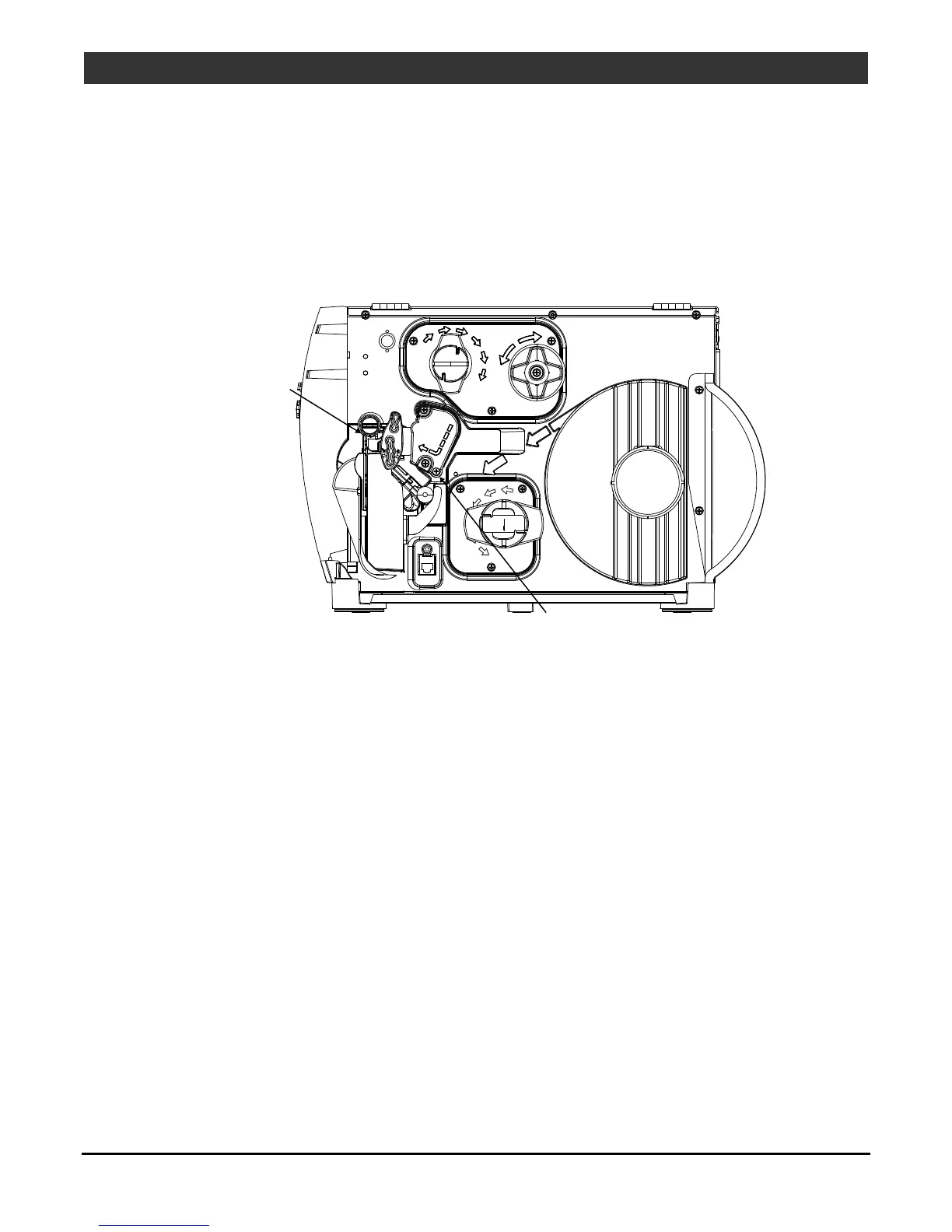
2.4.4 Cleaning the Ribbon Path
If equipped with the Thermal Transfer option, as ink accumulates on the Ribbon Path components, smooth
ribbon flow can be impeded causing wrinkling. To prevent problems, clean the Ribbon Path components as
follows:
1. Turn OFF and unplug the printer. Raise the cover.
2. Raise the Printhead Assembly then remove ribbon.
Ribbon Shield
Ribbon Idler
3. Using a cotton swab dampened with isopropyl alcohol, wipe the Ribbon Idler and the Ribbon Shield clean.
4. Allow the components to dry then replace the ribbon. Lower and latch the Printhead Assembly.
5. Close the cover. Plug in and turn ON the printer. Feed several labels to normalize tracking.
2.4.5 Cleaning the Exterior Surfaces
When soiled, clean the outer surfaces of the printer with a general-purpose cleanser. (Never use abrasive
cleansers or solvents.)
1. Turn OFF and unplug the printer.
2. Using a soft cloth or sponge dampened with a general-purpose cleanser to wipe the exterior surfaces
clean.
3. Allow the surfaces to dry.



 To Next Page