25
I-Class Mark II Maintenance Manual
Ad
ustments and Maintenance
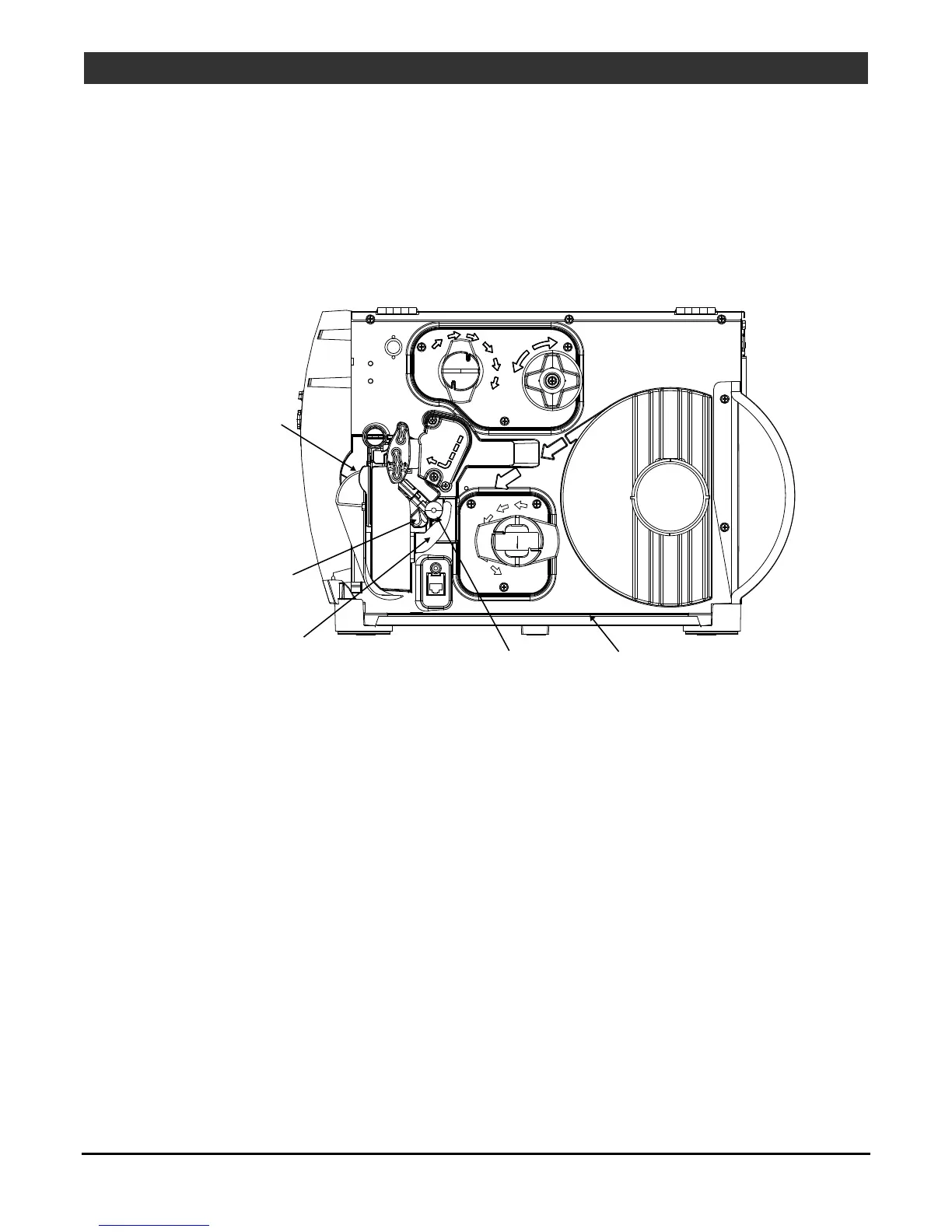
2.4.3 Cleaning the Media Path, Media Sensor, and Interior
As paper dust and other contaminants accumulate inside the printer, the particles can be pulled through the
Media Sensor to the printhead, causing inconsistent label detection and voids in the print. To prevent
problems, clean Media Path, Media Sensor and other components as follows:
1. Turn OFF and unplug the printer. Raise the cover.
2. Raise the Printhead Assembly then remove the media (and ribbon, if installed).
Tear Bar or
Rewind Arcplate
Media Sensor
Media Guide
Media Idler
Baseplate
3. Using compressed air or a soft brush, remove all debris from the Baseplate and the Media Sensor.
4. Using a cotton swab dampened with isopropyl alcohol, wipe the Media Idler, Media Guide and, if attached,
the Tear Bar or Rewind Arcplate clean.
5. Allow the components to dry then replace the media (and ribbon, if necessary). Lower and latch the
Printhead Assembly.
6. Close the cover. Plug in and turn ON the printer. Feed several labels to normalize tracking.



 To Next Page
 Loading...









