LS10 Installation and Operating Guide Page 18
LS10 Installation & Operating Guide Document # 9301H66300 Ver. 1.01
1.3.1 Using the Touch Screen
The LS10 is equipped with a touch screen display that enables you to easily navigate by touching any
button with your finger. You can also use a non-abrasive stylus that will not scratch the screen, if you
prefer.
1.4 The Home Screen
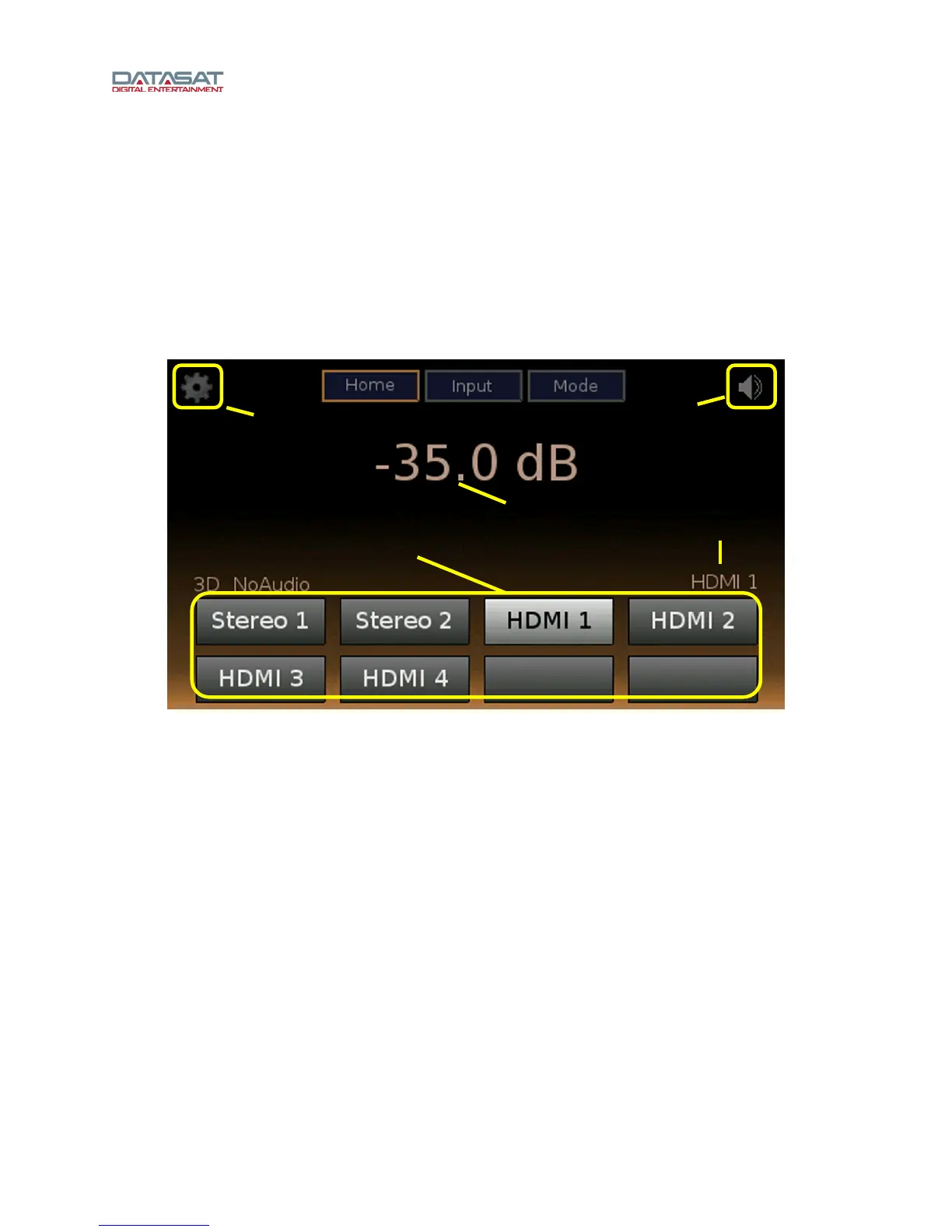
When the system has finished booting up, the Home Screen will appear, as shown in the above example.
Your Home Screen may look somewhat different, due to user-configurable input names, currently
selected input, and current audio volume.
Figure 4. Home Screen
The Home Screen of the LS10 provides one-touch access to the following features:
Volume and current input appears on the main part of the display (see Figure 4).
Mute/Unmute – the top-right “speaker” icon selects mute/unmute.
Setup – the top-left “gear” icon opens the User Setup screen. See User Setup, p
age 19.
Home bu
tton – this top button returns you to the Home screen.
Input button – the top center button opens the Inputs screen, for complete input selection.
See Inputs, page 30.
Mode button – audio p
rocessing mode, see Mode, Audio Processing, page 23.
Named Audio
Input buttons – provide simple means of selecting an input.
1.4.1 Adjusting the Volume control
Adjust the volume control by using the knob on the front panel. Select a volume level from
-70 dB to 0 dB. The selected volume level is displayed in the upper center of the Home screen.
To mute the volume control, touch the Mute button (see Figure 4).
Unmute the LS10 by touchi
ng the Mute button again. Increasing the volume will also unmute.
Mute /
Unmute
Go to Setup
Named audio inputs
Volume
Current
input type



 To Next Page