LS10 Installation and Operating Guide Page 19
LS10 Installation & Operating Guide Document # 9301H66300 Ver. 1.01
1.5 User Setup
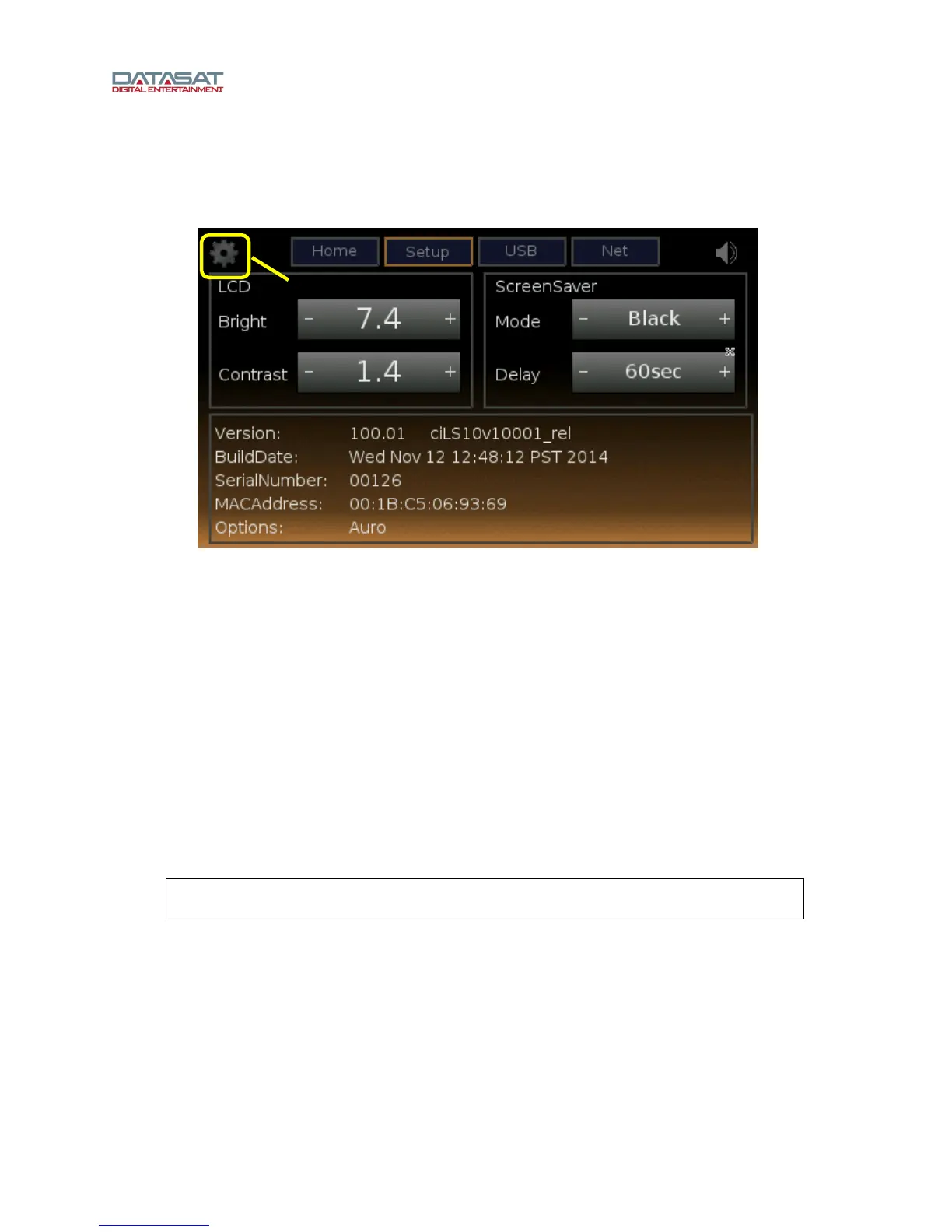
Selecting the “gear” icon from the Home screen opens the User Setup screen.
Figure 5. User Setup Screen
The User Setup screen provides these functions:
Adjust the brightness and contrast of the touch screen (+/- to increase or decrease)
View LS10 version information
Select the ScreenSaver mode (displaying Status, None, Dim, Image, or Black) and set its
Delay timing (10, 60 (default), or 300 seconds)
Touch USB to access information you have stored on a flash drive that is installed into the
USB port on the rear panel
Touch Net, to access the Network screen
Touch Home to return to the Home screen.
1.5.1 Network
The Network screen features two network modes: DHCP and Static. It also features a Save button
which must be used to accept any changes to the network configuration.
Note: A network IP address is required for the installer to use VNC to access the setup
menus. The IP address can be either DHCP or Static.
Gear icon



 To Next Page