LS10 Installation and Operating Guide Page 52
LS10 Installation & Operating Guide Document # 9301H66300 Ver. 1.01
3.9 Bass Management Setup
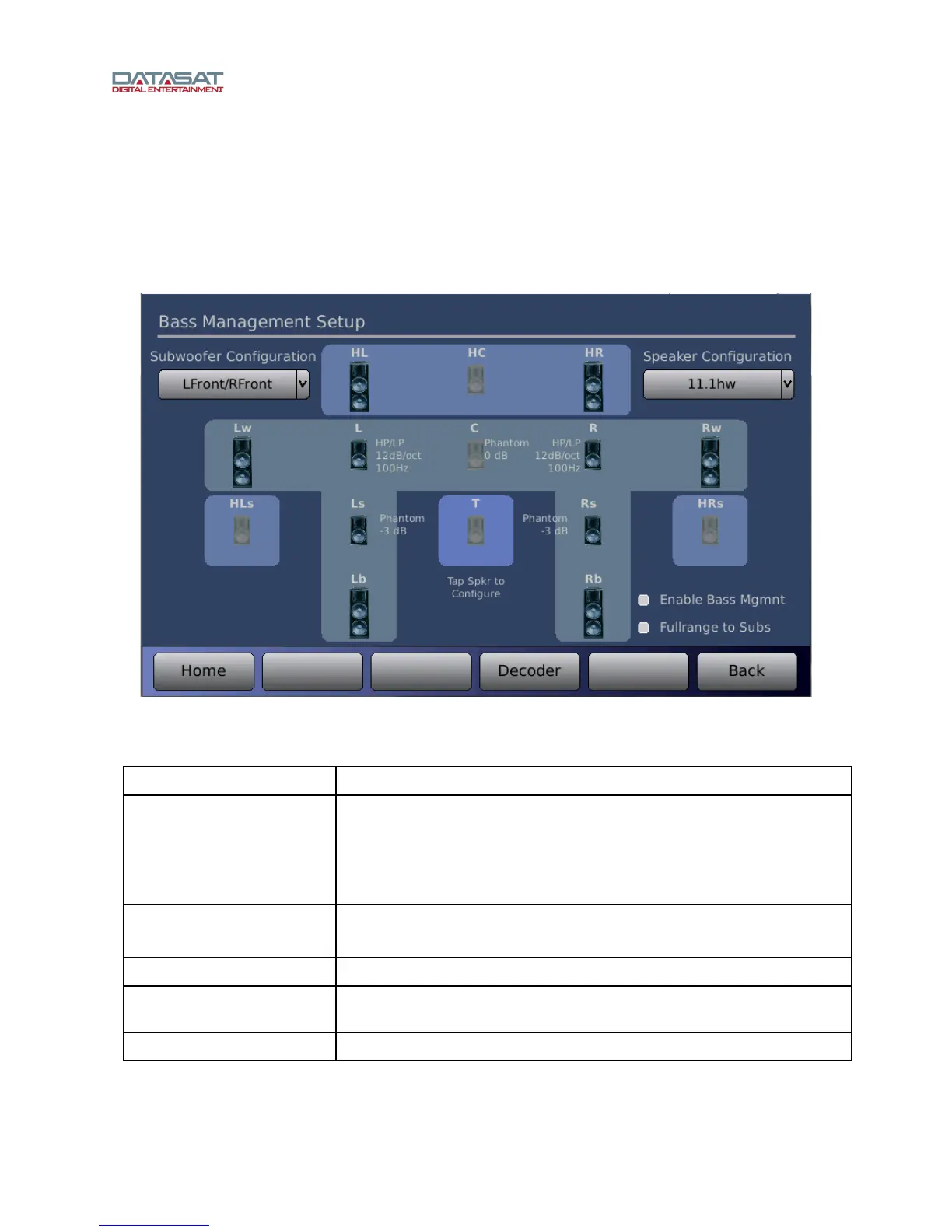
Bass management balances the bass portion of the audio system based on the speaker configuration.
Sub-bass configurations vary from none up to 2 subwoofers. For details of bass management theory, see
4.1 Bass Management Theory, page 78.
Press the Ba
ss Managem
ent button on the Setup Home screen (or from the Decoder screen) to open
the Bass Management Setup screen for the selected input.
Figure 38. Bass Management Setup
Table 10. Bass Management Setup
Controls Description
Speaker Configuration
Select speaker configuration that matches the installation. Only the
speakers available for the chosen configuration will be active for setup.
Unavailable speakers will be disabled and grayed out on the screen.
Use the up/down arrow keys (or mouse wheel) on your connected
computer to view choices and select.
Subwoofer Configuration
Select number and positions for subwoofers. See subwoofer
configuration options table below.
Enable Bass Mgmnt
Global enable for all bass management functions.
Full Range to Subs
When enabled, omits the Low Pass filters for all channels crossed to the
subwoofer.
Speaker icons
Click an icon to open a speaker setup screen.



 To Next Page