LS10 Installation and Operating Guide Page 70
LS10 Installation & Operating Guide Document # 9301H66300 Ver. 1.01
Gateway
Current and configured gateway or router, which connects to other
networks (for example, to the Internet).
DNS Server 1
Domain Name Server 1, current and configured
DNS Server 2
Domain Name Server 2, current.
NTP Server
Network Time Protocol server, configured, where the correct time
will be obtained.
Log Server
Server where the log files will be stored. Note: Server must support
the syslog logging protocol.
DHCP or Static
DHCP means that when the LS10 is connected to the network, an
IP Address is automatically assigned to it.
The boxes for IP Address, Mask, Broadcast Addr, Gateway and
DNS Server 1 are filled in.
In Static IP mode, the installer must assign the IP Address, Mask,
Broadcast Addr, Gateway and DNS Server 1.
Speed
Auto, 100 MB/s or 10 Mb/s (use the up/down arrow keys on the
connected computer to select)
Link Up
When the LS10 is successfully connected to the network, the text
Link Up will be displayed along with the connection type. The
options are: 10Mbps Full-duplex or 100Mbps Full-duplex
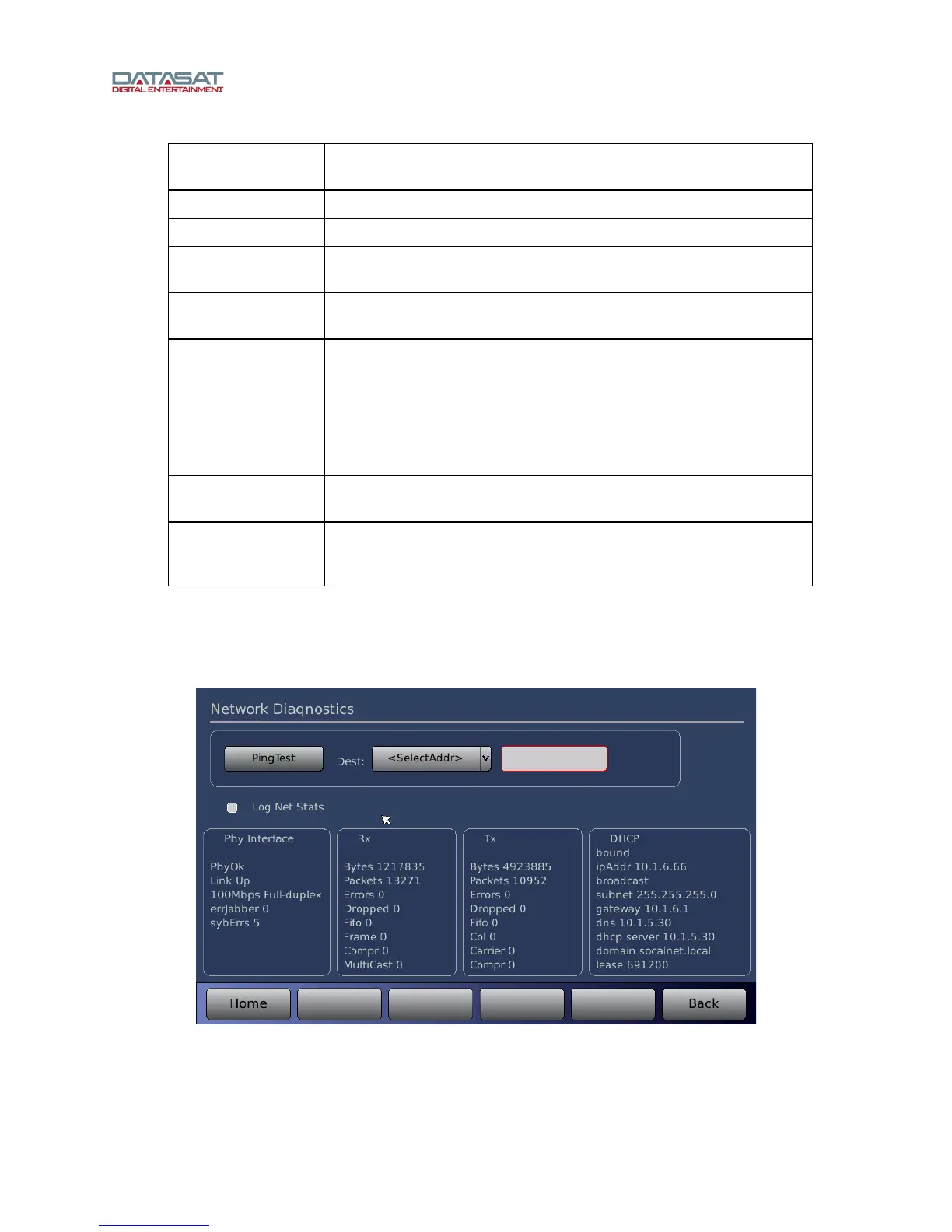
3.18 Network Diagnostics
On the Network Configuration screen, tap Net Diag.
Figure 51. Network Diagnostics



 To Next Page