LS10 Installation and Operating Guide Version 1.01
Appendix F. USB Audio Interface F-1 Document #: 9301H66300 Ver. 1.01
Appendix F. USB Audio Interface
The Datasat Audio USB interface runs in Class 2 mode. This allows playback of 24/192 audio.
Windows requires installation of a driver to play 176 and 192 KHz audio over USB. Mac or Linux
computers do not require installation of a driver.
Setting up USB Audio on a Mac
1. Connect the Datasat LS10 USB Audio input to the Mac.
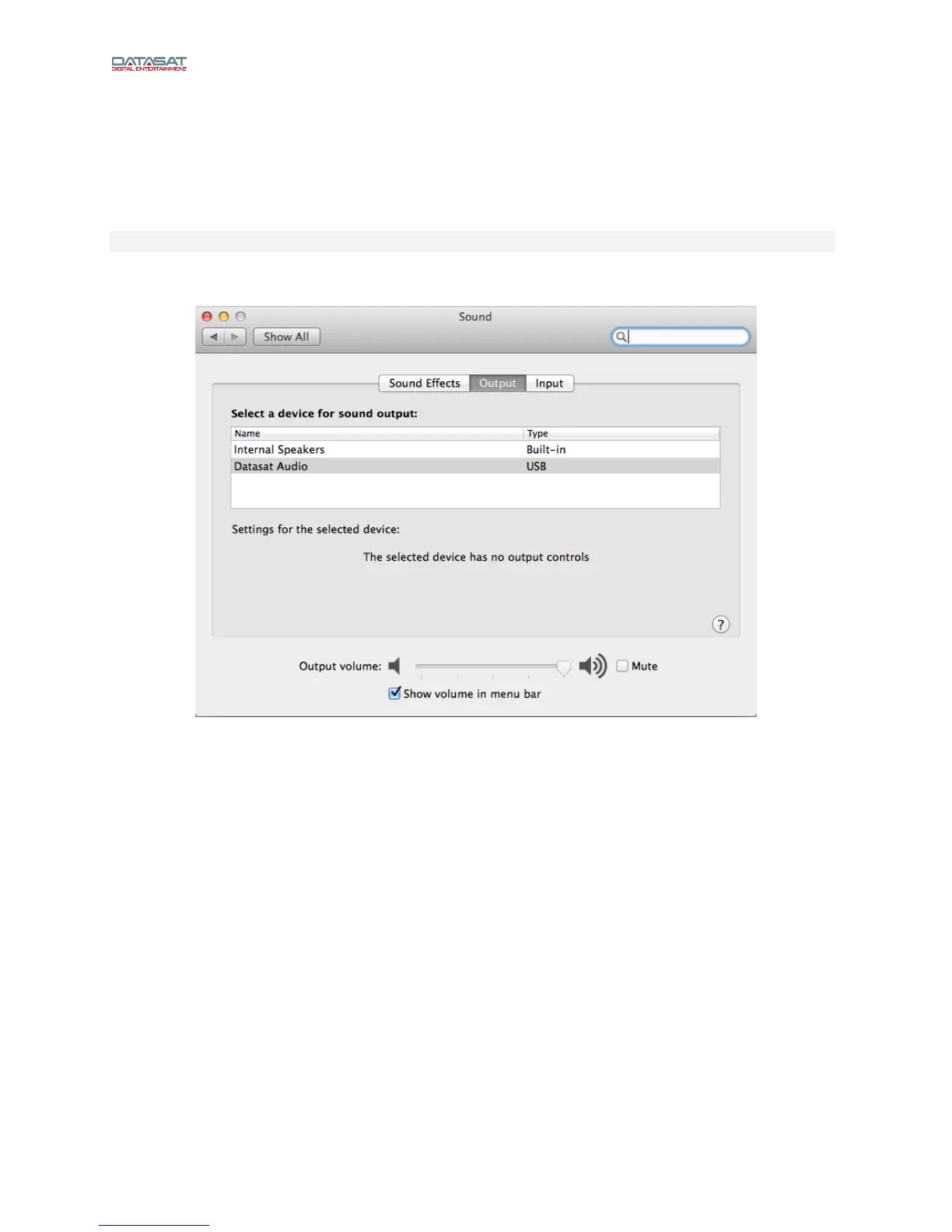
2. On the Mac, go to System Preferences > Sound.
Figure 1
3. Select Datasat Audio as the Output. You may also need to select Datasat Audio as
the playback device.
4. Start the Audio Midi Setup utility, which is located in Applications > Utilities > Audio
MIDI Setup (Or type audio into the spotlight search and click on Audio Midi Setup).
5. Click on Datasat Audio. Set the audio output to the desired sample rate and choose
the 2ch-24bit Integer or the 2ch-32bit Integer option. Note: Some audio players will
adjust the sample rate to the source material.



 To Next Page