LS10 Installation and Operating Guide Page 50
LS10 Installation & Operating Guide Document # 9301H66300 Ver. 1.01
3.8 Decoder
Your speaker configuration determines the Decoder options that are displayed. Refer to Table 2, page 24.
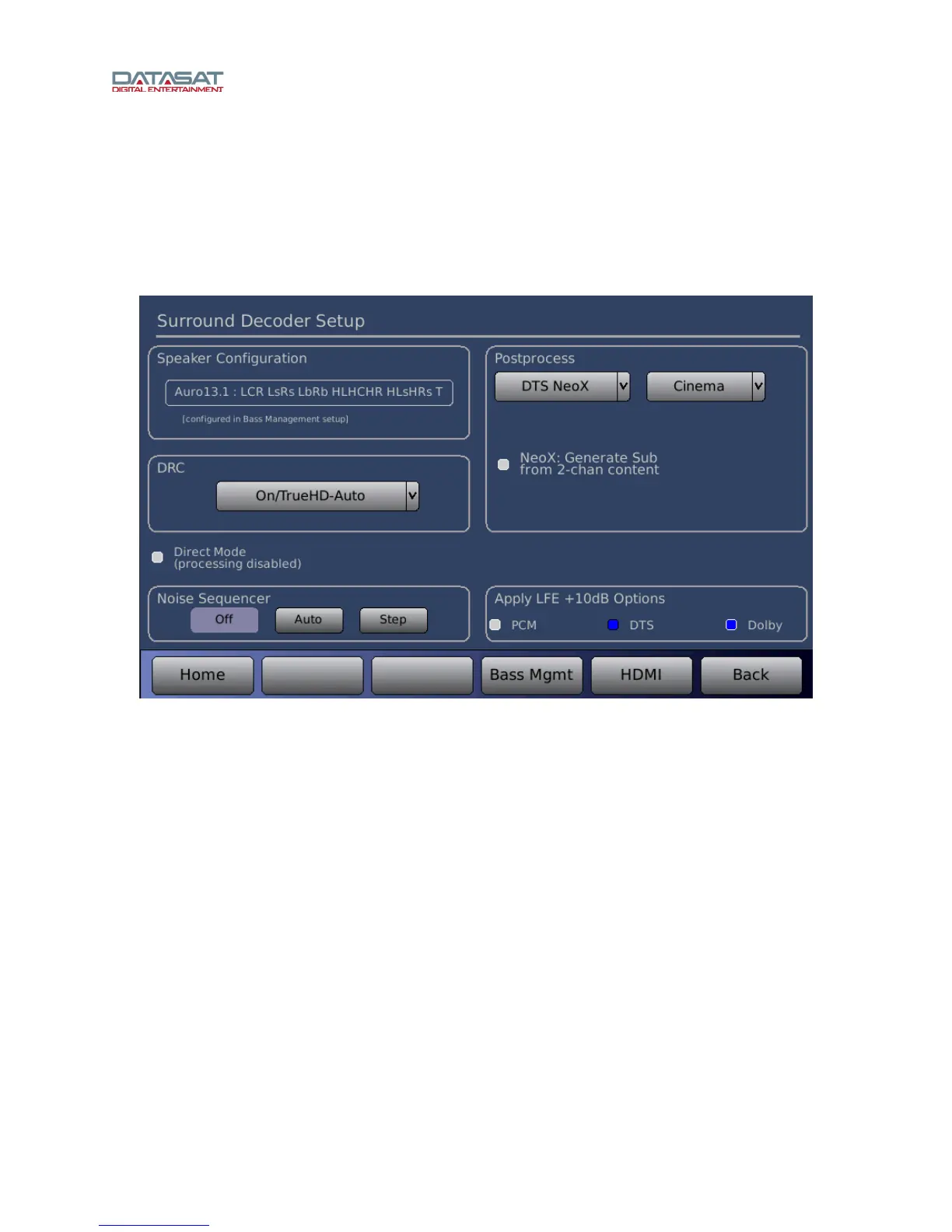
Press the Decoder button on the Setup Home screen to open the Surround Decoder Setup screen. The
configuration options on the Setup Decoder screen are identical to those on the front panel Mode
screen.
Figure 37. Surround Decoder Setup
3.8.1 Decoder Sources
The LS10 decoder auto-detects the stream type on a digital input and performs the decoding for that
stream type. The following are acceptable decoder stream types:
Dolby True HD
Dolby Digital Plus
DTS Digital Surround
DTS-HD Master Audio / DTS-HD HR
LPCM (2, 5.1, 7.1)
Auro-3D encoded content (option on the LS10)
These streams may originate from a BluRay, Game Console, Satellite link or other source device.
The decoder section applies a channel downmix or upmix as required by the Speaker Configuration.



 To Next Page