6159932010-09
25 / 60
English
CVIC - MODCVIC - MULTICVIC
SECTION 6 - PROGRAMMING THE VERSION «H» CONTROLLER
This section explains how you can change the default settings in the main menus of the controller.
1 - «CONTROL» Menu
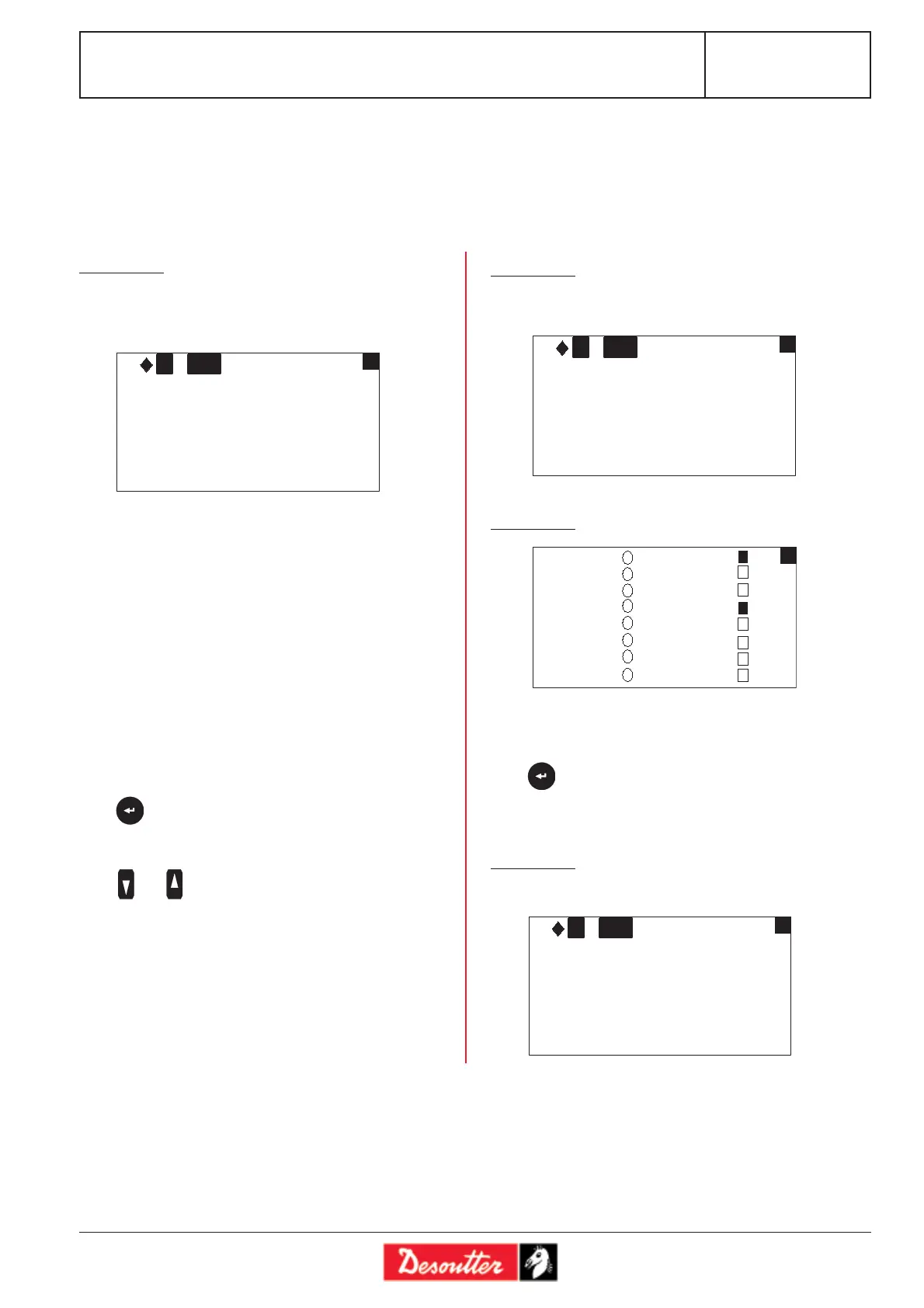
This screen displays the tightening results of the last run
cycle, the detailed tightening report and the status of the
NcyOK counter.
Screen no. 2 displays the tightening report: OK or NOK
Screen no. 3 provides information on the status of inputs
(left-hand column) and outputs (right-hand column)
according to the tightening report.
Press to display an additional message providing infor-
mation on the origin of the fault.
2 - «RESULTS» Menu
This menu allows you to display and delete the tightening results.
Screen no. 1
Screen no. 2
Screen no. 3
List of tightening reports:
Accept accept report
Reject reject report
TMAX max. torque
Tmin min. torque
AMAX max. angle
Amin min. angle
Scy cycle stopped by the interruption of the «start
cycle» signal
Imax stop by overcurrent trip
Time maximum phase time exceeded (stop by time-
out)
Srv servodrive fault
Prg programming fault
Press to display an additional message providing infor-
mation on the origin of the fault.
Press and to move from one screen to another.
C 1 PV
Airbag
0/1 Accept-Time
0 Nm
0 °
1
C 1
OK
2
Airbag
PV
CYC1
CYC2
CYC4
VALSP
ACKNO
SCY
DIR
RESET
CYC1
CYC2
CYC4
REDEY
INCYC
ACCRP
REJRP
NCYOK
3
This screen displays the result of a bar code reading.
Screen no. 4
C 1 PV
Airbag
0/1 Accept-Time
0 Nm
0 °
4
02513654








 To Next Page