6159932010-09
35 / 60
English
CVIC - MODCVIC - MULTICVIC
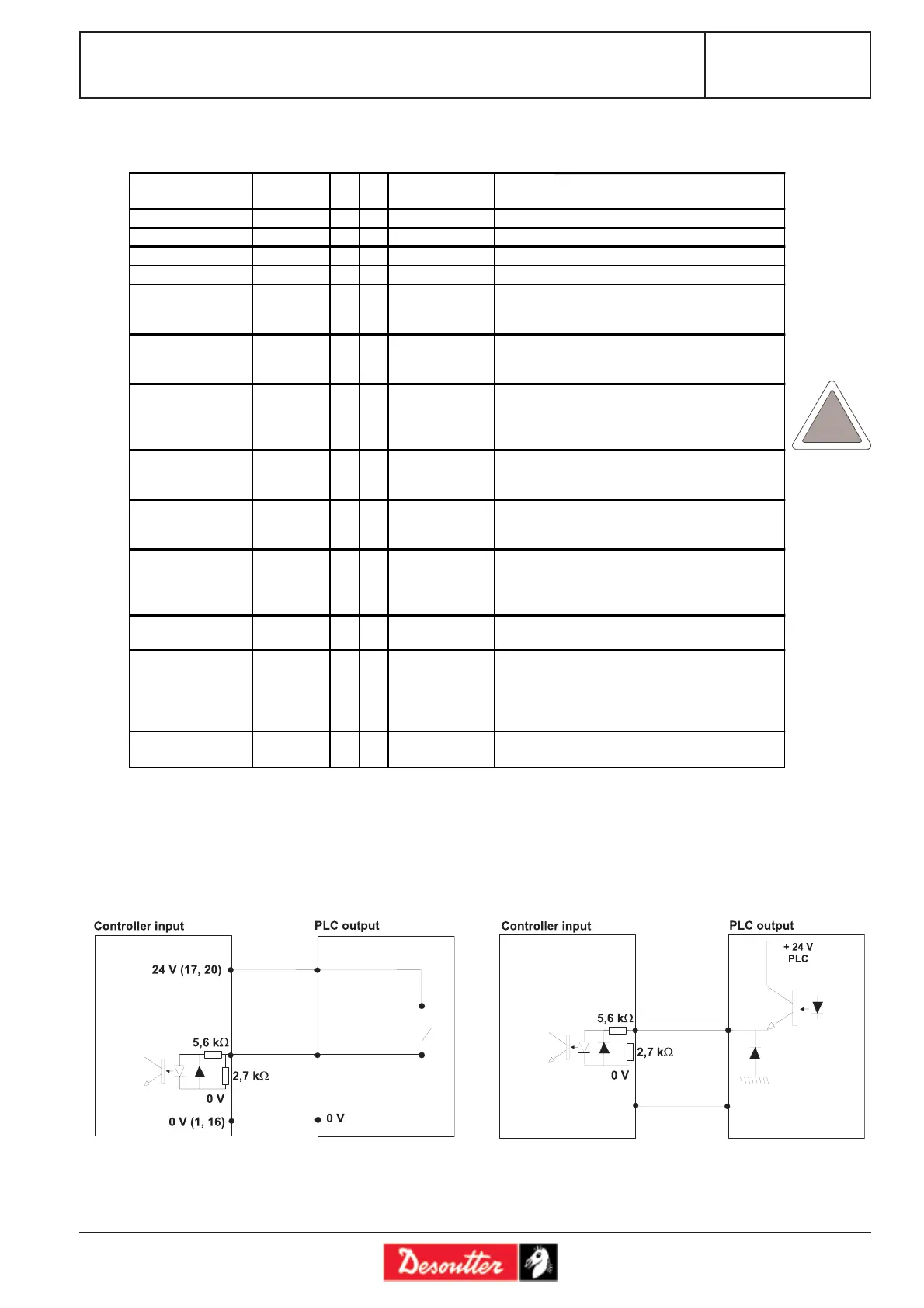
PLC output, CVIC input wiring
Two configurations are available:
A) The CVIC 24 V (contacts 17 and 20) is used as the
«common» of a PLC relay board.
B) By default, the PLC 24 V is sent to the inputs of the
controller.
The inputs are type II as per standard CEI 1131-2 (24V/13mA per input).
3.6.2 - Description of Inputs
Inputs Name L H Factory
configuration
Comments
Cycle 1 selection CYC1 x x Binary coding - weight 1, i.e. from 0 to 15
Cycle 2 selection CYC2 x x Binary coding - weight 2, i.e. from 0 to 15
Cycle 4 selection CYC4 x x Binary coding - weight 4, i.e. from 0 to 15
Cycle 4 selection CYC8 x x Binary coding - weight 8, i.e. from 0 to 15
Spindle validation SPVAL x x Validates or not the tool start in both tightening
directions if "Sp. val." is enabled in the Station
Menu.
Tightening
direction validation
SPVALFS x Validates or not the tool start in the tightening
direction if "Sp. val." is enabled in the Station
Menu.
Untightening
direction validation
SPVRRV x Validates - or not - the tool start in the
untightening direction if "SpV.rrv" is enabled in
the Station Menu – No effect in ECPHT
mode.
Error
acknowledgement
ACKNOW x x x Validates again the tool operation after a reject
report if the error acknowledgement function in
the Station Menu is enabled.
Start cycle SCY x x x The cycle is run as long as the signal is at 1.
When the signal drops, the cycle stops and the
report is sent to the PLC.
Tightening /
Untightening
DIR x x x Validates the untightening direction as soon as the
start cycle signal appears, at the speed
programmed in the Station Menu and with the
maximum current of the tool.
Reset RESET x x x This signal resets the tightening reports and
deletes the results displayed.
External stop EXSTOP x When the parameter is programmed on "yes" in
the programming screen of the run down speed,
final speed and run reverse phases, the system
stops the current phase on a pulse and switches to
the next one.
Synchronisation SYNC x Validates the synchronization of the tightening
phases of several controllers (see Appendix).
ECPHT








 To Next Page