PULSE MX
20
PART 2: USER MANUAL
- 1 - EDITOR
The editor is the programme which enables you to set (and edit) the values of all parameters of the x-
tures and to save their status as a cue or palette.
The editor has various windows and displays; when switched on, the console shows the editor in display
xtures mode.
1.1 FIXTURES DISPLAY
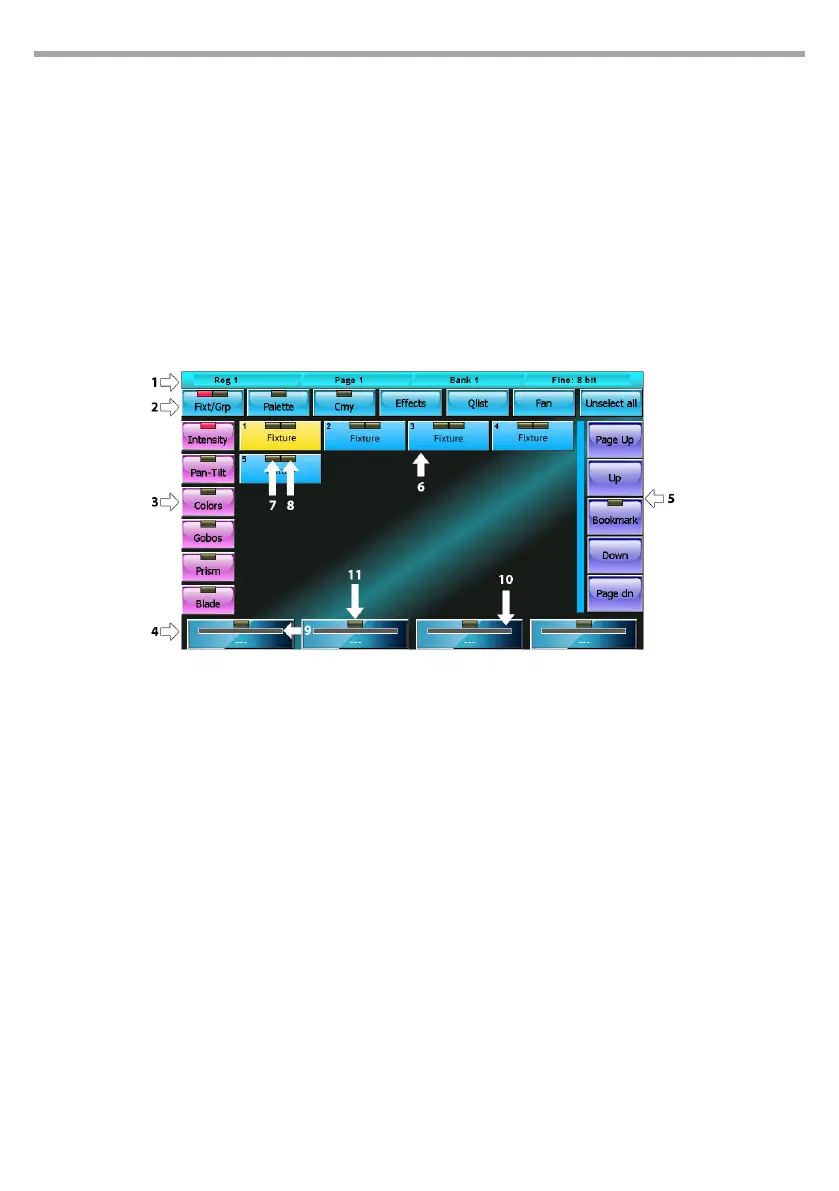
Fixture display editor mode
Window contents
1 – status bar
From left to right: Current playback, Current page and Current Bank.
2 – command buttons
Each of these buttons carries out a specic command or opens a dierent window:
• Fixt/Grp: Switches between Fixture display and Group display
• Palette: recalls the Palette display
• Cmy: Recalls the default palette window which can be used on all xtures with RGB or CMY color
mixing systems
• Eects: Recalls the Eects window
• Fan: Recalls the Fan window
• Unselect All: Deselects all selected xtures
3 – parameter selection buttons
Pressing one of these buttons, the 4 parameters of the corresponding family, limited to selected
xtures, are displayed on the wheels and can be edited. If the selected family has more than 4 param-
eters, press the button again to scroll through them all, 4 at a time.
Fig.14



 To Next Page