PULSE MX
48
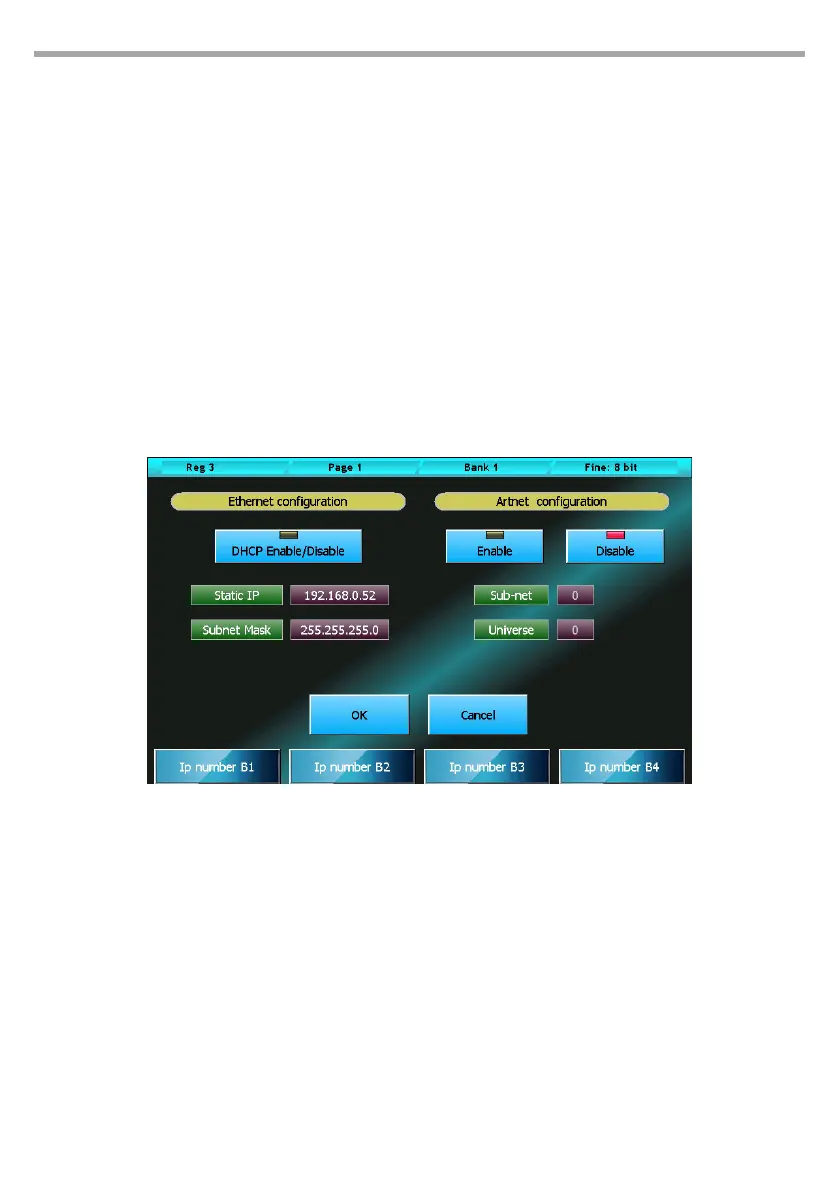
Ethernet configuration
DHCP Enable/Disable:
This function can be enabled only if the console is connected to an Ethernet network with a DHCP
server. In this way, the console will automatically acquire the IP number and the subnet mask from
the DHCP server.
Static IP:
If the function DHCP Enable/Disable is enabled, this eld will be ignored. Otherwise, it should be set
accordingly to the other devices connected with the network. While editing this eld, each wheel
modies one octet of the eld.
Subnet Mask:
If the function DHCP Enable/Disable is enabled, this eld will be ignored. Otherwise, it should be set
in accordance with the other devices connected with the network: in general, it is set to 255.0.0.0 or
255.255.255.0 . While editing this eld, each wheel modies one octet of the eld.
The rst wheel, together with the scrolling buttons on the left, allows to scroll down all the show’s x-
tures which include a Pan/Tilt function.
By clicking the option buttons for each xture, it is possible to separately select the Pan/Tilt inversion
and their swap.
The Save and Exit button saves all data and goes back to the Setup menu. Data are also saved if the win-
dow is closed by using the context specic menu or the Edit/Qlist button.
5.6 ARTNET CONFIGURATION
The conguration window for the Ethernet port and the Artnet connector is divided in two parts: the left
part allows to congure the Ethernet port on the console, while the right part allows to congure Artnet.
To edit the Static Ip, Subnet Mask, Sub-net and Universe elds, it is necessary to push the corresponding
button and then use the wheels.
IMPORTANT: the Artnet connector uses a 100Mbit Ethernet connection. It is necessary to verify that the device
connected to the console supports such speed.
Artnet conguration window Fig.42



 To Next Page