PULSE MX
22
1.2 GROUP DISPLAY
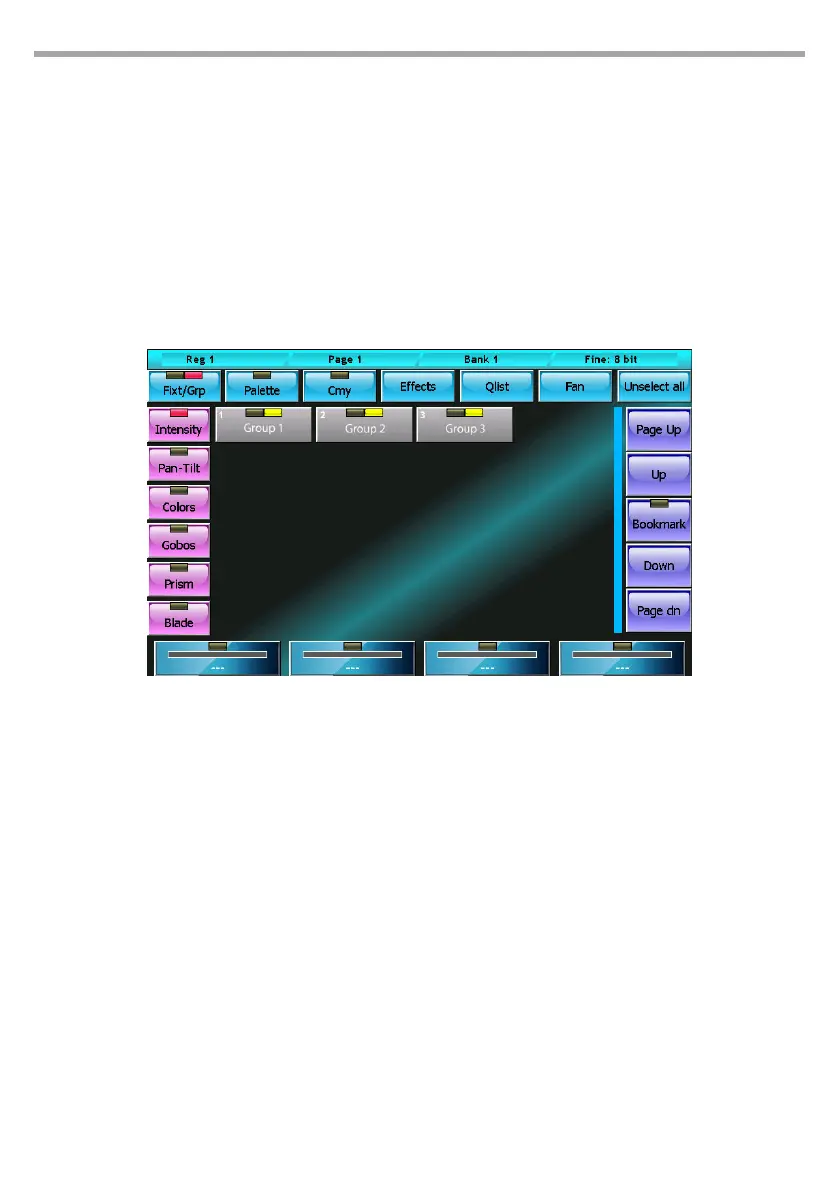
The groups window is identical, in both form and features, to the xtures window, except for the fact that
the selection is made for groups; by pressing a group button, all the xtures therein can be alternately
selected and de-selected.
The organization of the xtures into groups is particularly useful when a show includes many xtures
and these are often managed together in recurring groups.
As for the xtures, each group button has two leds: the rst informs us on the status of the channels
(when switched o, all parameters of all the group xtures are Empty; when red, all parameters of all the
group xtures are controlled by the editor; for all other cases, the LED is orange).
The context-specic menu is identical to the context-specic menu of the xtures window, with the
exception of the Select Range button which does not appear here.
Create/edit a group
To create a new group you must select the xtures that will be part of the group, press the Group button
on the Store Menu (recall by pressing the Store key), and then type the name of the new group to be
created using the virtual keyboard.
IMPORTANT: If a group already exists with the same name, the old group is overwritten.
To edit a group you proceed as just described, paying attention when inserting the name of the group
you want to edit
1.3 PALETTES DISPLAY
Palettes are predened memories which speed up programming; each xture usually already has some
predened palettes in the fdf le, but the user can create new personalised ones. The preparation of
pan-tilt palettes is very useful in that, once preparation of the palettes is complete, the pointing of the
xtures is done simply by selecting the xtures concerned and then clicking on the palette of the desired
location.
IMPORTANT: When programming the cues with the palette, make sure the reference to the palette is saved
rather than the values contained in it; in this way, when you edit a palette, the changes made will be reected
on all its cues. This photo is particularly useful to make positioning amendments on previously programmed
shows.
The palettes are organised in the 6 parameter families: Intensity, Pan/Tilt, Colors, Gobos, Prism and Blade
Group display editor mode Fig.15



 To Next Page