PULSE MX
44
5.1 ADD FIXTURES
The console can manage a maximum of 3072 channels (6 DMX Universes) and, in any case, no more than
1024 xtures.
IMPORTANT: Universe 1 and 2 are also available on the console's xlr connectors, while universe 3, 4 and 5 are
only available on Artnet.
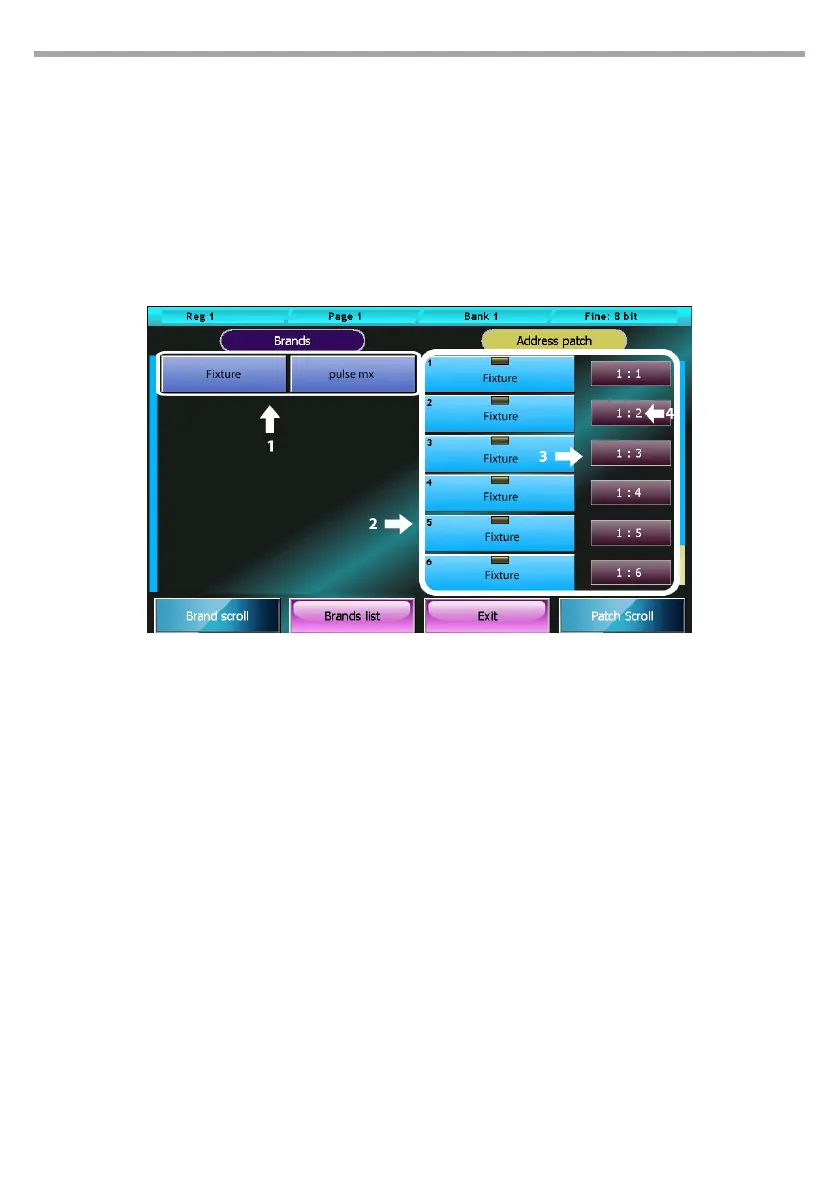
Patch window
The Address Patch button in the Setup menu opens the Patch window, which is divided in two main
parts: one to navigate the xture library and the other to view the list of xtures included in a show.
Buttons:
• Brand List: Back to the Brand list.
• Exit: Back to Setup menu.
• Pressing one of the brands’ buttons directly display the list of xtures belonging to the corre-
sponding brand.
• Pressing one of the xtures’ buttons directly displays the Add Fixture window allowing to add a
xture to the show.
• The context specic menu in the Patch window contains the following buttons:
• Disable xture: Disable the selected xtures Disabled xtures do not take up any DMX channel
and are not taken into account in any computation; they are easily recognisable, as their address
is displayed in grey font and preceded by an asterisk.
• Enable xture: Opposite to the “disable xture” button, it re-enables the selected xtures. If this
command creates an overlapping, the programme automatically disables some of the xtures
in order to restore a valid conguration, and noties the user of this measure through a specic
message.
• Change Address: Displays the digital numeric keyboard to allow editing the universe and the
DMX address of the selected xtures; type in the value for the universe and for the address, sepa-
rated by a full stop. If two or more xtures are selected, the programme will assign them consecu-
Patch window
1. Fixture library browsing area
2. Elenco delle xture inserite nello show
3. DMX universe (valid values are from 1 to 6)
4. DMX start address
Fig.37



 To Next Page