45
PULSE MX
tive DMX addresses, passing to the following universe if necessary. If the newly assigned address
creates an overlapping, the programme automatically disables some of the xtures in order to
restore a valid conguration, and noties the user of this measure through a specic message.
• Delete: After asking to conrm, this command deletes the selected features from the show. De-
letion is nal: it cannot be undone and eliminates all settings for the deleted xtures. This com-
mand, however, does not modify in any way the xture library les.
IMPORTANT: if the xture denition le for the show is incorrect, it is necessary to remedy the mistake
through the Fixture conguration programme. Editing the corresponding fdf library le does not have any
eect. In order to apply changes to a library le, it is necessary to erase from the show all corresponding
xtures (thereby losing their programming, including palettes) and subsequently re-insert them.
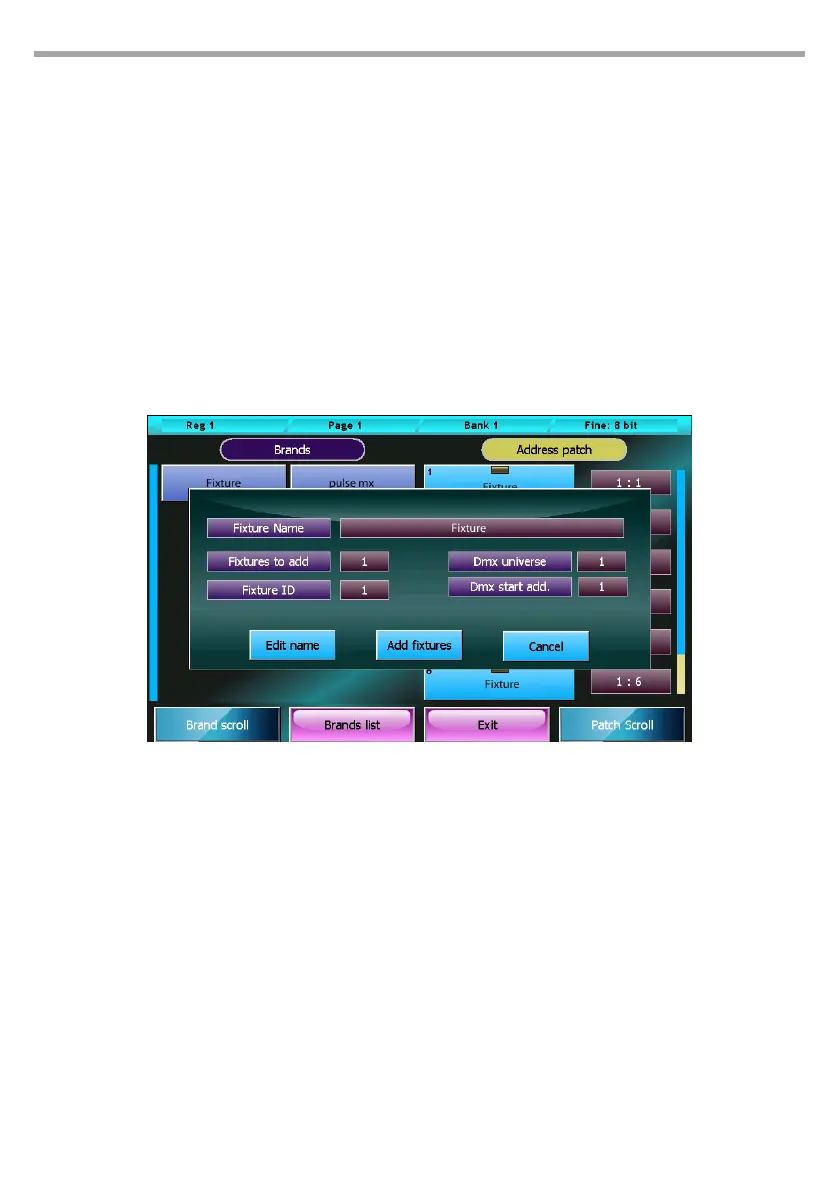
Add fixtures window
Pressing one of the xtures’ buttons in the navigation section of the Patch window displays the Add
xture window.
Buttons:
• Edit name: opens the digital keyboard allowing to edit the name to be used for a xture during
the show.
• Add xture: this button closes and nalizes the addition of a xture to the show.
• Cancel: this button cancels the operation, closes the Add Fixture window and goes back to the
Patch window.
Wheels:
• Fixture to add: how many xtures of the selected kind must be added to the show.
• Fixture ID: identication number of the xtures to be added. If two or more xtures are being
added, the programme will assign them progressive ID numbers.
• DMX universe: valid values for a DMX universe range from 1 to 6 (both included).
• DMX start add: starting DMX address. If two or more xtures are being added, the programme
will assign them progressive DMX addresses, taking into account the number of channels used by
each xture and passing, if necessary, to the following universe.
IMPORTANT: Universe 1 and 2 are also available on the console's xlr connectors, while universe 3, 4 and 5
are only available on Artnet.
Add Fixtures window Fig.38



 To Next Page