35
PULSE MX
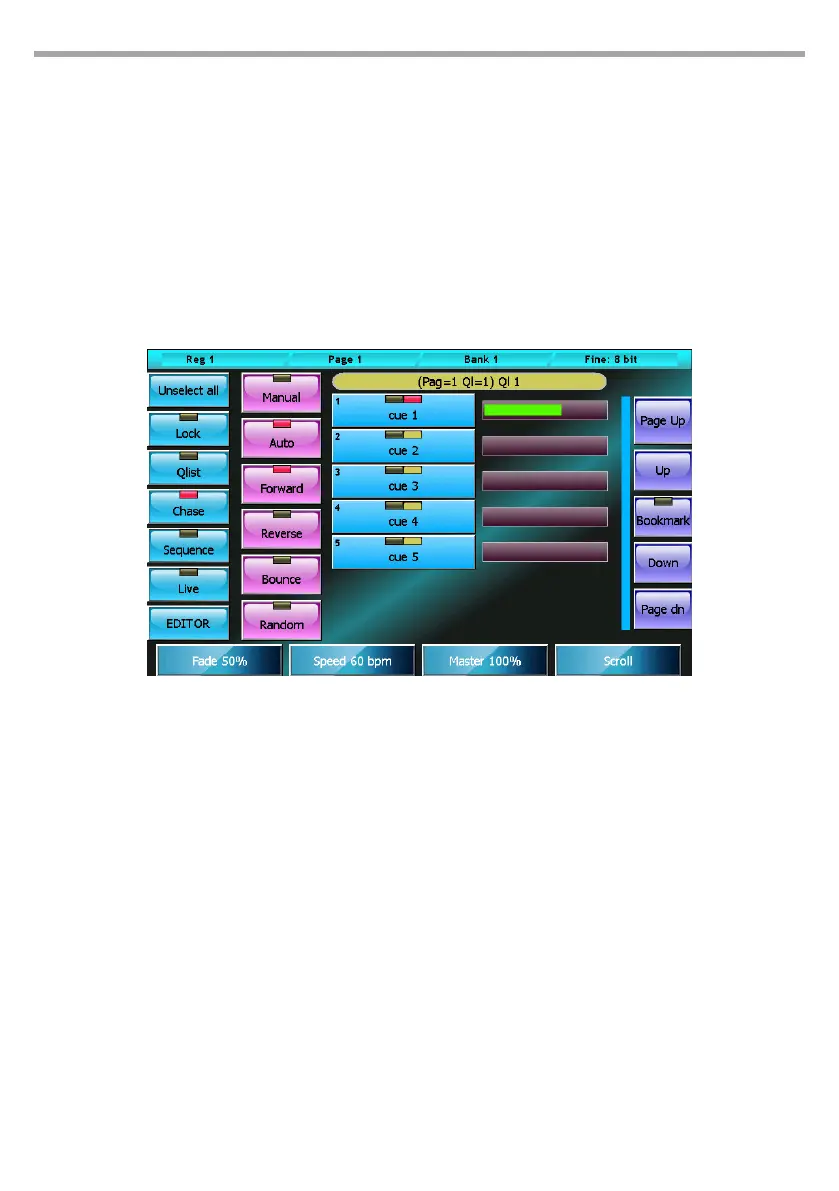
3.2 CHASE MODE
In a cue list congured in Chase mode, all cues are assigned a common timing, and timings at single cue
level are disregarded. If the Auto mode is active, upon every Fade-in completion, a trigger is automati-
cally sent to the following cue; on the other hand in Manual mode, to activate the following cue a clear
trigger is necessary. One of four options can be selected for the execution order of the cues:
• Forward: the cues are executed in the natural order, that is to say from the rst to the last and then
starting again from the rst
• Reverse: the cues are executed in a reversed order
• Bounce: the cues are executed from the rst to the last and then backwards from the last to the rst
and so on
• Random: the cues are executed in a random order.
Bottons:
• Unselect all: Deselects all Qlists
• Lock: when activated to edit the current qlist, a clear command is needed; this can be given via
the Select button, otherwise simply trigger a qlist to make the cue list current.
• Qlist, Chase, Sequence, Live: cue list mode selection buttons
• EDITOR: recalls the editor window.
• Manual: each cue must be activated by a manual trigger
• Auto: the cues are automatically activated in sequence
• Forward, Reverse, Bounce e Random: cue activation order selection buttons
Wheels:
The rst three wheels are used to set the timings which refer to all cues, while the fourth wheel con-
trols the window scrolling. The common values which can be set with the wheels are:
• Fade: percentage of cue time dedicated to Fade-in
• Speed: speed of the cue expressed in beats per minute; the cue time in seconds is calculated as
60/Speed.
• Master: master of intensity
If for example we had set Fade=40% and Speed=15 bpm in Auto mode, we would have a total cue
time of 60/15=4 seconds with a Fade-in of 4*40/100= 1.6 seconds; therefore, the cues would take
1.6 seconds to perform the fade-in and would be activated every 4 seconds. In any case, in Manual
Cue list in chase mode Fig.29



 To Next Page