PULSE MX
54
5.9 DIAGNOSTIC
IMPORTANT: the diagnostic programme interrupts all processes, including data transfer through DMD and
Artnet outputs.
This programme allows to verify the good functioning of all the consoles’ buttons, sliders, inputs and
outputs.
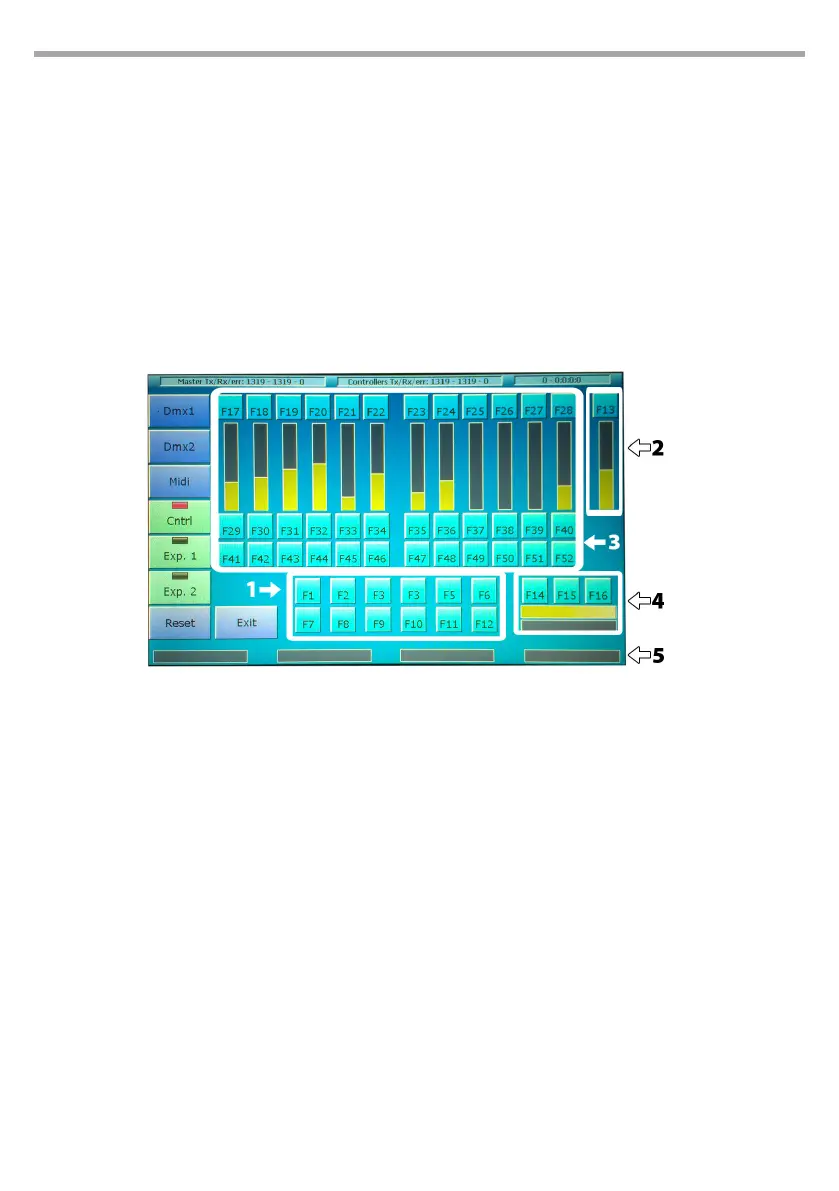
The diagnostic window displays, through graphical representation, all commands (trackballs, wheels,
sliders and buttons). When any command is activated, the graphical representation on the screen im-
mediately responds, allowing to check whether all command work properly.
The status bar on top shows in real time the data transfer between the console’s internal cards. Data
packets are displayed in the following order: transferred packets, received packets, packets containing
errors. For a correct functioning, the number of transferred packets should be almost identical to that of
received packets, and the number of errors should be lower than 0.1% (1 per mil) of transferred packets.
DMX1 output test
Connect with a male to female DMX cable the DMX1 output with the DMX-in input and press the
DMX1 button: the console will transfer a certain number of data packets through the DMX1 port and
compare them with the data received from the DMX-in input. If the two sets of data match, the test
is considered as a pass; if they do not match, the test is considered as a fail. Obviously, this test also
veries the correct functioning of the DMX-in input.
DMX2 output test
Connect with a male to female DMX cable the DMX1 output with the DMX-in input and press the
DMX2 button: the console will transfer a certain number of data packets through the DMX port and
compare them with the data received from the DMX-in input. If the two sets of data match, the test
is considered as a pass; if they do not match, the test is considered as a fail. Obviously, this test also
veries the correct functioning of the DMX-in input.
Diagnostic
1. Editor keys
2. Grand master and DBO
3. Controllers and playbacks keys
4. Trackball and Pan lock, Fine and Tilt Lock
keys
5. Encoder weels
Fig.45



 To Next Page