39
PULSE MX
- 4 - CONTROLLER
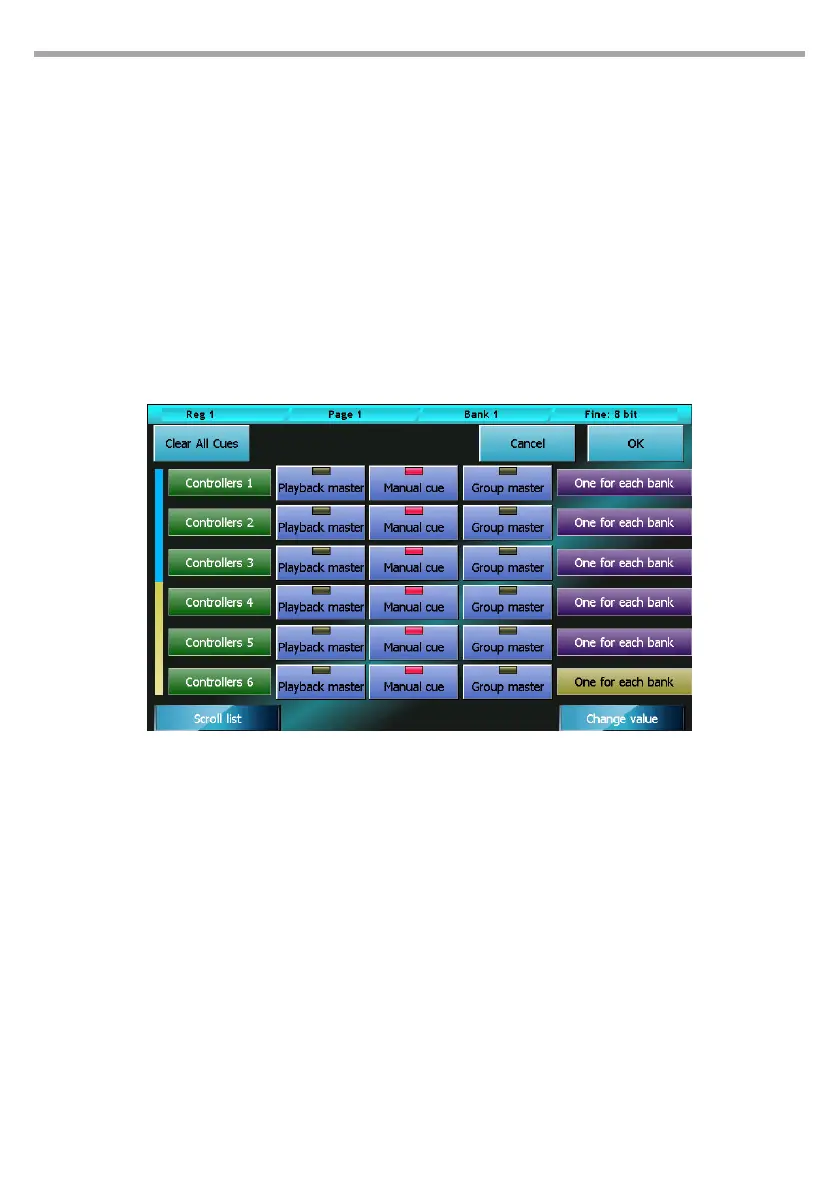
The controllers can be congured in three dierent ways using the Controller Conguration feature, ac-
cessible from the Setup menu:
• Playback master (default conguration)
• Group master
• Manual cue
The conguration of each controller is completely independent; therefore, it is possible to obtain any
combination of modes.
4.1 CONTROLLER CONFIGURATION
Press the Controller conguration button from the Setup Menu to access the window.
Buttons:
• OK: saves the changes and returns to the Setup menu
• Cancel: returns to the Setup menu without saving any changes
• Clear all cues: deletes, after conrmation, all controller cues of all banks.
Playback master mode:
In this mode (playback master), the slider and the controller key become master and ash of the
corresponding playback (i.e. controller 1 becomes master and ash of playback 1, controller 2 of
playback 2 and so on until controller 12; playbacks 13 to 24 cannot have a master)
Group master mode:
In Group master mode (group master), the slider becomes the master of intensity of all xtures be-
longing to the group allocated to the controller.
IMPORTANT: If a xture belongs to two or more distinct groups that are assigned to as many controllers,
the xture will be lowered according to the lowest value of the sliders.
Controller conguration window Fig.33



 To Next Page