PULSE MX
36
Buttons:
• Unselect all: Deselects all Qlists
• Lock: when activated to edit the current qlist, a clear command is needed; this can be given via
the Select button, otherwise simply trigger a qlist to make the cue list current.
mode we would have a Fade-in time of 1.6 seconds, but activation of the cues would remain under
the control of the operator.
IMPORTANT: during playback, it could be useful to use the wheels to regulate in the real time the amplitude
(Master Size) and speed (master Speed) of the cues or the intensity of the dimmer (Master Intensity). These
three values are not saved on the disk and every time the cue list is activated they return to their default values.
3.3 SEQUENCE MODE
In Sequence mode, the cues are automatically activated upon fade-in completion of the previous cue;
the order of activation is the natural one, that is to say from the rst cue to the last and then starting
again from the rst.
IMPORTANT: when the rst cue of the sequence is activated for the rst time, the Delay time is disregarded,
that is to say that when a trigger is sent to a sequence, this is done disregarding the Delay of the rst cue,
which will be considered normally in the following automatic activations.
Wait and Fade-out times cannot be inserted in this mode and are considered identical to the Delay and
Fade-in times
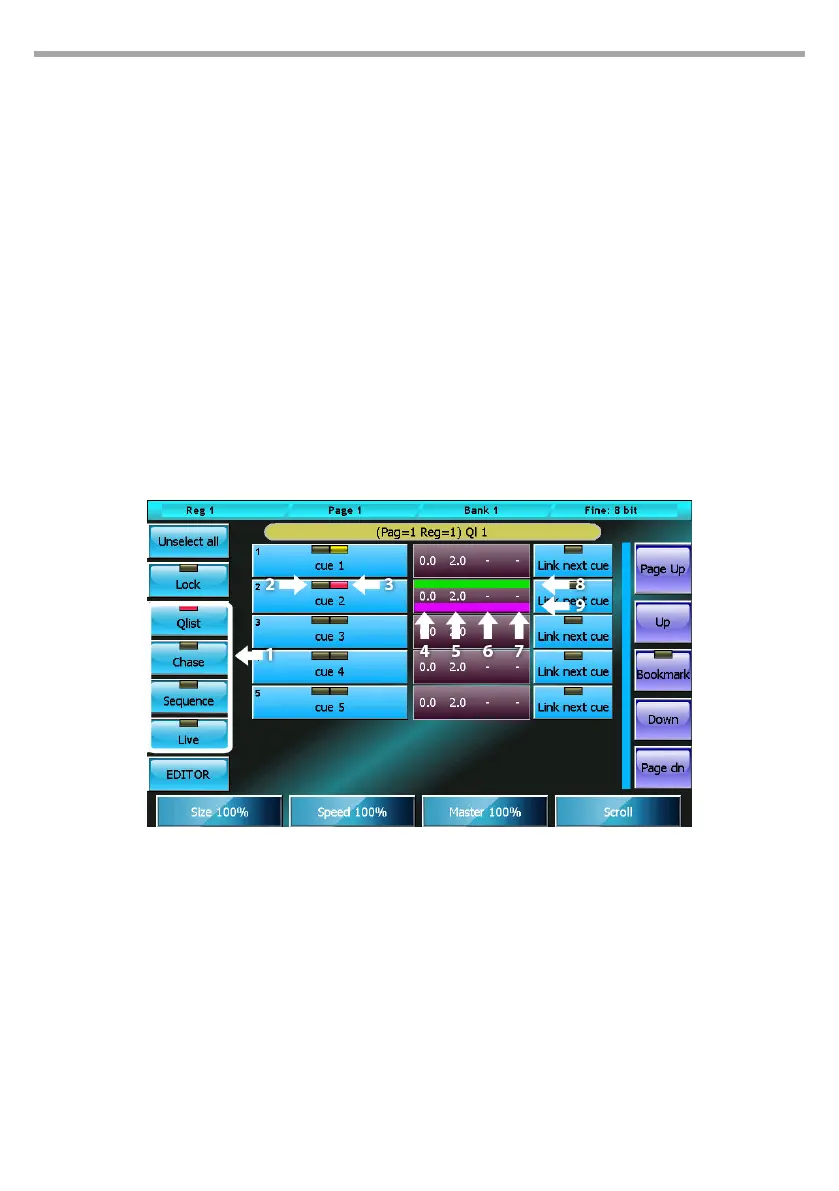
Cue list in sequence mode
1. Cue list mode selection buttons
2. Cue selection leds: red=selected, o=not
selected
3. Execution led: o, cue not in execution, yellow=
cue execution completed, red= in execution
4. Delay time in seconds
5. Fade-in time in seconds
6. Delay+Fade in timeline bar
Fig.30



 To Next Page