27
PULSE MX
Pivot buttons
Enables to select the pivot element of the group, that is to say the element which remains xed in
position and around which the others move. It is possible to select the rst xture (left), the last
xture (right) or the central xture (Center); if the number of xtures is even, the xed value will be
the intermediate value between the two central xtures.
Offset wheel
Moves all values in parallel in the same direction, increasing or reducing them in equal measure.
Amplitude wheel
Increases or decreases the amplitude of distribution; negative values are also acceptable.
1.7 EFFECTS
An eect is the predened trend of a value which is repeated in cycle in time and which can be applied
to any parameter of one or more xtures; speed and amplitude can be edited by the operator.
A typical eect is the Circle which, when applied to the pan and tilt of the xture, force them to follow
circular trajectories on the stage. Dierent xtures can share the same eect in order to move in a
coordinated fashion.
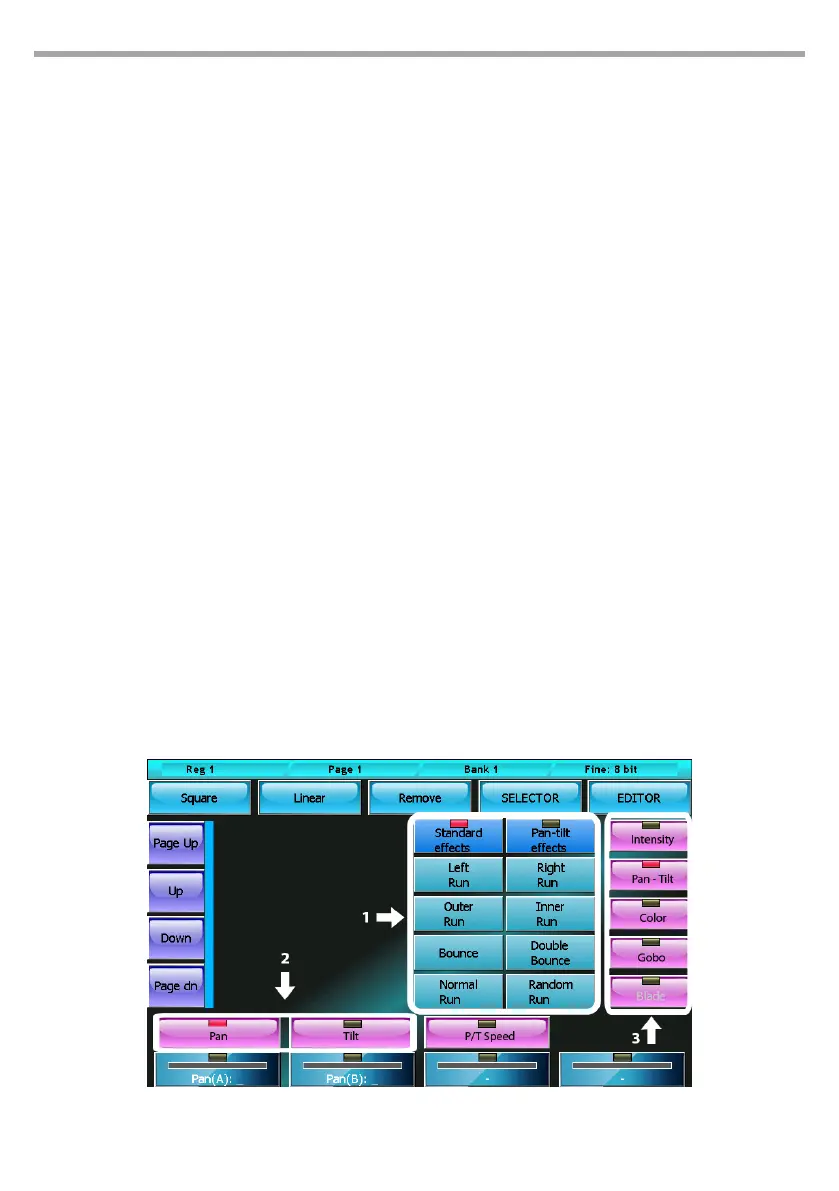
To apply an eect to an attribute of the previously selected xtures, do as follows:
• select the attribute interested by the eect by choosing its family; to do so, press one of the buttons
on the right and then press one of the attribute buttons placed horizontally on the wheels
• select the minimum and maximum values of the wave-form by clicking on the palette buttons or
operating on the rst two wheels
• with the linear and square buttons, it is possible to select the wave-form (respectively sinusoid and
square wave)
• The third wheel (Period) enables to vary the speed of the eect.
When two or more xtures are involved, it is possible to obtain “Mexican wave” type eects by operating
on the fourth wheel (Spread) and on the phase eect selection buttons
Movement eects generator for pan and tilt
1)1. Selection phase 2)2. Parameter selection 3)3. Family attribute selection
Fig.22



 To Next Page