65
PULSE MX
• Playback level: the level is expressed as percentage; if the value is above 100 will be interpreted as
100%
• Eect size and Eect speed: the level is expressed in step of 4 percentage points, so that the value
25 stands for 100%, the value 127 (that is the maximun value allowed for midi data bytes) stands for
508%
Buttons:
Midi Enable
Enables the Midi protocol processing
Mdi Disable
Disables the Midi protocol processing
OK
Saves all changes and goes back to the Setup menu
Cancel
Goes back to the Setup menu without saving any change
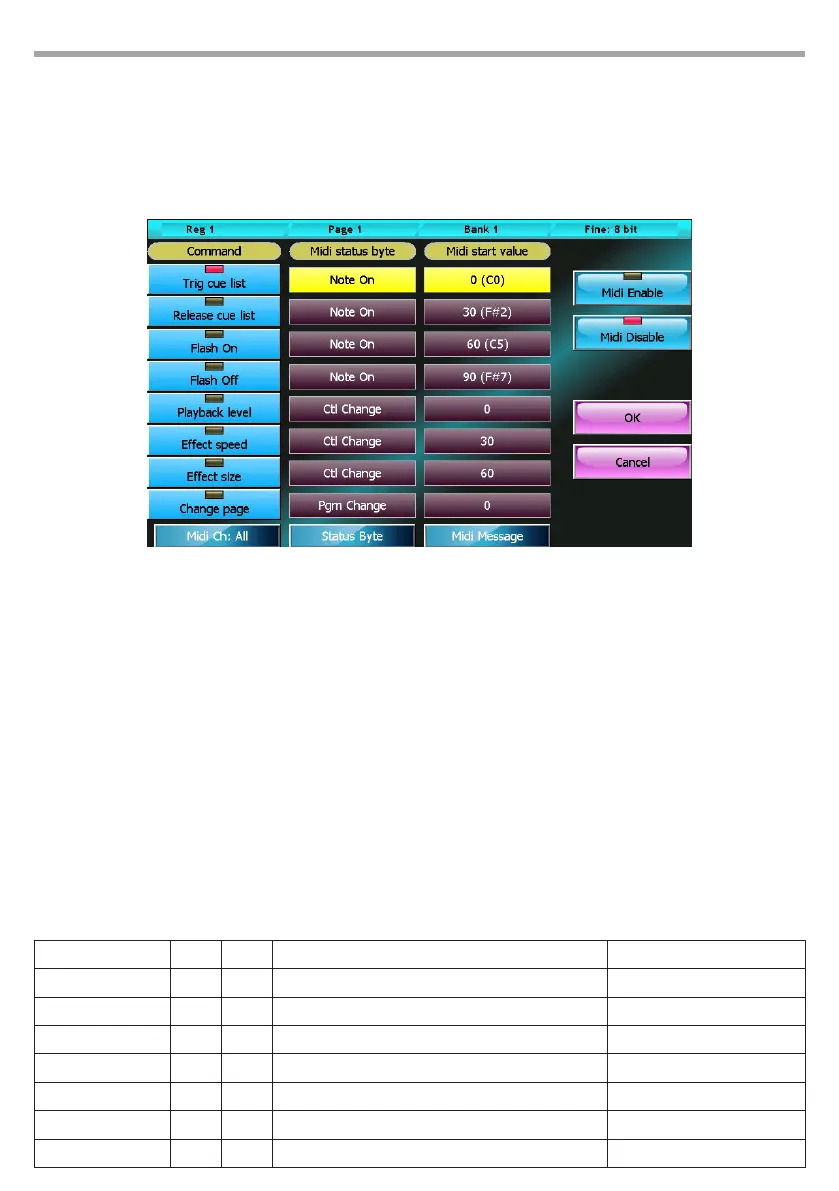
Some examples that refer to the conguration showed on above picture:
Midi conguration window Fig.53
Midi Status byte Byte 1 Byte 2 Operation Note
Note On 0 nn Trigs the current cue list nn must be dierent from 0
Note On 4 nn Trigs the cue list number 4 nn must be dierent from 0
Note On 38 nn Releases the cue list number 8 nn must be dierent from 0
Control Change 10 50 Sets the submaster level of cue list 10 to 50%
Control Change 40 50 Sets the master speed level of cue list 10 to 200%
Control Change 71 20 Sets the master size of cue list 11 to 80%
Program Change 11 -- Set the page 11 as the current page



 To Next Page