IP Endpoints Tab
53
Enable the IP Endpoint Type option and select SIP Stand-alone from the drop down box.
Enable the Assign Automatically with DHCP option. Check the box to enable DHCP or
uncheck it to assign static IP Addresses.
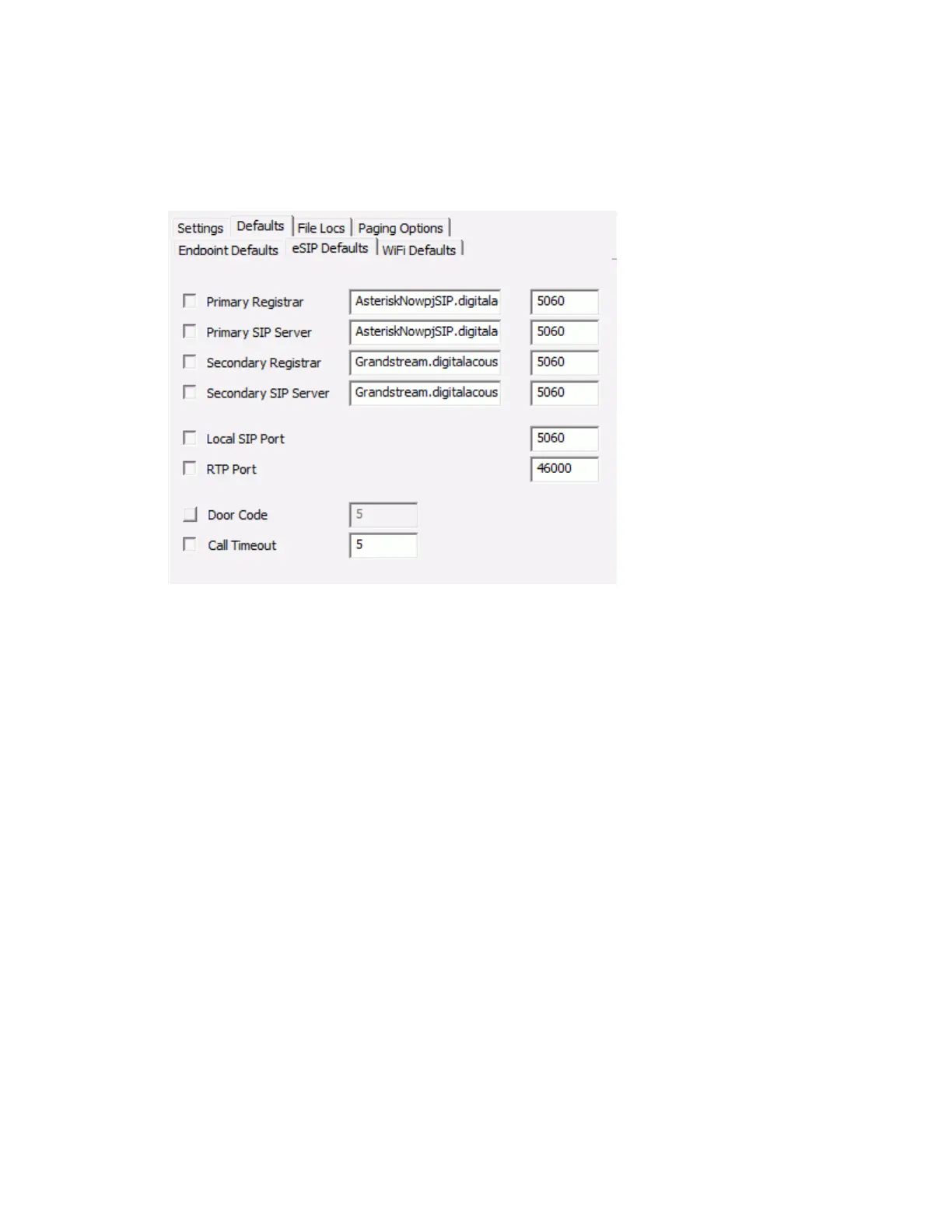
Select the Setup --> Defaults--> eSIP Defaults tab
Enable the Primary Registrar and Primary SIP Server options and enter the IP Address and
Port of the SIP Server. Typically, these have the same IP Address or DNS name.
Enable the Local SIP Port option and enter the default SIP Port for the IP Endpoint.
Enable the RTP Port option and enter the default RTP Port for the IP Endpoint.
If the IP7’s onboard relay will be used to open a door, enable the Door Code option and enter the
1 to 4 digit value to be entered through the Phones keypad to activate the relay.
Enable the Call Timeout option and enter the number of seconds to timeout an active call. While
in a SIP call, if the other party in the conversation terminates abnormally, this is the number of
seconds the IP7 will wait for RTP audio to be received before automatically ending the call.
The second step is to discover the IP Endpoints on the network:
Connect the IP7 IP Endpoints to the network.
Select the IP Endpoints tab.
Press the Find All button in the right hand corner of the screen. The IP Endpoints will be
discovered on the network and will be listed in the left hand pane.



 To Next Page