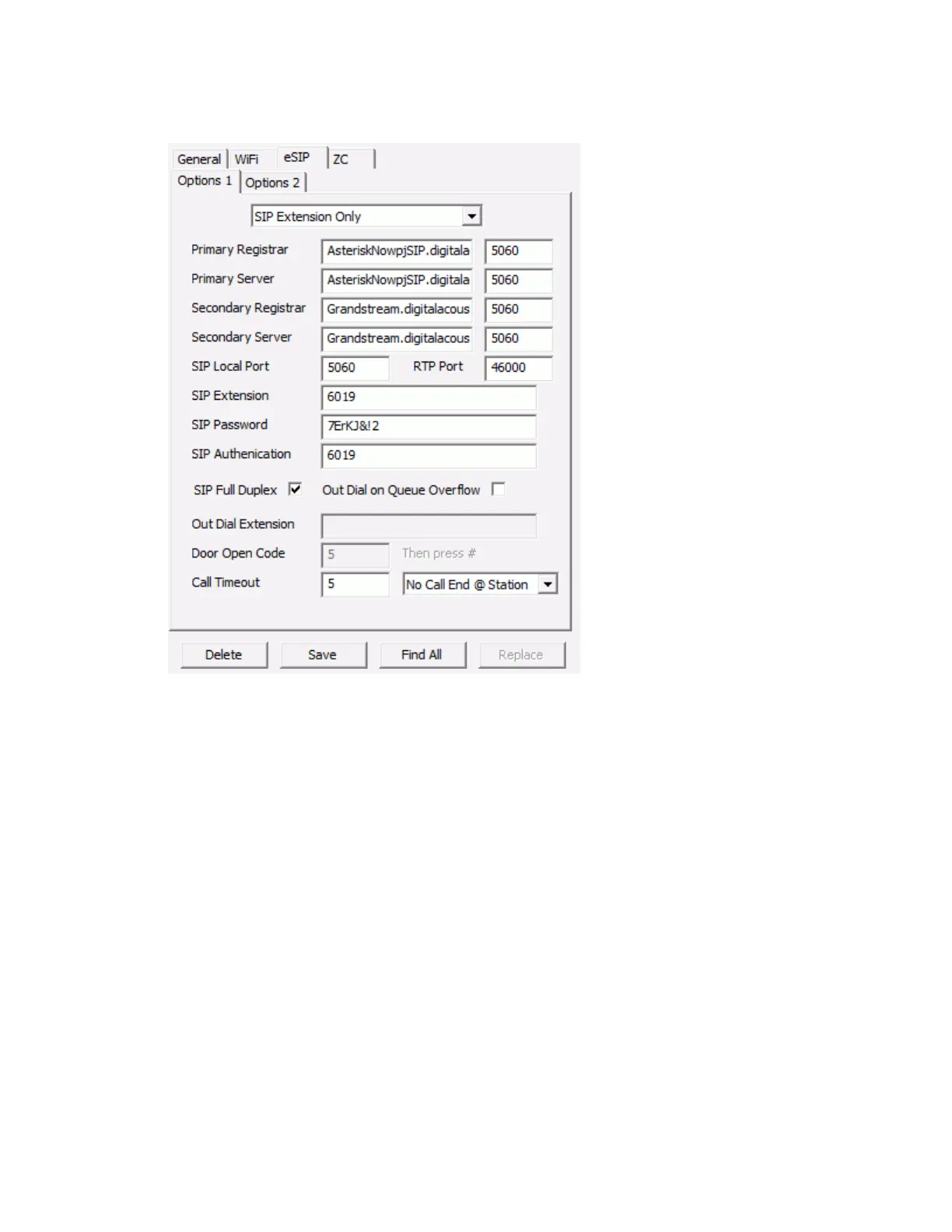
IP Endpoints Tab
55
Select the eSIP sub tab:
For “Paging” endpoints or endpoints that do not need to initiate a call, select SIP
Extension Only from the drop down list. If the endpoint should dial an extension when
it's TALK button is engaged, select Dial SIP Extension on PTT from the drop down list.
Enter the SIP Extension
Enter the SIP Password
Enter the SIP Authentication if used, otherwise specify the SIP Extension
SIP Full Duplex - check this box if the IP7 supports full-duplex with acoustic echo
cancelling or if a handset/headset is connected to it
Out Dial on Queue Overflow - this option does not apply to SIP Standalone
configuration
Out Dial Extension - If the Dial SIP Extension on PTT option has been selected, enter
the SIP or phone number to dial
Press the Save button
After the IP Endpoint restarts, dial the IP Endpoint’s Extension number using an IP Phone
to verify its configuration
Once all of the IP Endpoints are defined with SIP Standalone option, then the TalkMaster Server does not
have to be run and Queues, Paging Groups, Messages and Operators do not have to be created.



 To Next Page