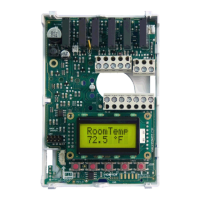
102 ECLYPSE Connected Thermostat (ECY-STAT)
To reset the controller to its factory default settings:
1. Separate the front cover from the back plate.
2. Place the reset switch in the ON position.
3. Replace the front cover on the back plate.
4. When you see the prompt on the ECY-STAT screen’s, separate the front cover from the back
plate, and return the reset switch back to the OFF position.
5. Replace the front cover on the back plate.
6. When the reset is completed, the ECLYPSE logo is shown on the ECY-STAT’s screen.
Rebooting or Resetting the Controller


 To Next Page