Simga2N Traction Advanced Manual– V1.3 Page 64 (166) ©2021 DMC GmbH Herten Germany
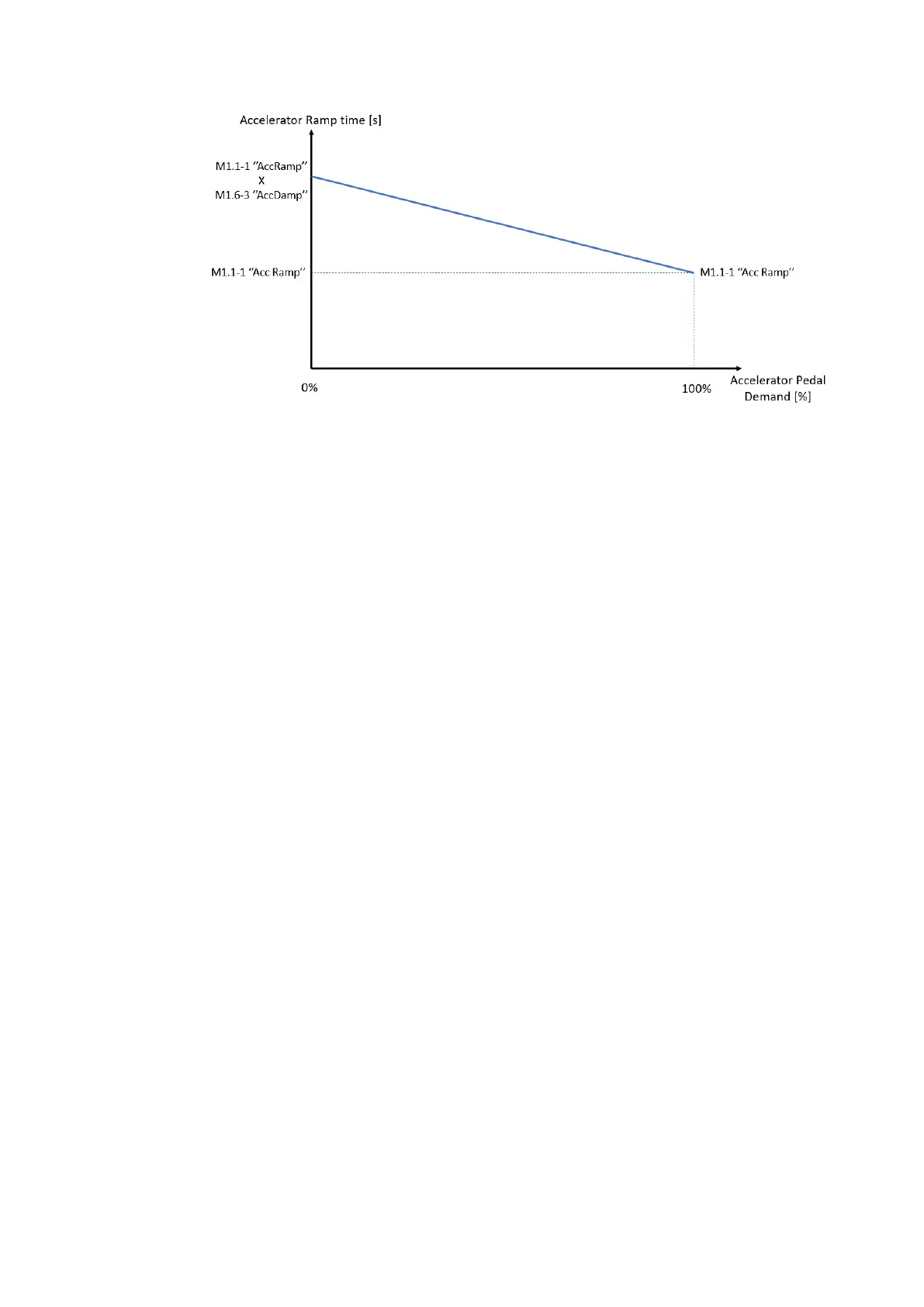
“M3-14 AccDamp” effect in speed mode
In other words if accelerator is partially pressed the speed responsiveness will be softer than if fully
pressed. The responsiveness increases as much the accelerator pedal is pressed and approaching the
100% of the range. This damping affects only the “M1-1 Acceleration delay “Accel”” in speed mode.
M1.6-4 Accelerator pot minimum voltage level “AccMin”
This sets the voltage on the Accelerator input that will correspond to zero speed or zero torque demand.
The type of Accelerator input (normal or wig wag) can be configured via the parameter “M1.6-2 Accelerator
type ”AccelTyp””.
For tuning this parameter refer to “APPENDIX C – Analogue Input tuning”.
M1.6-5 Accelerator pot maximum voltage level “AccMax”
This sets the voltage on the Accelerator input that will correspond to maximum speed or maximum torque
demand.
The type of Accelerator input (normal or wig wag) can be configured via the parameter “M1.6-2 Accelerator
type ”AccelTyp””.
When the accelerator is properly set, it reaches 100% when full pressed and sets the motor speed or torque
demand according to parameter “M2-1Control Mode “Spd/Torq””.
In “Speed Mode” when accelerator reaches 100%, the motor speed demand correspond to 100% of actual
speed limiting. If, for example,“ Maximum speed forward “SpdMaxF”” is active and set to 120Hz, then the
speed demand corresponding to 100% of accelerator is 120Hz. Else if, for example, the motor is running reverse
and “M5.1-3 Maximum speed reverse “SpdMaxR”” is set to 60Hz, the speed demand corresponding to 100%
of accelerator is 60Hz.
In “Torque mode” the accelerator is scaled on the maximum current set in the autotuning menu. So when
accelerator pedal is fully pressed (100%) the torque corresponding to maximum current is demanded to the
motor. In case of “Advanced mode” activated, the 100% of accelerator corresponds to the torque limits for
Drive style 1 and Drive Style2 (see “Advanced Mode” “M2-3Digital input 5 and 6 configuration ”Sp/In/Ad””).
For tuning this parameter refer to “APPENDIX C – Analogue Input tuning”.
M1.6-6 Accelerator/Neutral braking threshold “AccNBThr”
This adjustment is active in torque mode and if “M2-2 Vehicle type selection ”Ride/Wlk”” is set to 3 (Electric
Vehicle). It is useful to perform a neutral brake operation in torque mode with a braking effect proportional to
the first part of accelerator range. This adjustment is tuning the range of accelerator pedal that is used for
braking and the threshold where the accelerator starts to demand driving torque. The following graph helps to
understand the parameter behaviour.



 To Next Page